
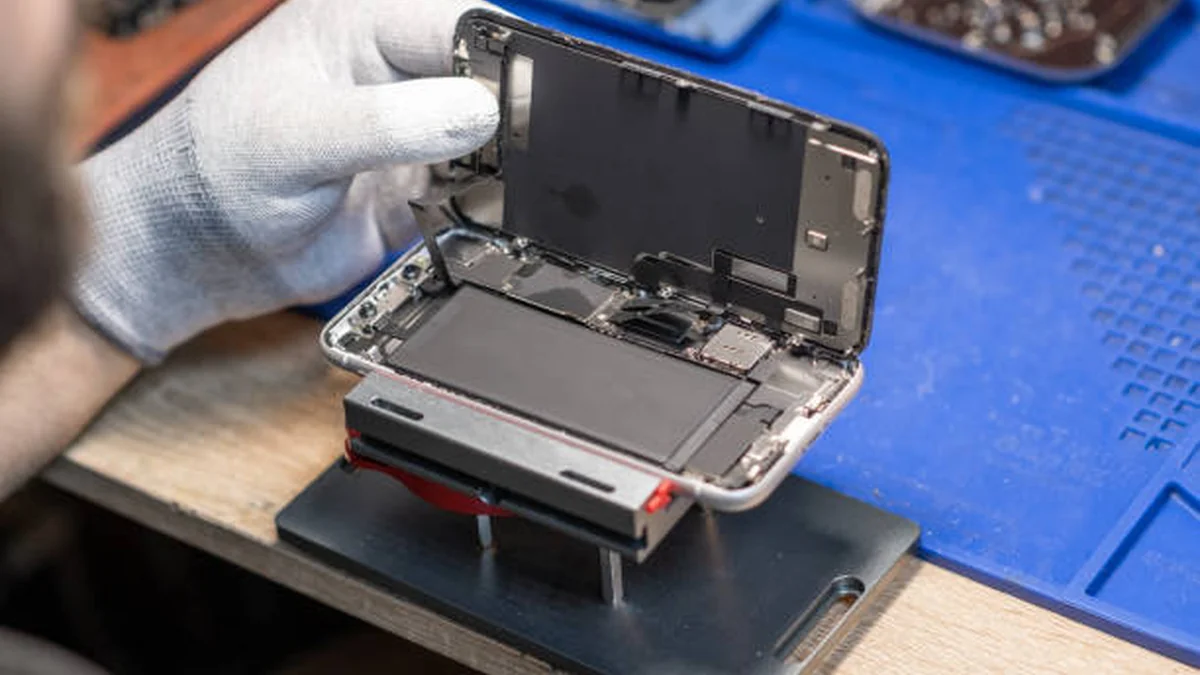

Your phone used to survive a full day. Now it’s begging for a charger by lunch, or worse, it shuts off at 30% like it has a mind of its own. Before you start shopping for a new device, there’s a good chance the fix costs under $100 and takes half an hour: replacing the battery.
Quick answer: Replace phone battery when battery health drops below 80%, it drains noticeably faster than before, or it randomly shuts down at a real charge level. Replacement costs $40–$129 depending on brand and where you get it done, and the job typically takes 20–30 minutes whether you do it yourself or visit a shop.
Signs To Replace Phone Battery
Not every slow phone has a battery problem, but a handful of symptoms point straight at the battery rather than software.
Rapid, unexplained drain. If your phone drops from 50% to 5% in the space of an hour with normal use, that’s not an app running wild — that’s a cell that can no longer hold a steady charge.
Random shutdowns at a real percentage. A worn battery can’t always deliver stable voltage under load. The phone reads 30% one second and powers off the next because the battery physically can’t supply enough current, especially in colder weather.
Sluggish, stuttering performance. Apps take longer to open, animations stutter even at high charge, and the whole phone feels a step behind. Aging cells sometimes can’t provide steady power, which pushes the OS into performance-management mode to prevent an unexpected shutdown.
Heat during normal use. Some warmth while gaming, navigating, or fast-charging is normal. A phone that gets uncomfortably hot browsing or texting is a different story — degrading cells generate more resistance, and resistance generates heat.
Physical swelling. A screen that’s lifting at the edges, a back panel that no longer sits flat, or a phone that suddenly feels “puffy” is a safety issue, not a cosmetic one. More on this below — it needs different handling than the other signs.
A battery health reading under 80%. This is the number that settles the argument. Both iOS and Android give you a way to check it directly, which is the next step before you spend a dollar on repairs.
How to Check Your Phone’s Battery Health
Don’t guess — check. Five seconds in your settings tells you whether the battery is actually the problem.
On iPhone
Open Settings → Battery → Battery Health & Charging. The Maximum Capacity percentage compares your current battery capacity to when it was new. Apple treats anything under 80% as significantly degraded and the point at which performance management is likely to kick in to prevent sudden shutdowns.
On Android/Samsung
Most Android phones don’t expose a single built-in “battery health” percentage the way iOS does, but manufacturer apps fill the gap. Samsung devices can check status through the Samsung Members app under device diagnostics. On other Android phones, a third-party tool like AccuBattery estimates your battery’s current capacity against its rated design capacity by tracking charge cycles over time. Same threshold applies: once you’re seeing a meaningful drop from the original design capacity alongside real-world symptoms, it’s time to plan a replacement.
Quick Takeaway: Battery health below 80%, combined with any of the symptoms above, is your green light to replace. Above 80% with no symptoms usually means something else — check your apps and settings before spending money on a repair.
How Much Does Phone Battery Replacement Cost in 2026?
Pricing varies more by where you get it done than by what phone you own, though flagship and foldable devices sit at the top of every tier.
| Route | Typical 2026 Cost | Turnaround | Notes |
|---|---|---|---|
| Apple / Samsung / Google (official) | $69–$129 | Same day to a few days | Genuine parts, preserves water-resistance rating; free if AppleCare+/Samsung Care+ is active and health is under 80% |
| Independent repair shop | $40–$110 | 20–60 minutes, often while you wait | Quality varies by shop; ask what battery grade they use |
| DIY kit | $15–$55 | 20–30 minutes (your time) | Cheapest option; risk falls entirely on your own handling |
A few things shift the number. Apple’s pricing scales by tier: older models like the iPhone SE and iPhone 8 sit near the bottom of the range, current flagships sit near the top. Foldables cost meaningfully more across every brand because the battery is often split across two hinge halves, which is more labor and more risk — Samsung’s Z Flip/Z Fold line and Motorola’s Razr series both carry this premium.
Coverage matters too. If you’re still under an active AppleCare+ or Samsung Care+ plan and your battery health has already dropped under 80%, the replacement is typically free — check that before paying anything out of pocket.
DIY vs. Professional Replacement: Which Should You Choose?
This isn’t purely a cost question — it’s a risk-tolerance and device-design question.
Choose professional service when:
- Your phone is a current flagship you plan to keep for years and you want the water-resistance seal preserved
- You still have active coverage that makes the repair free or near-free
- Your device has a glued-in battery under a glass back (most modern flagships), which is genuinely harder to open without cracking something
- You’re planning to sell or trade in soon — see the trade-in note further down
DIY makes sense when:
- You’re comfortable with small precision tools and patient, methodical work
- The phone is older, lower-value, or one you’re keeping as a backup/donation device rather than a daily driver
- You’ve bought a battery from a reputable source that includes the correct pre-cut adhesive strips for your model
- You’re not relying on the phone’s water-resistance rating, since resealing rarely restores factory-level protection
One nuance specific to iPhones: installing a non-genuine battery can trigger an “Unknown Part” notice in Settings. Modern iOS still shows battery health readings for it — it’s a disclosure, not a lockout — but it’s worth knowing before you buy a budget cell expecting a completely invisible swap.
How to Replace a Phone Battery Yourself (Step-by-Step)
If you’ve decided to DIY, follow this sequence closely. Skipping steps — especially the heating and prying steps — is where most damaged screens and pierced batteries happen.
What you’ll need:
- A genuine or reputable third-party replacement battery matched exactly to your model
- A precision screwdriver set (Phillips and, for iPhones, a Pentalobe bit)
- Plastic pry tools/spudgers (not metal — metal tools risk shorting the battery)
- A suction cup for screen removal
- A heat source: a heat pad, hot air station, or even a hair dryer on low, to soften the display adhesive
- Fine-point tweezers
- Pre-cut adhesive strips to reseal the new battery
- A clean, well-lit, static-free workspace
Steps:
- Power the phone off completely and, if possible, let the battery drain to a moderate level before opening the device. A charged battery carries more risk if it’s accidentally punctured or bent during disassembly.
- Remove the screws securing the back cover or display, keeping them organized by position — a magnetic mat or a piece of tape with labeled spots works well since screws are rarely interchangeable.
- Warm the edges of the screen or back panel to soften the factory adhesive, then use the suction cup and a plastic pry tool to gently separate it, working slowly around the perimeter rather than forcing one spot.
- Disconnect the battery connector from the logic board first, before touching anything else, to cut power to the device.
- Remove the old battery. If it’s adhered with stretch-release strips, pull them slowly and evenly. If they snap or the battery won’t budge, stop — do not pry, bend, or puncture the cell. Excess force here is the single most common cause of a DIY battery fire.
- Clean the battery bay of old adhesive residue with isopropyl alcohol before placing the new one.
- Install the new battery with fresh adhesive strips, then reconnect the battery connector.
- Power the phone on before fully resealing it and confirm it boots, charges, and reads a sensible battery percentage. This is the point to catch a bad connection, not after everything is glued shut.
- Reseal the back cover or display, replace all screws, and do a final function check — camera, charging, and Face ID/fingerprint sensor if applicable.
Quick Takeaway: The two mistakes that cause real damage are forcing a stuck screen open and prying at a stuck battery. Heat and patience solve both; force does not.
Swollen Battery? Stop and Read This First
A swollen battery is a different situation from the symptoms above, and it changes the plan entirely.
Swelling happens when internal battery chemistry breaks down and releases gas that the sealed pouch can’t vent. It shows up as a screen that’s lifting at the edges, a back panel that no longer sits flush, or a phone that feels noticeably thicker than it used to.
If you see any of this:
- Stop using the phone and stop charging it immediately
- Do not press, squeeze, or attempt to flatten the back cover or screen
- Do not attempt a DIY replacement yourself — a swollen cell is unstable, and prying near it or puncturing it can trigger a thermal event
- Power the device off if you can do so without applying pressure, and keep it away from flammable materials until it reaches a professional or an e-waste/battery recycling facility
This is the one scenario in this whole guide where “just do it yourself to save money” is the wrong call, regardless of your technical skill.
Should You Replace the Battery or Replace the Phone?
Run the math before you commit either way.
A battery service costs roughly $40–$129 across brands in 2026. A new flagship phone starts around $700–$800 before trade-in. Even at the high end, a battery replacement is a fraction of the cost of a new device — which is why, for a phone that’s otherwise working well, replacing the battery wins most of the time.
The calculation changes when problems stack up. If the screen is cracked, the charging port is failing, and the battery is dead, the combined repair cost starts approaching what the phone is actually worth — at that point, check the phone’s trade-in value before sinking more money into it.
Software support life matters too. Apple’s devices typically get six to seven years of iOS updates; Samsung’s current flagships get seven years of OS and security updates. If your phone still has years of updates ahead of it, a $69–$129 battery is cheap insurance. If it’s about to age out of update support, you’re paying for a shorter runway than the price suggests.
One easy mistake to avoid: don’t replace the battery right before selling or trading in the phone. Trade-in programs and resale marketplaces generally don’t adjust their offers based on battery health, so a freshly installed $99 battery adds almost nothing to what you’ll get for the device — you’re better off keeping that money and letting the buyer handle it.
After the Replacement: Testing, Calibration, and Making the New Battery Last
Once the new battery is in, a couple of habits will keep it healthy for years instead of months.
Test before you fully close it up. Confirm the phone charges normally, holds a charge overnight, and doesn’t overheat during a normal charging cycle.
Let it calibrate. Run the new battery through one or two full charge-and-discharge cycles in the first week so the phone’s internal percentage reading matches actual capacity.
Keep it between 20% and 80% for daily use when practical. Modern lithium-ion cells degrade faster at the extremes — sitting at 100% for long periods or repeatedly draining to 0% both add stress.
Manage heat. Extreme temperatures degrade batteries faster than almost anything else. Avoid leaving the phone in direct sun, a hot car, or under a pillow while fast-charging.
Use built-in optimization features. Dark mode, auto-brightness, and any “optimized charging” setting your phone offers reduce daily strain on the new cell without any effort from you.
Recheck battery health every few months. A quick glance at the same settings menu you used to diagnose the original problem will flag early decline long before it becomes another shutdown-at-30% situation.
Replacing a phone battery is one of the highest-value repairs in tech — cheap relative to the alternative, quick to complete, and often the difference between a phone that feels new again and one you were about to replace for no good reason. Check your battery health today, decide whether DIY or a shop fits your comfort level, and get another year or two out of the phone you already have.
LOOKING FOR MORE FIXES? VISIT TECHKOU.NET AND KEEP LEARNING.
FAQ Section
1. How do I know if my phone battery needs replacing? Check battery health in your settings (iPhone: Settings → Battery → Battery Health). A reading under 80%, combined with fast drain, random shutdowns, or sluggish performance, means it’s time to replace it.
2. Can I replace my phone battery myself? Yes, on most models, if you’re comfortable with small precision tools and patient work. Glued-in flagship batteries are harder to open safely, and any sign of swelling means you should skip DIY entirely and see a professional.
3. How much does it cost to replace a phone battery? Expect $69–$129 from the manufacturer, $40–$110 at an independent shop, or $15–$55 for a DIY kit in 2026, depending on your model and whether it’s a foldable.
4. How long does a battery replacement take? Around 20–30 minutes for most phones, whether done professionally or at home, though foldables and heavily adhered flagships can take longer.
5. Is it worth replacing the battery or buying a new phone? Almost always worth replacing if the rest of the phone works well — a battery costs a small fraction of a new device. It’s only questionable when multiple repairs (screen, port, battery) stack up on an older phone.
6. What should I do if my battery is swollen? Stop using and charging the phone immediately, avoid pressing on it, and take it to a professional or recycling center. Never attempt to pry open or repair a swollen battery yourself.
7. Does replacing the battery void my warranty or affect water resistance? Official manufacturer service preserves the water-resistance seal and typically includes a repair warranty. DIY or third-party repairs rarely restore factory-level water resistance and, on iPhones, a non-genuine battery triggers an “Unknown Part” notice in Settings.
8. How often should you replace a phone battery? Most lithium-ion phone batteries last roughly 500–800 charge cycles, which works out to about 1.5–2 years of typical daily use before a noticeable capacity drop shows up.
