
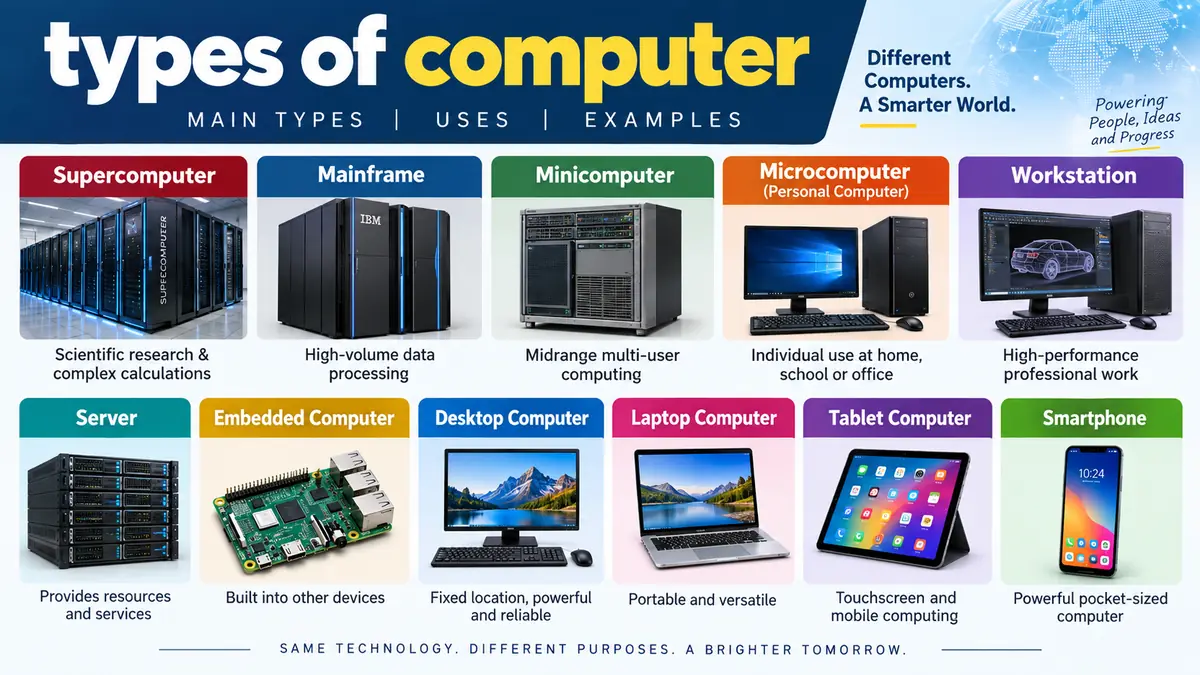

A laptop, a bank mainframe, and a machine used for climate simulations are all computers, but they are built for very different jobs. That is why learning the types of computer is easier when you understand how computers are classified rather than trying to memorize one long list.
Computers can be classified by size and processing capacity, data handling, and purpose. Major categories include supercomputers, mainframes, minicomputers, microcomputers, workstations, servers, and embedded computers. By data handling, computers are also classified as analog, digital, or hybrid systems.
This guide explains each category, what makes it different, where it is used, and how familiar devices such as desktops, laptops, tablets, and smartphones fit into the broader classification.
What Are the Main types of computer?
There is no single universal list of computer types because the same machine can belong to several categories.
A laptop, for example, is a personal computer, a microcomputer, a digital computer, a general-purpose computer, and a portable computer at the same time.
For learning purposes, computers are commonly classified in three main ways:
- By size and processing capacity — supercomputer, mainframe, minicomputer, and microcomputer.
- By data handling — analog, digital, and hybrid computer.
- By purpose or role — general-purpose, special-purpose, workstation, server, embedded system, and similar categories.
Traditional computer-science material often emphasizes four categories based on size and power: supercomputers, mainframes, minicomputers, and personal computers or microcomputers. Modern classifications also commonly include servers, mobile computers, workstations, and embedded systems.
| Computer type | Main characteristic | Typical use |
|---|---|---|
| Supercomputer | Extreme computational performance | Scientific simulations and research |
| Mainframe | High-volume, reliable multi-user processing | Banking and large organizations |
| Minicomputer | Midrange multi-user computing | Departments and specialized systems |
| Microcomputer | Designed primarily for individual use | Home, school, and office |
| Workstation | High-performance single-user system | Engineering, design, science |
| Server | Provides network resources or services | Websites, applications, databases |
| Embedded computer | Built into another product | Cars, appliances, industrial equipment |
The boundaries are not always rigid. Modern hardware has changed dramatically, and terms such as minicomputer and microcomputer are much less common in everyday technology discussions than they once were.
types of computer Based on Size and Processing Power
The traditional classification by size actually describes more than physical dimensions. Processing capacity, number of users, workload, storage, reliability, and intended application also matter.
1. Supercomputer
A supercomputer is a computing system designed to perform extremely demanding calculations at very high speed.
Instead of concentrating mainly on ordinary tasks such as documents or web browsing, supercomputers tackle problems requiring enormous amounts of computation.
Common applications include:
- Weather forecasting
- Climate modeling
- Scientific simulations
- Aerospace research
- Engineering
- Physics
- Molecular and medical research
- Cryptanalysis
- Oil and gas exploration
Educational computer classifications consistently place supercomputers at the high-performance end of the spectrum.
Modern supercomputing also relies heavily on parallel processing. Rather than expecting one processor to complete an enormous problem alone, many processing units can work on portions of a calculation simultaneously.
Quick takeaway: A supercomputer is built primarily for computationally intensive problems where processing performance and large-scale parallelism matter.
2. Mainframe Computer
A mainframe computer is a powerful system designed to process very large workloads while serving many users, applications, or transactions reliably.
Mainframes are closely associated with organizations where downtime, data integrity, security, and transaction processing are critical.
They can be used in areas such as:
- Banking
- Insurance
- Government
- Large corporate databases
- Enterprise transaction processing
- Reservation and record-management systems
A common mistake is to think that a mainframe is simply a slower supercomputer. The distinction is more about workload.
A supercomputer is optimized for massive computational problems. A mainframe is typically optimized for dependable, high-volume processing of business workloads and data.
| Feature | Mainframe | Supercomputer |
|---|---|---|
| Main focus | Large-scale transaction and data processing | Extremely intensive calculations |
| Typical users | Banks, governments, enterprises | Scientists, engineers, researchers |
| Workload | Many simultaneous transactions/jobs | Large mathematical and scientific problems |
| Key strength | Reliability and throughput | Computational performance |
So, mainframe vs. supercomputer is not simply a comparison of which machine is “bigger.” Their architectures and workloads serve different goals.
3. Minicomputer
A minicomputer historically described a midrange computer positioned between a mainframe and a microcomputer.
Minicomputers could support multiple users and were once widely used by departments, laboratories, factories, universities, and medium-sized organizations.
Classic minicomputers became particularly important before modern servers and powerful personal computers took over many of their roles.
The term is now largely historical. Modern classifications often use terms such as midrange computer or server for systems performing comparable organizational roles. Even contemporary references note that minicomputer is no longer a commonly used category.
That distinction matters when studying older textbooks. The category is still useful for understanding computer history, but you should not assume that modern IT departments routinely describe their machines as minicomputers.
4. Microcomputer
A microcomputer is a computer built around a microprocessor and traditionally designed primarily for individual use.
The development of the microprocessor made it possible to put substantial computing capability into much smaller and less expensive systems.
Microcomputers include many familiar personal computing devices:
- Desktop computers
- Laptops
- Some tablets
- Small personal computing systems
The term became closely associated with the personal computer (PC). Today, people usually say desktop, laptop, PC, or device rather than calling their machine a microcomputer.
Are Microcomputers and Personal Computers the Same?
They overlap heavily but come from slightly different naming traditions.
“Microcomputer” originally emphasized the technology and scale of a computer based on a microprocessor. “Personal computer” emphasizes the fact that the machine is primarily intended for an individual user.
In ordinary modern usage, personal computers are the most familiar examples of microcomputers.
Common Types of Personal Computers
Personal computing has developed into several distinct form factors. Each balances performance, portability, screen size, battery life, upgradeability, and ease of use differently.
Desktop Computer
A desktop computer is designed to remain in a relatively fixed location, such as a desk at home, school, or work.
A conventional desktop setup may include:
- System unit
- Monitor
- Keyboard
- Mouse
- Speakers or headphones
- External peripherals
Desktops can be easier to upgrade and repair than tightly integrated portable devices. Their larger enclosures also provide more room for cooling, storage, graphics hardware, and expansion.
Desktop computers are commonly used for office work, education, software development, gaming, content creation, and general home computing.
Laptop Computer
A laptop combines major computer components into a portable unit.
It normally includes a:
- Display
- Keyboard
- Touchpad
- Processor
- Memory
- Storage device
- Battery
- Wireless connectivity
The biggest difference between a desktop and laptop is portability.
A laptop can run on battery power and travel easily, while a traditional desktop normally remains connected to external power and separate peripherals.
Tablet Computer
A tablet computer is a portable touchscreen device designed around direct interaction with the display.
Tablets are especially useful for:
- Reading
- Web browsing
- Streaming
- Note-taking
- Drawing
- Presentations
- Lightweight productivity
Some tablets support detachable keyboards and styluses, allowing them to perform tasks traditionally associated with laptops.
Smartphone
A modern smartphone is also a sophisticated digital computing device.
It contains a processor, memory, storage, operating system, display, sensors, networking hardware, and software applications. Smartphones can process data, execute programs, connect to networks, store files, and communicate with other systems.
This demonstrates why computer classification depends on context. A smartphone may not look like a traditional PC, but it performs many fundamental computing functions.
Workstations, Servers, and Embedded Computers
Not every modern computer fits neatly into the traditional four-category model.
Several computer types are better understood according to the jobs they perform.
Workstation
A workstation is a high-performance computer generally intended for one professional user running demanding applications.
Workstations may be designed for:
- Computer-aided design (CAD)
- 3D modeling
- Engineering
- Scientific analysis
- Animation
- Architecture
- Professional media production
- Software development
Historically, a workstation was clearly differentiated from an ordinary PC by more powerful processors and specialized hardware.
Today’s premium PCs can also be extremely powerful, so the boundary between a high-end desktop and workstation is less obvious. The term generally implies professional workloads, performance, stability, or specialized hardware rather than a particular physical size.
Server
A server is a computer or computing system that provides resources, applications, data, or services to other computers called clients.
Servers can perform different jobs, including:
- Hosting websites
- Running applications
- Storing files
- Managing databases
- Handling email
- Authenticating users
- Providing network services
- Running cloud workloads
A server is therefore defined largely by its role, not simply its size.
A modest computer can operate as a home server, while data centers can contain large numbers of powerful rack-mounted servers.
This is another reason a single linear ranking of computer types can be misleading.
Embedded Computer
An embedded computer is a computing system built into a larger device to perform a specific function.
You may use embedded computers every day without seeing them.
They can be found in:
- Cars
- Washing machines
- Smart TVs
- Routers
- Industrial machines
- Medical equipment
- Printers
- Security systems
- Smart home devices
Unlike a general-purpose desktop, an embedded system is usually optimized for a narrower set of tasks.
A computer inside a vehicle, for example, may monitor sensors or control a subsystem rather than provide a conventional desktop interface.
Quick takeaway: Desktop and laptop describe familiar form factors, while terms such as server, workstation, and embedded computer often describe the machine’s role or intended workload.
types of computer Based on Data Handling
Another major classification looks at the kind of data a computer processes.
Under this system, there are three main categories: analog computers, digital computers, and hybrid computers.
Analog Computer
An analog computer works with continuous physical quantities or signals rather than representing everything as discrete binary values.
Continuous variables can include:
- Voltage
- Pressure
- Temperature
- Speed
- Electrical current
Historically, analog computers were valuable for modeling physical systems and solving certain engineering and scientific problems.
One point deserves clarification: not every analog measuring instrument is automatically a computer. A simple thermometer or mechanical speedometer may illustrate a continuous quantity, but calling every such device an “analog computer” oversimplifies the technical definition.
A true analog computing system performs computation through continuously varying physical quantities.
Digital Computer
A digital computer processes discrete information, typically using binary representation based on 0s and 1s.
Most modern general-purpose computing devices are digital.
Examples include:
- Desktop PCs
- Laptops
- Smartphones
- Tablets
- Digital servers
- Many modern supercomputers
Digital computers perform arithmetic and logical operations and can store, process, retrieve, and transmit digital information.
The device you are using to read this article is almost certainly a digital computer.
Hybrid Computer
A hybrid computer combines aspects of analog and digital computing.
Such systems can be useful when continuously changing physical signals need to be measured or modeled while digital processing is used for calculation, control, storage, or output.
Applications may appear in specialized:
- Scientific systems
- Industrial control environments
- Medical equipment
- Engineering systems
The key idea is the combination of continuous-data handling with digital computation rather than simply connecting an ordinary computer to a sensor.
| Data-handling type | Data | Main characteristic |
|---|---|---|
| Analog | Continuous | Represents or processes continuously varying quantities |
| Digital | Discrete/binary | Processes digitally represented information |
| Hybrid | Both | Combines analog and digital approaches |
General-Purpose and Special-Purpose Computers
Computers can also be classified according to the range of tasks they are designed to perform.
General-Purpose Computer
A general-purpose computer can perform many different tasks by running different software.
A laptop is a straightforward example.
The same laptop can be used to:
- Write a document
- Browse the web
- Edit photos
- Play games
- Run spreadsheets
- Program software
- Join video calls
Its hardware is not restricted to one specific application.
Desktop computers, laptops, smartphones, and many servers can therefore be considered general-purpose digital computers.
Special-Purpose Computer
A special-purpose computer is designed primarily for a particular job or a limited group of related functions.
Examples can include computing systems used for:
- Industrial control
- Vehicle systems
- Network equipment
- Appliances
- Specialized medical devices
Embedded systems frequently fall into this category.
The advantage is efficiency. Hardware and software can be optimized for a well-defined task instead of supporting every possible application.
The disadvantage is flexibility. A specialized controller inside an appliance cannot normally replace a laptop simply because both contain processors.
How Modern Computer Types Overlap
One of the biggest weaknesses in older explanations of types of computer is that they make the categories look mutually exclusive.
They are not.
Consider a laptop. It can simultaneously be classified as:
Laptop → personal computer → microcomputer → digital computer → general-purpose computer → portable computer
A server provides another example:
Server → digital computer → general-purpose or specialized system → network computer
An embedded controller might instead be:
Embedded computer → digital computer → special-purpose computer
This layered approach is more accurate because different classification systems answer different questions.
| Classification asks… | Example categories |
|---|---|
| How powerful or large is it? | Microcomputer, mainframe, supercomputer |
| How does it handle data? | Analog, digital, hybrid |
| Who or what is it designed for? | Personal, enterprise, embedded |
| What job does it perform? | Workstation, server |
| Is it portable? | Desktop, laptop, tablet, mobile device |
| How broad is its purpose? | General-purpose, special-purpose |
This also explains why arguments about the “exact number” of computer types rarely have one correct answer.
The answer changes with the classification method.
What Is the Difference Between Microcomputer, Minicomputer, Mainframe, and Supercomputer?
These four terms belong to a traditional classification based broadly on size and computing capability.
A microcomputer is associated with personal computing and microprocessor-based systems.
A minicomputer historically occupied the middle ground and could support multiple users.
A mainframe handles large-scale organizational workloads and high volumes of data or transactions.
A supercomputer is designed for exceptionally demanding computational workloads.
A useful way to remember them is:
Personal computing → Microcomputer
Historical midrange multi-user computing → Minicomputer
Large enterprise processing → Mainframe
Extreme scientific computation → Supercomputer
Do not interpret that sequence as a simple performance chart. A modern personal computer can outperform historical machines from larger categories, because computing technology improves over time.
The categories describe system roles and computing eras as much as raw speed.
Which Type of Computer Is Most Common?
For everyday users, digital personal computers and mobile computing devices are the most familiar.
Desktops and laptops dominate conventional personal computing, while smartphones and tablets extend computing into highly portable form factors.
Behind the applications people use every day, however, servers are equally important. Websites, cloud applications, streaming platforms, online databases, and business systems depend on server infrastructure that users may never physically see.
Embedded computers may be even less visible. They operate quietly inside vehicles, appliances, electronics, industrial equipment, and smart devices.
This creates an interesting reality: many computers around you do not resemble the familiar monitor-and-keyboard image of a computer at all.
How Do You Identify a Type of Computer?
Instead of judging a computer only by appearance, ask a few questions.
- What is it designed to do?
A scientific simulation system and an office PC have very different purposes. - Who uses it?
Is it intended for one person, many simultaneous users, an entire organization, or another machine? - What kind of data does it process?
This helps distinguish analog, digital, and hybrid approaches. - How much computing capacity does the workload require?
This helps separate personal systems from large enterprise and high-performance systems. - Is it a complete standalone device or part of something else?
A computer built into a car or appliance is likely an embedded system. - Is portability part of the design?
This helps distinguish desktop, laptop, tablet, and other mobile form factors.
This method is more useful than memorizing names because it also works when new computing devices appear.
Why Computer Classification Has Changed Over Time
Computer categories evolve because hardware evolves.
Early electronic computers could occupy enormous spaces. The development of integrated circuits and microprocessors allowed increasingly powerful systems to become smaller and more affordable.
Terms that once described clear technological divisions can therefore become outdated.
“Microcomputer” is a good example. It was once an important distinction because a computer built around a microprocessor represented a major change in computing. Today, microprocessors are so widespread that consumers rarely describe their laptops as microcomputers.
The same issue affects minicomputer. Its historical role remains important, but modern server and midrange architectures have largely replaced the term in everyday professional language.
Meanwhile, new practical categories have become more significant:
- Cloud servers
- Mobile computers
- Embedded systems
- High-performance workstations
- Wearable computing devices
- Edge-computing systems
The fundamental principles remain the same: computers receive data, process instructions, store information where required, and produce useful output. What changes is the scale, architecture, form factor, and environment in which those operations occur.
Final Takeaway
Understanding the types of computer becomes much simpler once you stop treating them as one fixed list.
By traditional size and capacity, the major categories are supercomputers, mainframes, minicomputers, and microcomputers. By data handling, computers are classified as analog, digital, or hybrid. Modern computing also includes desktops, laptops, tablets, smartphones, workstations, servers, and embedded systems.
The most useful next step is to identify the classification method first. Ask whether you are comparing computers by processing capacity, data handling, purpose, role, or form factor. Once that is clear, each computer type fits naturally into the right category.
