
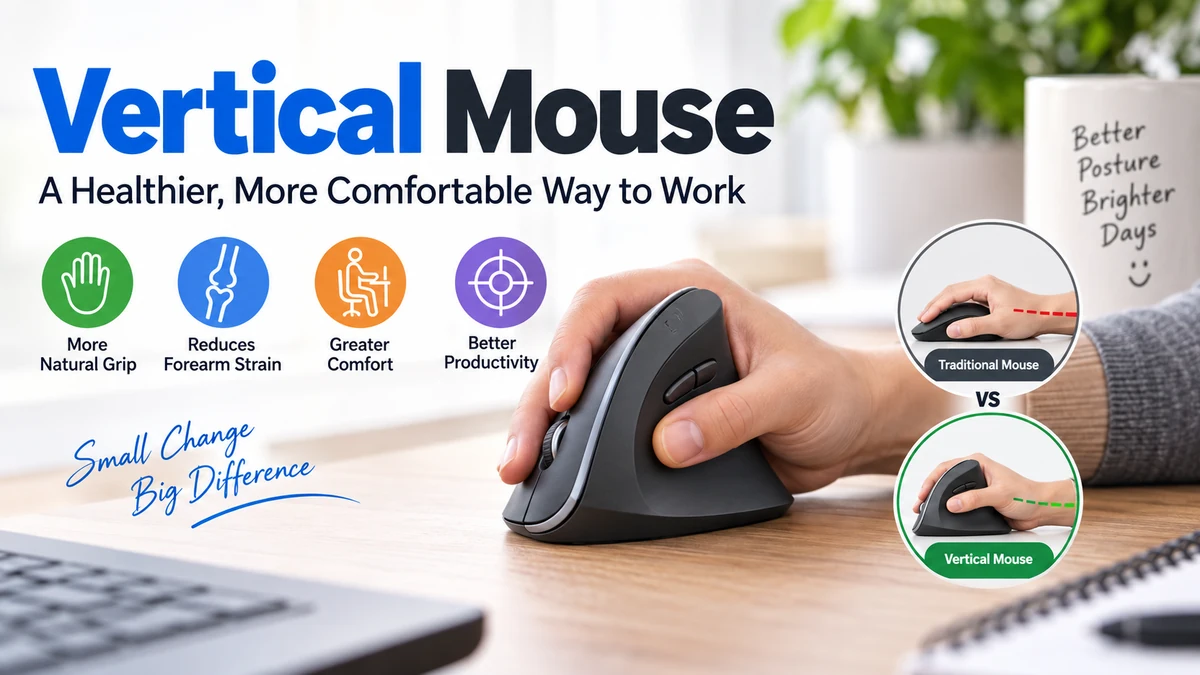

A computer mouse may seem like a small part of your desk setup, but your hand can spend hours resting on it every day. That makes mouse shape, hand position, and movement more significant than they first appear.
A vertical mouse is an ergonomic computer mouse that rotates the hand into a more upright, handshake-like position instead of keeping the palm flat against the desk. The design reduces forearm pronation and may improve comfort during prolonged computer use, although individual results depend heavily on mouse fit, technique, and workstation setup.
What Is a Vertical Mouse?
A vertical mouse performs the same basic functions as a traditional mouse. It moves the cursor, selects objects, scrolls pages, opens menus, and can include programmable buttons.
The major difference is its physical orientation.
Instead of placing the palm almost parallel to the desk, the body of the mouse rises upward so the hand rests on its side. This position is commonly described as a handshake grip.
Vertical designs typically position the thumb on one side while the index and middle fingers operate buttons on the opposite side. The scroll wheel usually sits between the primary buttons.
Inside, the technology remains familiar. An optical or laser sensor detects movement across the desk and translates that movement into pointer movement on the screen. In other words, a vertical mouse changes how you hold the pointing device rather than fundamentally changing how a computer mouse works.
Why is the mouse vertical?
The purpose is primarily ergonomic.
When using a conventional flat mouse, the forearm rotates so the palm faces downward. This rotation is called pronation. A vertical design reduces the amount of pronation required by placing the forearm closer to a neutral orientation.
Ergonomic research comparing different mouse designs has found that angled and vertical designs can reduce forearm pronation compared with traditional flat mice.
Quick takeaway: A vertical mouse is not a different kind of pointing technology. It is mainly an alternative ergonomic shape designed to change the position of your hand, wrist, and forearm while you control the cursor.
How Does a Vertical Mouse Work?
Using one initially looks unusual, but its operation is straightforward.
You place your hand around the raised body as though you were loosely shaking someone’s hand. Your thumb rests along the inner side while your other fingers reach the primary buttons and scroll wheel.
Moving the entire mouse moves the pointer.
Most models use the same technologies found in standard mice, including:
- Optical sensors
- Adjustable DPI settings
- Left and right buttons
- Scroll wheels
- Forward and back buttons
- USB receivers
- Bluetooth
- Wired USB connections
- Rechargeable or replaceable batteries
- Programmable controls
DPI, or dots per inch, is commonly used to describe mouse sensitivity. Increasing the DPI generally allows the cursor to travel farther on screen for a given amount of physical mouse movement.
Higher sensitivity can therefore reduce the distance you need to move your arm, although extremely high settings may make precise cursor control difficult.
Some ergonomic models include a dedicated cursor-speed button so sensitivity can be changed without opening software settings.
Vertical Mouse vs Traditional Mouse
The most obvious difference between the two designs is hand orientation, but that change influences movement, comfort, and the learning experience.
| Feature | Vertical Mouse | Traditional Mouse |
|---|---|---|
| Hand position | Upright or angled | Palm-down |
| Forearm rotation | Reduced pronation | Greater pronation |
| Button position | Mostly on the side | Mostly on top |
| Learning curve | Usually requires adjustment | Familiar to most users |
| Handedness | Often right- or left-hand specific | Many models are ambidextrous |
| Wrist movement | Encourages arm movement when used correctly | Often encourages wrist-driven movement |
| Precision | Can feel unfamiliar initially | Familiar for precision work |
| Ergonomic goal | Reduce awkward forearm rotation | General-purpose control |
Neither design automatically guarantees good ergonomics.
A badly sized vertical model can be uncomfortable, while a properly sized conventional ergonomic mouse combined with good desk posture may work well for another user.
Research comparing flat, angled, and fully vertical designs found that increasing mouse angle reduced pronation, but a fully vertical design produced poorer pointing performance in that particular experiment. Less extreme angled designs achieved improved wrist posture without the same performance penalty.
That finding highlights an often-overlooked point: more vertical is not necessarily better for everyone.
What Are the Benefits of a Vertical Mouse?
The main potential advantages come from changing forearm and wrist posture rather than from additional electronic features.
Reduced Forearm Pronation
This is the clearest biomechanical difference.
Place your forearm on a desk with your thumb pointing upward. Now rotate your hand until the palm faces downward.
That rotation is forearm pronation.
A conventional mouse generally requires more of it, while a vertical design keeps the hand closer to the first position.
Studies of alternative mouse positions have reported reduced forearm pronation and, in some circumstances, lower forearm muscle load compared with traditional mouse use.
A More Comfortable Hand Position for Some Users
The raised shell can support the palm while allowing the thumb and fingers to rest around the device rather than directly over it.
For people who spend several hours working at a computer, this change can make long sessions feel more comfortable.
One long-term study involving computer users with existing musculoskeletal pain investigated a mouse that allowed a more neutral forearm and wrist position. Participants using the alternative design reported reductions in pain affecting areas including the neck, shoulder, forearm, wrist, and hand.
That does not mean every vertical mouse will produce the same result for every person, but it provides useful evidence for the ergonomic principle behind these devices.
Less Reliance on Wrist-Only Movement
A common mouse habit is planting the wrist on the desk and repeatedly moving the mouse by bending the wrist from side to side.
With a vertical mouse, users are often encouraged to move from the elbow and shoulder instead.
Think of the mouse and forearm as moving together rather than treating the wrist as a hinge.
This technique can distribute movement across larger muscle groups.
Useful Ergonomic Features
Modern vertical mice often combine their shape with features such as programmable buttons and adjustable pointer sensitivity.
Extra thumb buttons can reduce repeated trips to keyboard shortcuts or browser controls, while adjustable DPI can decrease the physical distance needed to move the pointer.
These features are not unique to vertical designs, but they can complement an ergonomic workstation.
Can a Vertical Mouse Help With Wrist Pain?
It can improve comfort for some users, particularly when discomfort is associated with prolonged mouse use or forearm positioning, but it should not be treated as a medical device or guaranteed treatment.
Evidence deserves careful interpretation.
Research supports the idea that alternative mouse designs can change wrist and forearm posture. Some studies have also found improvements in reported discomfort or muscle loading.
However, the evidence is not strong enough to claim that simply switching mice prevents or cures specific medical conditions.
For example, a study involving people with carpal tunnel syndrome found that ergonomic devices, including a vertical mouse, altered wrist and forearm positions but did not reduce carpal tunnel pressure in the tested participants. The researchers concluded that the evidence did not support a strong recommendation either for or against those devices.
Does a vertical mouse help carpal tunnel syndrome?
This question requires particular caution.
Carpal tunnel syndrome (CTS) involves compression of the median nerve as it passes through the carpal tunnel in the wrist. A vertical mouse may change wrist and forearm posture, but that does not mean it treats the underlying condition.
Someone with persistent numbness, tingling, weakness, or significant hand and wrist pain should seek appropriate medical assessment rather than relying solely on a mouse replacement.
Ergonomic equipment is best considered one part of a broader workstation and movement strategy.
Are There Any Disadvantages?
A vertical mouse has genuine trade-offs, and understanding them before switching can prevent frustration.
There Is a Learning Curve
The first few hours can feel surprisingly awkward.
Years of muscle memory have taught most computer users exactly how far to move a traditional mouse and how much force to use when clicking.
Rotating the hand changes those mechanics.
You may initially:
- Overshoot icons
- Move the cursor too far
- Click less accurately
- Grip the mouse too tightly
- Accidentally lift or tilt it while clicking
- Feel slower during detailed work
Give your hand time to adapt rather than judging the design after ten minutes.
Clicking Can Push the Mouse Sideways
On a standard mouse, you click downward toward the desk.
On a vertical model, some of the clicking force can be directed sideways. Lightweight models may therefore move slightly when a button is pressed aggressively.
A relaxed grip and light click usually help.
Size Matters More Than Many People Expect
An ergonomic shape only works when your hand actually fits it.
Research into mouse design has identified hand size, geometry, weight, and grasp position as factors that can affect muscle activity and usability.
A mouse that is too large may force your fingers to stretch. One that is too small may encourage excessive gripping.
Handedness Can Limit Your Options
Many traditional mice have symmetrical shells and can be used with either hand.
Most vertical models cannot.
Their sculpted shape is typically designed specifically for the right or left hand. Left-handed users should therefore check orientation carefully rather than assuming a model is ambidextrous.
Very Precise Tasks May Initially Feel Harder
Photo editing, illustration, CAD, 3D design, and competitive gaming can involve rapid or extremely precise pointer movements.
A vertical mouse can still perform these tasks, but the different grip may temporarily reduce accuracy until new muscle memory develops.
This aligns with research showing that fully upright designs can sometimes involve a performance trade-off even while reducing pronation.
How to Use a Vertical Mouse Correctly
Buying an ergonomic mouse but using it with poor technique defeats much of the purpose.
1. Position It Close to Your Body
Keep the mouse near the keyboard.
If you continually reach forward or sideways for it, your shoulder must remain extended throughout the day.
The ideal location allows your upper arm to remain relaxed near your torso.
2. Keep Your Wrist Straight
Your wrist should follow roughly the same line as your forearm.
Avoid bending it sharply upward, downward, left, or right while gripping the mouse.
3. Relax Your Grip
You do not need to squeeze a vertical mouse.
Let the shell support your hand and apply only enough pressure to guide it.
Excessive gripping can undermine the comfort you were trying to gain by changing devices.
4. Move From the Arm
Instead of repeatedly pivoting at the wrist, use the forearm and elbow to guide larger cursor movements.
The goal is smooth movement rather than holding the wrist stationary and flicking the mouse around it.
5. Adjust Pointer Sensitivity
If you need to move your entire arm across a large section of the desk just to cross the screen, try increasing pointer sensitivity gradually.
If the cursor feels difficult to control, reduce it.
The correct DPI is not the highest available setting. It is the setting that lets you comfortably reach all parts of your display while maintaining reliable accuracy.
6. Check Desk and Chair Height
Mouse ergonomics cannot compensate for an unsuitable workstation.
Your shoulders should remain relaxed rather than shrugged upward. Your elbows should be comfortably positioned, and your forearms should have appropriate support.
Also keep the keyboard and mouse at similar heights so you are not repeatedly reaching between different levels.
How to Choose the Right Vertical Mouse
Ignore impressive-looking specifications for a moment. Fit comes first.
Start With Hand Size
Measure from the base of your palm to the tip of your middle finger and compare that measurement with the manufacturer’s sizing information when available.
Your fingers should comfortably reach the buttons without stretching.
Your palm should also receive enough support that you do not have to squeeze the device to maintain control.
Consider the Grip Angle
Vertical mice do not all use the same angle.
Some are moderately tilted while others put the hand close to fully upright. For example, different ergonomic designs may use intermediate angles rather than a strict 90-degree position.
This matters because research suggests angled designs can reduce pronation without necessarily requiring a completely vertical orientation.
Models such as the Logitech MX Vertical use a 57-degree angle, while other products take different approaches to hand orientation.
The best angle is therefore the one that allows your hand to rest comfortably while maintaining reliable cursor control.
Check Right- or Left-Hand Compatibility
Do this before looking at secondary features.
A strongly sculpted right-handed model is generally unsuitable for left-handed operation.
Some manufacturers offer separate versions, while others produce less aggressively contoured ergonomic shapes.
Wired vs Wireless
Both can work perfectly well.
A wired vertical mouse avoids batteries and connection management. It can make sense for a fixed desktop workstation.
Wireless models may use:
- Bluetooth
- A 2.4 GHz USB receiver
- Rechargeable batteries
- Replaceable batteries
Wireless connectivity reduces cable clutter and may make it easier to move between a laptop and desktop setup.
Sensor and DPI
You do not need extreme DPI numbers for normal office work.
What matters more is smooth, predictable tracking and enough sensitivity adjustment to suit your display size and preferred movement style.
High-resolution or multi-monitor setups may benefit from a broader sensitivity range.
Weight
Weight affects how much effort is required to start and stop movement.
Research on ergonomic mouse design has noted that mouse weight can influence forearm muscle activity during rapid operation.
A very heavy device can require more effort, while an extremely light vertical mouse may move when side buttons are pressed.
Balance matters more than chasing the lowest possible number.
Buttons and Software
Extra buttons can be useful for repetitive workflows.
Common assignments include:
- Back and forward
- Copy and paste
- Undo
- Application switching
- Browser controls
- DPI adjustment
Programmable controls are particularly helpful when they eliminate repetitive keyboard-and-mouse movements, but they should be treated as convenience features rather than the primary reason to choose an ergonomic mouse.
Who Should Consider Using a Vertical Mouse?
A vertical mouse makes the most sense for people who spend substantial amounts of time controlling a computer with a mouse.
That can include:
- Office workers
- Remote workers
- Programmers
- Students
- Writers and editors
- Data-entry professionals
- Researchers
- Designers
- People using multiple monitors
- Anyone who finds a traditional mouse position uncomfortable
It can also be worth exploring if you notice forearm fatigue after long computer sessions and suspect your current mouse position contributes to it.
However, switching devices should not be viewed as a substitute for breaks, good desk posture, sensible workloads, or professional evaluation of persistent symptoms.
Vertical Mouse for Gaming: Does It Work?
Technically, yes.
A vertical mouse uses the same basic sensor technology as other modern computer mice, so there is nothing preventing it from being used for games.
The question is whether its shape suits the game.
For strategy games, simulation titles, turn-based games, and casual gaming, the ergonomic shape may work well once you become accustomed to it.
Competitive shooters are more complicated.
Fast flicks, rapid repositioning, low-sensitivity aiming, and repeated lifting can feel less natural with a tall mouse. Gaming mice also tend to emphasize low weight, high polling rates, sensor performance, button placement, and fast physical control.
A vertical model therefore makes more sense when comfort during long sessions is the priority rather than maximum competitive performance.
Vertical Mouse vs Trackball
A trackball takes ergonomic pointing in a different direction.
With a vertical mouse, you physically move the device across the desk. With a trackball, the mouse body remains stationary while your fingers or thumb rotate a ball to move the cursor.
| Factor | Vertical Mouse | Trackball |
|---|---|---|
| Device moves | Yes | No |
| Desk space required | Moderate | Very little |
| Forearm orientation | More upright | Depends on design |
| Cursor controlled by | Arm/hand movement | Ball movement |
| Learning curve | Moderate | Often greater |
| Useful for limited desk space | Somewhat | Very useful |
Neither is universally superior.
Someone who wants familiar mouse movement with a different hand angle may prefer the vertical design. Someone who wants to minimize arm movement or has very little desk space may find a trackball more suitable.
How Long Does It Take to Get Used to a Vertical Mouse?
There is no universal adjustment period.
Some people become comfortable quickly, while others need several days or longer before the movement feels automatic.
A useful approach is to transition gradually.
Start with ordinary browsing, email, and basic office tasks rather than immediately using the mouse for precision-intensive work.
During the adjustment period, pay attention to your grip. New users sometimes squeeze the mouse because its tall shape feels unstable. That added tension can create discomfort unrelated to the intended ergonomic posture.
You may also need to experiment with DPI because the sensitivity that felt right on your previous mouse may not feel natural with a different grip.
Quick takeaway: Expect an adaptation period. Initial awkwardness does not necessarily mean the mouse is the wrong choice, but continuing pain or strain should not simply be ignored.
Common Vertical Mouse Mistakes
The first mistake is buying a model solely because it carries the word ergonomic.
Ergonomics depends on the relationship between the product and the person using it.
Other common problems include choosing the wrong hand size, using an unsuitable grip angle, keeping the mouse too far from the keyboard, squeezing the shell, bending the wrist while moving it, and setting sensitivity unnecessarily low.
Another mistake is expecting the mouse to solve an entire workstation problem.
If your chair is too low, your desk is too high, your keyboard forces your arms outward, and you work for hours without changing position, replacing one peripheral will not correct everything.
Good ergonomics works as a system.
Is a Vertical Mouse Actually Better?
A vertical mouse is different in a biomechanically meaningful way, but “better” depends on the user.
Research provides reasonable evidence that alternative angled and vertical mouse designs can reduce forearm pronation. Studies have also reported reduced muscle loading or discomfort under certain conditions.
At the same time, the evidence does not justify treating vertical mice as a universal solution for carpal tunnel syndrome or other musculoskeletal conditions. One study specifically found that although ergonomic devices changed wrist posture, they did not reduce carpal tunnel pressure in participants with CTS.
The practical lesson is simple: posture improvement, comfort, fit, and usability should be considered together.
A moderately angled mouse that fits your hand may be more comfortable than an aggressively vertical model that does not. Likewise, a vertical design that feels excellent for eight hours of office work might not be your preferred choice for competitive gaming or detailed graphics work.
Final Thoughts on Choosing a Vertical Mouse
A vertical mouse changes one fundamental part of everyday computer use: the orientation of your hand and forearm.
By shifting the hand toward a handshake-like position, it can reduce forearm pronation and may make extended computer sessions more comfortable. Research supports meaningful changes in forearm and wrist posture, although health benefits vary and a vertical design should not be considered a treatment for conditions such as carpal tunnel syndrome.
If you decide to try one, focus first on hand size, grip angle, button reach, weight, handedness, and comfortable cursor control rather than marketing claims or extreme specifications.
Then set it up properly: keep it close to your keyboard, relax your grip, maintain a straight wrist, adjust the DPI to reduce unnecessary movement, and use your forearm rather than repeatedly flicking from the wrist.
That combination matters more than simply replacing a flat mouse with a vertical one.
