
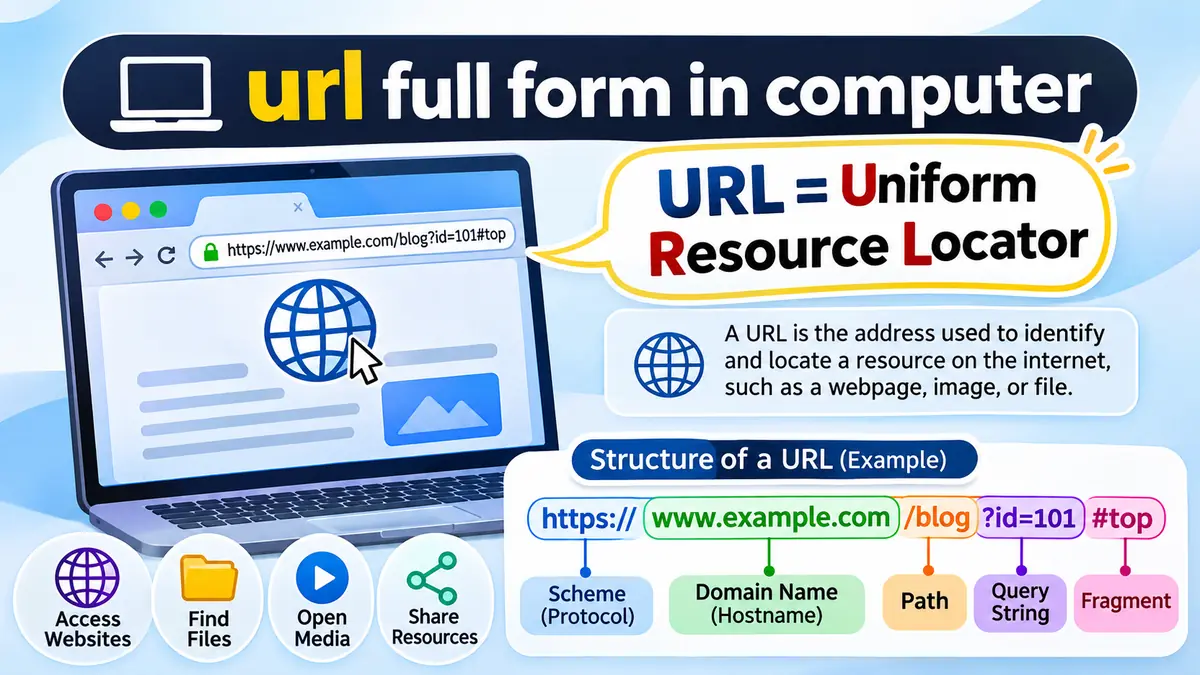

Every time you open a website, click a link, or download a file from the internet, a URL helps your browser find the resource you want. But what does URL actually stand for, and how does it work?
The url full form in computer is Uniform Resource Locator. A URL is the address used to identify and locate a resource on the internet, such as a webpage, image, video, or document. It tells a web browser where the resource is located and which protocol to use to access it.
URLs are a fundamental part of the World Wide Web. Understanding them makes it easier to navigate websites, recognize suspicious links, and understand how browsers communicate with web servers.
What Is the url full form in computer?
The full form of URL is Uniform Resource Locator.
A URL is a specific type of Uniform Resource Identifier (URI) that identifies a resource by its location and provides a way to access it.
The term can be understood by examining its three words:
- Uniform: The address follows a standardized structure.
- Resource: The address identifies something accessible, such as a webpage, file, or image.
- Locator: The address specifies where the resource can be found and how it can be accessed.
For example:
This URL identifies a webpage located at the /about path on the example.com website.
When you enter this address into a browser such as Google Chrome, Mozilla Firefox, Microsoft Edge, or Safari, the browser uses the URL to request the corresponding resource.
Who Invented the URL?
The URL concept was developed by Tim Berners-Lee during the creation of the World Wide Web at CERN.
Berners-Lee developed the foundational web technologies, including HTML, HTTP, and the system of resource identifiers that evolved into modern URLs.
The World Wide Web emerged around 1989–1991, and URL specifications were subsequently standardized through Internet Engineering Task Force (IETF) documents.
RFC 1738, published in December 1994, described Uniform Resource Locators. Modern URI syntax is defined by RFC 3986, published in January 2005.
What Is a URL in Computer Networking?
In computer networking, a URL is an address that identifies a network-accessible resource and specifies how to retrieve or interact with it.
A browser uses the information in a URL to determine the communication protocol, destination server, and requested resource.
For instance, consider:
This address identifies a resource under the /products/laptops path.
When the URL is opened, the browser typically performs several operations:
- Reads and interprets the URL.
- Determines the protocol, such as HTTPS.
- Uses the Domain Name System (DNS) to resolve the hostname when necessary.
- Establishes a network connection to the destination server.
- Negotiates a secure TLS connection for HTTPS.
- Sends an HTTP request for the specified resource.
- Receives the server response and displays or processes the content.
Modern browsers may use HTTP/2 or HTTP/3, which can change the underlying connection process, but the URL continues to identify the requested resource.
Why Are URLs Important?
URLs make resources on the internet addressable and accessible.
Without standardized resource addresses, users and applications would struggle to identify specific webpages, documents, and services across different networks.
URLs are essential for web browsing, search engines, hyperlinks, online applications, file sharing, and communication between internet services.
They also allow people to share a specific webpage instead of giving someone only the name of a website.
Structure of a URL: Understanding Its Main Parts
A URL consists of several components, each serving a different purpose.
Consider this example:
Anatomy of a URLIllustrative URL showing its main components.
1. Scheme or Protocol
The scheme appears at the beginning of a URL and indicates how the resource should be accessed.
Common examples include:
http://— Hypertext Transfer Protocolhttps://— Hypertext Transfer Protocol Secureftp://— File Transfer Protocolfile://— Access to local or network files
HTTPS is the standard choice for modern public websites because it provides encrypted communication and server authentication.
2. Subdomain
A subdomain appears before the main domain name.
For example, in www.example.com, www is a subdomain.
Other examples include blog.example.com, shop.example.com, and support.example.com.
A website can operate without the www subdomain.
3. Domain Name
The domain name identifies the website’s internet namespace.
In https://www.example.com, the registered domain is example.com.
The .com portion is called a top-level domain (TLD). Other common TLDs include .org, .net, .edu, and country-code domains such as .pk and .uk.
4. Port Number
A port identifies the network service used for a connection.
For example:
Port 443 is the default for HTTPS, while port 80 is the default for HTTP.
Because browsers understand these defaults, users normally do not need to enter them.
5. Path
The path identifies a resource or route within a website.
Example:
Here, /blog/computer-basics is the path.
A path may represent a physical file, but many modern websites use application routing to generate content dynamically.
6. Query String
A query string begins with a question mark (?) and passes additional parameters.
Example:
Here, q=computer specifies a search term, while page=2 indicates a requested page number.
Multiple parameters are commonly separated by an ampersand (&).
7. Fragment Identifier
A fragment begins with the hash symbol (#).
Example:
The fragment may direct the browser to a specific section of the page.
Unlike the path and query, the fragment is normally processed by the browser and is not sent as part of the HTTP request. MDN+2
What Are the Different Types of URLs?
URLs can be classified according to their structure and how they reference resources.
Absolute URL
An absolute URL includes the scheme and the information needed to identify a resource independently of the current webpage.
Example:
https://www.example.com/images/logo.png
It can be used directly in a browser without requiring a base URL.
Relative URL
A relative URL reference identifies a resource relative to another URL.
Example:
images/logo.png
If a webpage is located at https://example.com/blog/, this reference normally resolves to:
https://example.com/blog/images/logo.png
Relative references are especially useful when creating internal website links.
Root-Relative URL
A root-relative reference begins with a forward slash.
Example:
/contact
On the website https://example.com, it refers to:
It uses the website’s origin rather than the current page directory.
Dynamic URL
A dynamic URL commonly includes parameters used by an application to select or generate content.
Example:
The server may use these values to display a particular product or variation.
However, query parameters do not automatically mean that a webpage is dynamically generated.
Static URL
A static-looking URL generally has a clean, stable path.
Example:
The content might be stored in a file or generated by a content management system. A readable path alone does not determine how the page is produced.
Difference Between URL, URI, and URN
URL, URI, and URN are related concepts, but they have different meanings.
| Term | Full form | Main purpose |
|---|---|---|
| URL | Uniform Resource Locator | Identifies a resource through its location or access mechanism |
| URI | Uniform Resource Identifier | Identifies a resource |
| URN | Uniform Resource Name | Identifies a resource using a naming scheme |
A URL is a type of URI, while a URN is another form of resource identifier.
For example:
- URL:
https://example.com/book - URN:
urn:isbn:0451450523
The first identifies a resource through a web address. The second uses an ISBN-based identifier.
RFC 3986 provides the formal framework for understanding these distinctions. RFC Editor+1
Difference Between a URL and a Domain Name
A domain name is only one component of a typical website URL.
Consider these examples:
| Feature | Domain name | URL |
|---|---|---|
| Example | example.com | https://example.com/about |
| Purpose | Identifies a domain | Identifies a specific resource |
| Includes protocol | No | Usually, for an absolute web URL |
| Includes path | No | Can include one |
| Includes query parameters | No | Can include them |
| Scope | Domain-level | Resource-level |
A domain name can be used in many different URLs.
For instance, example.com could have separate URLs for its homepage, contact page, articles, and downloadable files.
A domain name is not the same as an IP address either. DNS helps translate hostnames into information that browsers can use to establish network connections.
Difference Between HTTP and HTTPS URLs
HTTP and HTTPS are two common schemes used in web addresses.
| Feature | HTTP | HTTPS |
|---|---|---|
| Full form | Hypertext Transfer Protocol | Hypertext Transfer Protocol Secure |
| Default port | 80 | 443 |
| Encryption | Not provided by HTTP itself | Uses TLS encryption |
| Server authentication | Not inherent | Uses certificates |
| Typical use | Legacy sites, local testing | Modern public websites |
An HTTPS URL starts with https://.
HTTPS helps protect information transmitted between a browser and server from interception or modification during transit.
However, HTTPS does not guarantee that a website is legitimate. Fraudulent websites can also use valid HTTPS certificates.
Users should therefore inspect the actual domain name instead of relying only on a padlock or secure connection indicator.
Examples of URLs in Everyday Computer Use
URLs appear in many digital activities, including browsing, education, communication, and file sharing.
| Purpose | Example URL |
|---|---|
| Website homepage | https://www.example.com/ |
| Article | https://example.com/blog/url-guide |
| Image | https://example.com/images/photo.jpg |
| PDF document | https://example.com/files/notes.pdf |
| Search results | https://example.com/search?q=internet |
| Page section | https://example.com/tutorial#chapter2 |
| FTP resource | ftp://ftp.example.com/manual.txt |
These examples demonstrate how a URL can identify different kinds of resources.
A URL does not always point to an HTML webpage. It may refer to a JSON response, audio file, image, PDF, downloadable archive, or another resource.
How Does a URL Work in a Web Browser?
The process of opening a URL involves several technologies working together.
How a browser loads a webpage
1
Enter URLBrowser interprets the address
2
DNS LookupResolves the hostname
3
ConnectEstablishes a network connection
4
HTTP RequestRequests the resource
5
Server ResponseReturns content and status
6
Render PageBrowser displays the result
For a typical HTTPS website, the browser first interprets the address and checks whether it already has relevant DNS or connection information.
If needed, DNS resolves the hostname. The browser then establishes a suitable connection, performs TLS security negotiation, and sends an HTTP request.
The server returns an HTTP response containing a status code, headers, and potentially the requested content.
A successful HTML response may cause the browser to request additional resources such as CSS stylesheets, JavaScript files, fonts, and images.
Not every URL results in a successful page load. The resource may have moved, been deleted, or become temporarily unavailable.
How to Find and Copy a Website URL
Finding a webpage’s URL is straightforward on desktop and mobile devices.
On a Desktop Computer
- Open a browser such as Chrome, Firefox, Edge, or Safari.
- Visit the desired webpage.
- Click the address bar at the top of the browser.
- Select the complete address using
Ctrl + Lon Windows orCommand + Lon macOS. - Copy it using
Ctrl + CorCommand + C.
You can then paste the URL into a document, email, or messaging application.
On a Mobile Phone
Open the webpage in your mobile browser, tap the address bar or share icon, and choose the option to copy the link.
The exact controls depend on the browser and operating system.
How to Identify a URL in a Link
A hyperlink often displays descriptive text rather than the actual URL.
For example, a link may display “Read the guide” while pointing to a longer address.
On a desktop computer, hovering over a hyperlink commonly reveals its destination in the browser’s status area.
On mobile devices, pressing and holding a link may display a preview of its destination.
This is useful for checking links before opening them.
What Makes a URL Valid?
A valid URL must follow the syntax rules associated with its scheme.
For a typical HTTPS web address, the structure looks like this:
The scheme and hostname are important components, while the query and fragment are optional.
Common URL formatting considerations include:
- Schemes such as
httpsare case-insensitive. - Hostnames are generally case-insensitive.
- Paths may be case-sensitive depending on the server.
- Spaces and certain special characters must be encoded appropriately.
- Reserved characters such as
?,#, and/have structural meanings.
For example, a space may be represented as %20 in a URL path.
The formal URI syntax is described in RFC 3986, while modern browser URL parsing and processing are specified by the WHATWG URL Standard. RFC Editor+1
What Is URL Encoding?
URL encoding represents characters in a form that can be safely included in a URL.
It is commonly called percent-encoding because encoded bytes use a percent sign followed by hexadecimal digits.
Examples include:
| Character | Percent-encoded representation |
|---|---|
| Space | %20 |
# | %23 |
& | %26 |
? | %3F |
/ | %2F |
Whether a character needs encoding depends on the URL component and its intended meaning.
For example, a forward slash normally separates path segments, but %2F can represent an encoded slash within a component.
Why Are URLs Important for Search Engine Optimization?
URLs also play a role in how search engines discover, crawl, and organize webpages.
A descriptive URL can help users understand what a page contains before they open it.
Consider these examples:
Less descriptive:
More descriptive:
Both may be valid, but the second communicates the subject more clearly.
Characteristics of an SEO-Friendly URL
A well-structured URL generally has these characteristics:
- Uses meaningful, readable words.
- Avoids unnecessary parameters when possible.
- Separates words with hyphens.
- Maintains a consistent structure.
- Avoids unnecessary duplication.
- Uses HTTPS for secure access.
- Remains stable when content is updated.
Google can crawl URLs with query parameters, so dynamic URLs are not inherently bad for SEO.
The greater concern is whether multiple URLs expose duplicate or nearly identical content, making crawling and canonicalization more complicated.
Can Changing a URL Affect SEO?
Yes. Changing a webpage’s URL changes its address.
If the old address has incoming links or search visibility, changing it without proper handling can cause broken links and lost traffic.
When a page permanently moves, a server-side permanent redirect, commonly HTTP 301 or 308, can direct users and search engines to its new location.
Canonical tags can also help indicate the preferred version when similar content is accessible through multiple URLs.
A URL should therefore be treated as a stable identifier rather than something to change casually.
URL Safety: How to Recognize Suspicious Web Addresses
Understanding URL structure can help protect users from phishing attacks and misleading websites.
A suspicious link may imitate a familiar brand while using a different registered domain.
For example:
and
are not the same domain.
In the second example, the registered domain is example.net, not example.com.
The additional words before it are subdomains.
Warning Signs of Unsafe URLs
Watch for addresses that contain:
- Misspelled versions of familiar domain names.
- Unexpected subdomains or unusual redirects.
- Requests for passwords or payment details on unfamiliar websites.
- Misleading shortened links.
- Strange characters designed to imitate trusted names.
A URL shortener can hide the final destination, although shortened links are not automatically malicious.
Similarly, an IP-address-based URL is not necessarily unsafe, but it may deserve additional scrutiny when used unexpectedly for a login page.
Does HTTPS Mean a URL Is Safe?
No. HTTPS means the connection can be encrypted and the server’s certificate can be validated.
It does not establish that the website’s content, operator, or intentions are trustworthy.
Before entering sensitive information, verify the registered domain and use trusted navigation methods.
Common URL Errors and How to Fix Them
URLs can fail for several reasons, including spelling mistakes, server configuration problems, and missing resources.
404 Not Found
A 404 response means the server could not find the requested resource.
Possible causes include an incorrect path, a deleted webpage, or an outdated link.
Check the spelling of the address or navigate to the website’s homepage.
403 Forbidden
A 403 response indicates that the server understood the request but refuses to authorize it.
This may result from access restrictions, permissions, or security rules.
Unlike a 404 error, it does not necessarily mean the resource is missing.
500 Internal Server Error
A 500 response indicates that the server encountered an unexpected condition preventing it from fulfilling the request.
This is generally a server-side issue rather than a URL syntax problem.
Too Many Redirects
A redirect loop occurs when URLs repeatedly send the browser between addresses without reaching the intended destination.
Website administrators may need to correct redirect rules, HTTPS settings, or application configuration.
Invalid URL
An invalid URL may contain an unsupported scheme, malformed hostname, or incorrectly structured characters.
Check the address carefully and ensure that special characters are encoded where required.
url full form in computer: Quick Revision for Students
For school examinations, computer fundamentals classes, and general knowledge questions, these are the most useful facts to remember.
| Question | Answer |
|---|---|
| What is the full form of URL? | Uniform Resource Locator |
| What does a URL identify? | A resource and its location or access mechanism |
| Who developed the URL concept? | Tim Berners-Lee |
| What does HTTP stand for? | Hypertext Transfer Protocol |
| What does HTTPS stand for? | Hypertext Transfer Protocol Secure |
| What is a domain name? | A human-readable name within the DNS hierarchy |
| What does DNS stand for? | Domain Name System |
| What is the default HTTPS port? | 443 |
| What symbol starts a query string? | ? |
| What symbol starts a fragment? | # |
| Is a URL a type of URI? | Yes |
For a one-mark examination question, the answer is simply:
URL stands for Uniform Resource Locator.
For a two- or three-mark question, you can write:
A URL (Uniform Resource Locator) is the address of a resource on the internet. It specifies the location of a webpage, file, or other resource and provides the information needed to access it. An example is https://www.example.com.
Conclusion
The url full form in computer is Uniform Resource Locator. It is the standardized address mechanism used to locate and access resources on the internet.
A URL can contain a scheme, hostname, port, path, query string, and fragment. Understanding these components helps with web browsing, computer networking, website development, search engine optimization, and online security.
The easiest way to remember the concept is to think of a URL as the internet address of a specific resource. Whenever you open a webpage or share a link, a URL helps connect the browser to the intended destination.
