
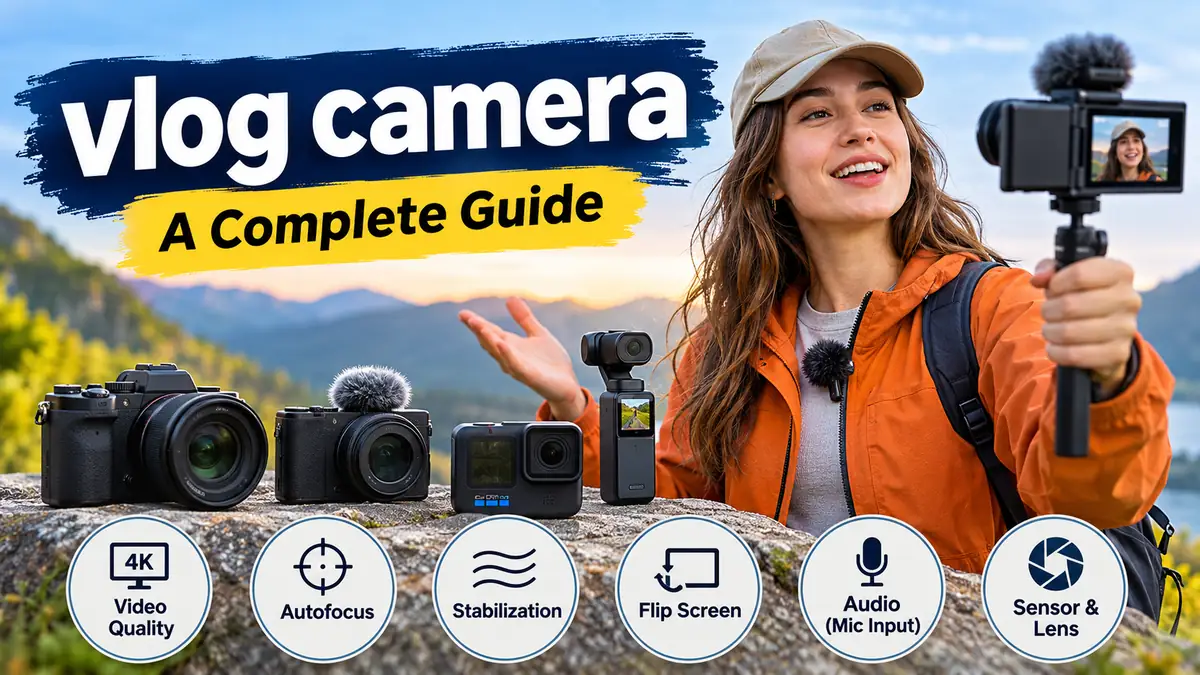

A great vlog can be filmed with a smartphone, a compact camera, or a professional mirrorless system. The difference often comes down to how well the equipment handles movement, sound, lighting, and everyday recording.
Choosing a vlog camera is less about finding the highest resolution and more about understanding which features actually improve your videos.
A vlog camera is a digital camera designed or configured for video blogging, typically featuring reliable autofocus, a front-facing screen, effective stabilization, and microphone connectivity. Popular options include compact cameras, mirrorless cameras, and action cameras. The right type depends on whether you record talking-head videos, travel footage, tutorials, or moving subjects.
What Is a vlog camera?
A vlog camera is a device used to record video content in which the creator documents experiences, explains topics, shares opinions, or demonstrates activities.
Unlike traditional photography-focused cameras, vlogging equipment prioritizes features that make self-recording easier.
For example, a photographer can stand behind a camera and compose a picture through the viewfinder. A vlogger may need to hold the camera at arm’s length, walk through a crowded street, monitor their face on a screen, and speak clearly while recording.
That changes which features matter most.
How a vlogging camera differs from a regular camera
| Feature | Why it matters for vlogging |
|---|---|
| Flip-out screen | Lets you check framing while recording yourself |
| Face and eye autofocus | Helps keep your face sharp during movement |
| Image stabilization | Reduces visible shake in handheld footage |
| External microphone input | Allows clearer speech recording |
| Wide-angle lens | Makes self-recording easier at arm’s length |
| Lightweight body | Improves comfort during extended filming |
| USB-C connectivity | Supports charging, file transfer, or webcam functions on compatible models |
| Recording indicator | Makes it easier to confirm that recording has started |
A conventional camera can still produce excellent vlogs. The difference is how easily it supports the recording workflow.
Types of vlog camera and Their Uses
Vlogging cameras fall into several categories, each with distinct strengths and limitations.
Compact point-and-shoot cameras
Canon PowerShot V10 Vlog Camera – Black — Glazer’s Camera
Buy Canon PowerShot V10 Essential Kit, Black — Canon Ireland Store
Compact cameras are designed for portability and convenience. They typically use a built-in lens, reducing the need to carry additional equipment.
Examples include the Sony ZV-1 II and Canon PowerShot V10.
Their main advantages include simple operation, small size, and convenient automatic settings.
However, compact cameras may offer less flexibility than interchangeable-lens systems. Their smaller sensors can also limit low-light performance compared with larger-sensor cameras.
These cameras suit everyday lifestyle videos, personal updates, travel diaries, and creators who prefer minimal equipment.
Mirrorless cameras
Sony ZV-E10 II Mirrorless Vlog Camera with 16-50mm Lens Kit (Black) – JB Hi-Fi NZ
Canon EOS R50 + RF-S 18-45 mm IS STM | Foto Manthey
Sony ZV-E10 II 數位單眼相機 (ZV-E10M2) – 普羅相機
4
Mirrorless cameras provide interchangeable lenses, larger sensors, and extensive control over video settings.
Examples include the Sony ZV-E10 II and Canon EOS R50.
They allow creators to change focal lengths, experiment with shallow depth of field, and use specialized lenses for different shooting environments.
A wide-angle lens works well for handheld talking videos, while a standard or portrait lens can produce a more flattering composition for stationary interviews.
The trade-offs include additional equipment, potentially greater weight, and more settings to learn.
Action cameras
GoPro HERO13 Black Accessory Bundle – Outdoorphoto
Osmo Action 5 Pro Standard Combo | Action Camera
Action cameras are small, rugged devices designed for movement and challenging environments.
Models such as the GoPro HERO13 Black and DJI Osmo Action 5 Pro are useful for cycling, hiking, outdoor activities, and point-of-view recordings.
They generally provide wide-angle coverage and strong electronic image stabilization.
Their limitations can include less natural perspective for close-up portraits, limited background blur, and reduced image quality in very dark environments.
Gimbal cameras
DJI Osmo Pocket 3 Action Camera / 4K Resolution / Face + Motion Tracking / Compact in Qatar
A gimbal camera uses mechanical stabilization to compensate for movement.
The DJI Osmo Pocket 3 is an example of this category.
A three-axis gimbal compensates for pitch, roll, and yaw, helping produce smoother footage while walking or turning.
This design is particularly useful for travel vlogs, walking tours, behind-the-scenes footage, and handheld storytelling.
Mechanical stabilization does not eliminate every type of movement. Vertical bouncing while walking can still appear in recordings.
Smartphones
Modern smartphones are capable video cameras, particularly when paired with a suitable microphone and stable mounting system.
They offer convenient editing, quick uploads, computational video processing, and multiple camera modules.
For many beginners, learning composition, lighting, and sound recording with a smartphone is more valuable than immediately switching to dedicated equipment.
Essential Features of a Good vlog camera
Camera specifications can be confusing because manufacturers often emphasize resolution, frame rates, and sensor technology without explaining their practical effects.
The following features have the greatest influence on everyday vlogging.
Video resolution: 1080p versus 4K
Resolution describes the number of pixels recorded in each video frame.
| Resolution | Pixel dimensions | Common use |
|---|---|---|
| Full HD | 1920 × 1080 | Everyday videos and smaller files |
| 4K UHD | 3840 × 2160 | Detailed footage and flexible editing |
| 6K | Commonly around 6000 pixels wide, depending on format | High-resolution capture and reframing |
| 8K UHD | 7680 × 4320 | Specialized high-resolution production |
For most creators, 4K provides a useful balance between image detail, editing flexibility, and file size.
Recording in 4K also allows some cropping when exporting a 1080p video.
However, 4K does not automatically produce better footage. Lens quality, lighting, exposure, autofocus, compression, and sensor performance also influence the final image.
A well-lit 1080p recording can look better than poorly exposed 4K footage.
Autofocus and subject tracking
Autofocus is especially important when recording without another person operating the camera.
A useful vlogging autofocus system should recognize faces, maintain focus on eyes, and respond smoothly when subjects move closer to or farther from the lens.
Modern systems may use phase-detection autofocus, contrast detection, or hybrid methods.
Face and eye detection can improve reliability, but performance varies between models and recording modes.
One common problem is focus hunting, where the camera repeatedly shifts focus between the subject and the background.
Before recording an important video, test autofocus while moving, turning your head, and holding objects in front of the lens.
Image stabilization
Image stabilization reduces unwanted camera movement.
Three major approaches are used:
- Optical image stabilization (OIS): Lens elements move to compensate for shake.
- In-body image stabilization (IBIS): The camera sensor moves to counteract motion.
- Electronic image stabilization (EIS): Software adjusts or crops recorded frames to reduce shake.
Some cameras combine multiple stabilization methods.
Electronic stabilization can narrow the field of view because it needs extra image area for cropping. This matters when recording yourself at arm’s length.
For walking videos, stabilization should be tested in the exact recording mode you intend to use.
Flip-out screen and framing
A fully articulating or side-flipping screen allows creators to monitor composition while facing the lens.
This helps with headroom, exposure, and confirming that the subject remains inside the frame.
A screen that flips upward can also work, although an accessory mounted above the camera may obstruct it.
Look for a display that remains visible outdoors and provides useful recording indicators.
Microphone input and audio monitoring
Audio quality is one of the most overlooked parts of video production.
Viewers may tolerate slightly soft footage, but wind noise, distortion, and unclear speech can make a video difficult to follow.
A 3.5 mm microphone input allows many cameras to connect to external microphones. Some systems support digital microphones through a compatible accessory shoe or USB connection.
A headphone output is also valuable because it lets you monitor the actual recorded sound.
Not every camera includes both connections.
Understanding Camera Sensors and Lenses
The sensor and lens influence image quality, field of view, background blur, and performance in challenging light.
Sensor sizes explained
Common sensor formats include 1/2.3-inch-type, 1-inch-type, Micro Four Thirds, APS-C, and full-frame.
Larger sensors generally provide greater potential for low-light performance and shallow depth of field when other relevant factors are comparable.
However, sensor size alone does not determine image quality.
Processing, sensor generation, lens aperture, stabilization, and recording settings also matter.
For example, a well-designed 1-inch-type sensor camera can deliver excellent daylight video while remaining much smaller than a full-frame system.
Why wide-angle lenses matter
A wide-angle lens makes it easier to fit your face and surroundings into the frame.
This is particularly important for handheld self-recording.
Full-frame-equivalent focal lengths around 16–24 mm are commonly useful for arm’s-length vlogging, although personal preference and camera distance matter.
A very wide lens captures more background but can exaggerate facial features when placed close to the face.
A moderately wide lens often produces a more natural-looking result.
Aperture and background blur
Aperture describes the size of the lens opening and is represented by an f-number, such as f/1.8 or f/4.
A lower f-number generally means a wider opening, allowing more light to reach the sensor.
Wide apertures can help in dim environments and create a blurred background.
However, shallow depth of field makes accurate autofocus more important.
For moving vlogs, keeping the subject reliably sharp is usually more useful than maximizing background blur.
Best Camera Settings for Vlogging
Even an expensive camera can produce disappointing footage when the settings are poorly matched to the recording environment.
Understanding a few basic controls helps creators achieve more consistent results.
Frame rate: 24, 30, or 60 fps?
Frame rate describes how many individual frames a camera records each second.
- 24 fps: Commonly associated with cinematic-style motion.
- 25 fps: Useful in regions with 50 Hz electrical systems.
- 30 fps: A practical choice for talking videos, tutorials, and everyday vlogs.
- 60 fps: Captures smoother motion and allows 2× slow motion when placed on a 30 fps timeline.
- 120 fps: Useful for more pronounced slow-motion effects when supported.
Higher frame rates require shorter exposure times for natural motion blur, which can make low-light recording more challenging.
For most talking-head videos, 25 or 30 fps is sufficient.
Shutter speed and the 180-degree rule
A common filmmaking guideline is to use a shutter speed approximately twice the frame rate.
For example:
| Frame rate | Typical shutter speed |
|---|---|
| 24 fps | 1/50 second |
| 25 fps | 1/50 second |
| 30 fps | 1/60 second |
| 60 fps | 1/125 second |
| 120 fps | 1/250 second |
These settings usually produce natural-looking motion blur.
However, they are guidelines rather than absolute rules. Faster shutter speeds may be useful for sports or fast-moving subjects.
ISO and exposure
ISO controls the camera’s sensitivity setting or signal amplification, depending on the imaging system.
Increasing ISO can brighten footage, but higher settings may introduce more visible noise or reduce usable dynamic range.
When possible, improve lighting before relying on very high ISO values.
For indoor vlogging, a window or soft LED light can make a substantial difference.
White balance and natural colors
White balance controls how a camera interprets color temperature.
Automatic white balance works well in many situations, but it may shift unexpectedly when the scene changes.
For a fixed indoor setup, selecting a consistent white balance often produces more predictable skin tones and background colors.
For example, daylight is commonly around 5,600 K, while many warm household lights have lower color temperatures.
How to Choose a vlog camera for Different Recording Styles
Different types of videos place different demands on camera equipment.
The following comparison shows how recording style influences feature priorities.
| Vlogging style | Most important features | Suitable camera type |
|---|---|---|
| Daily lifestyle | Portability, autofocus, flip screen | Compact or smartphone |
| Travel vlogging | Stabilization, battery life, low weight | Gimbal or compact |
| YouTube talking-head | Image quality, microphone support, lens flexibility | Mirrorless |
| Outdoor adventures | Durability, weather resistance, stabilization | Action camera |
| Product tutorials | Close focusing, autofocus tracking, controlled lighting | Compact or mirrorless |
| Walking tours | Smooth stabilization, wide field of view | Gimbal camera |
| Studio interviews | Audio monitoring, manual controls, reliable power | Mirrorless |
For beginners
A beginner-friendly camera should minimize technical distractions.
Reliable automatic exposure, face tracking, straightforward menus, and a front-facing screen are often more useful than advanced professional recording formats.
The Sony ZV-1F is an example of a simple fixed-lens camera designed around self-recording.
Its wide-angle lens and directional microphone make it suitable for straightforward video blogging, although its digital stabilization and limited lens flexibility create trade-offs. RTINGS.com
For YouTube videos
A camera for YouTube should match the type of content being produced.
Stationary educational videos benefit from consistent lighting, dependable autofocus, and good microphone placement.
Creators recording tutorials or product demonstrations may appreciate a camera with an interchangeable lens and close-focus capability.
The Sony ZV-E10 II, for instance, combines an APS-C sensor with interchangeable lenses, 4K recording up to 60p, and subject-tracking autofocus. It does not include in-body image stabilization, which is worth considering for handheld work. Sony Pakistan+1
For travel videos
Travel vlogging introduces practical challenges, including crowded locations, unpredictable weather, limited charging opportunities, and long periods of carrying equipment.
A small camera that is easy to deploy may be more useful than a heavier system offering marginally better image quality.
Gimbal cameras are especially convenient for walking footage, while action cameras are useful in demanding outdoor environments.
For low-light recording
Indoor events, evening streets, and dim restaurants can challenge small camera sensors.
A larger sensor paired with a bright lens may improve low-light results, although the exact improvement depends on exposure and camera design.
The Sony ZV-E1 is an example of a full-frame camera designed with advanced video recording and low-light performance in mind.
However, full-frame equipment is not essential for most vloggers. Good lighting can improve results across nearly every camera category.
Video Recording Formats, Codecs, and Color Profiles
Camera specifications often include technical terms such as H.264, H.265, 10-bit recording, Log, and 4:2:2.
These describe how video information is captured, compressed, and stored.
H.264 versus H.265
H.264, also known as AVC, is widely supported by editing software, computers, and online platforms.
H.265, also called HEVC, can provide more efficient compression at comparable visual quality, but it may require more processing power during editing.
Some professional cameras also support formats such as Apple ProRes or higher-bitrate intraframe recording.
The best format depends on editing hardware, storage capacity, and workflow requirements.
What does 10-bit video mean?
Bit depth describes how many tonal values can be represented per color channel.
An 8-bit signal provides 256 possible values per channel, while a 10-bit signal provides 1,024.
This can help preserve smoother gradients and provide more flexibility during color grading.
However, bit depth is only one component of image quality. Exposure, dynamic range, compression, and color processing remain important.
Understanding Log recording
Log profiles use a specialized tone curve designed to preserve more highlight and shadow information for subsequent color correction.
Examples include Sony S-Log3, Canon Log, and Panasonic V-Log.
Log recording can be useful for creators who understand color grading, but it is not automatically the best setting for beginners.
Standard picture profiles are usually easier when the goal is to record, edit, and publish quickly.
Why 4:2:2 and 4:2:0 matter
Chroma subsampling determines how much color information is stored relative to brightness information.
A 4:2:2 recording retains more horizontal color detail than 4:2:0 at the same resolution and bit depth.
This can be useful for demanding color correction and green-screen production.
For ordinary social-media videos, the difference may be less noticeable than improvements in lighting, exposure, or audio.
Essential Accessories for Better Vlogging
Finding the Camera Best for Vlogging in New Zealand | Prac Skills Blog
Accessories can improve a recording setup without requiring a more expensive camera body.
External microphones
Different microphones serve different recording situations.
A shotgun microphone mounted on the camera can improve directional sound pickup, particularly when the subject remains relatively close.
A wireless lavalier microphone is useful when the creator moves away from the camera.
USB microphones can work well for stationary computer-based recording, provided the recording device supports them.
Wind protection is especially important outdoors. A furry windshield can reduce wind interference, although it cannot eliminate all unwanted noise.
Tripods and handheld grips
A compact tripod makes it easier to maintain stable framing for stationary videos.
Handheld grips can improve comfort when recording at arm’s length.
For moving footage, a gimbal may provide smoother results than a simple grip, although it adds equipment and setup time.
Portable LED lighting
A small LED panel can improve indoor recordings by illuminating the face more evenly.
Soft, diffused light generally produces more flattering results than a harsh light positioned directly in front of the subject.
For a simple setup, place a soft light slightly to one side of the camera and avoid overly bright backgrounds.
Memory cards and storage
Video recording places continuous demands on memory cards.
SD cards may carry classifications such as U3, V30, V60, or V90, which indicate minimum sustained write performance.
The correct card depends on the camera’s bitrate and recording format.
For example, a 100 Mbps video stream generates approximately 45 GB of data per hour before accounting for recording variations and file overhead.
A higher-bitrate format can consume storage much faster.
Always check the manufacturer’s recommended card specifications for the recording mode you intend to use.
Spare batteries and USB power
Battery life depends on recording resolution, screen brightness, autofocus activity, temperature, and other factors.
Some cameras support USB Power Delivery, allowing compatible power banks or adapters to supply power during recording.
Not all cameras can record continuously while charging, so compatibility should be verified.
Common vlog camera Problems and How to Fix Them
Many recording problems are caused by setup choices rather than defective equipment.
Footage looks shaky
Start by checking whether stabilization is enabled.
If the camera uses electronic stabilization, verify whether the selected mode introduces excessive cropping.
Hold the camera with both hands when possible, keep movements gradual, and avoid abrupt turns.
For walking shots, a gimbal or camera with effective stabilization may be more useful than relying on editing software to repair severe shake.
Autofocus keeps losing the subject
Enable face or eye tracking when appropriate.
Check that the subject is sufficiently illuminated and that the camera is not repeatedly focusing on objects in the foreground.
If the camera supports autofocus transition speed or subject-shift sensitivity, adjusting these settings can make focus changes more predictable.
For stationary recordings, manual focus can sometimes eliminate unwanted focus hunting entirely.
Audio sounds muffled or distorted
Check microphone placement, input gain, and environmental noise.
Distortion can occur when the recording level is too high. Muffled audio may result from an obstructed microphone, excessive distance, or inappropriate noise reduction.
Record a short test clip and listen through headphones before beginning a longer session.
Camera overheats during recording
High-resolution recording, warm environments, and prolonged operation can increase camera temperature.
Some cameras include internal fans or temperature-management settings, while others rely on passive cooling.
Avoid direct sunlight when practical, provide ventilation, and use recording settings appropriate for the required output.
The Canon PowerShot V1 includes a cooling fan designed to support extended video recording. DPReview
Footage has flickering lights
Artificial lighting can flicker when camera shutter timing conflicts with the local electrical frequency or the light’s electronic driver.
In regions using 50 Hz electricity, 25 fps with a 1/50-second shutter is often a useful starting point.
In 60 Hz regions, 30 fps with a 1/60-second shutter commonly works well.
Some LED lights still require fine shutter adjustments because their flicker behavior depends on the driver.
Fast camera movement causes distortion
Rolling shutter occurs when different parts of the sensor are read at slightly different times.
This can make vertical lines appear tilted during fast pans or rapid movement.
The effect varies significantly between cameras and recording modes.
Slower pans, wider lenses, and cameras with faster sensor readout can help reduce visible rolling-shutter distortion.
How to Set Up a vlog camera for Your First Video
A simple recording process helps prevent technical mistakes.
- Choose a quiet location. Reduce background noise and position yourself away from distracting sounds.
- Set the resolution and frame rate. Start with 4K at 25 or 30 fps if supported and suitable for your workflow.
- Adjust framing. Position the camera at approximately eye level and leave comfortable space around your head.
- Enable face autofocus. Confirm that your face remains sharp when you move naturally.
- Set exposure and white balance. Avoid overexposed highlights and unwanted color shifts.
- Connect the microphone. Check input levels and record a short audio test.
- Enable appropriate stabilization. Use a tripod for stationary videos or stabilization for handheld footage.
- Record a test clip. Review focus, audio, exposure, framing, and background distractions.
- Record the main video. Speak naturally and leave short pauses between sections to simplify editing.
- Back up the footage. Transfer the files to reliable storage before formatting the memory card.
This process works for smartphones, compact cameras, and advanced mirrorless systems.
Editing and Publishing Your Vlogs
Recording is only the first stage of video production.
Editing turns individual clips into a coherent story.
Organizing footage
Create separate folders for raw video, audio, music, graphics, and exported files.
Clear filenames and consistent organization make it easier to locate material when revisiting a project.
For larger productions, maintaining backups on separate storage devices reduces the risk of losing footage.
Choosing video editing software
Common editing tools include DaVinci Resolve, Adobe Premiere Pro, Final Cut Pro, and CapCut.
Each provides different combinations of timeline editing, audio tools, effects, and color correction.
Beginners generally benefit from learning basic cuts, sound balancing, captions, and exposure correction before exploring complex visual effects.
Horizontal versus vertical video
Horizontal 16:9 video is widely used for conventional YouTube uploads.
Vertical 9:16 video is common on YouTube Shorts, Instagram Reels, and TikTok.
Creators producing both formats should consider framing carefully during recording.
Some cameras support open-gate recording, which captures a larger sensor area and can provide greater flexibility for creating horizontal and vertical versions from the same footage.
The Fujifilm X-M5 is one example of a compact camera with open-gate video capabilities. RTINGS.com+1
Export settings
For ordinary online video, H.264 in an MP4 container remains a practical choice because of its broad compatibility.
Match the exported frame rate to the editing timeline unless there is a specific reason to convert it.
Use a bitrate appropriate to the resolution, motion, and delivery platform.
Excessive compression can produce blockiness, banding, and loss of fine detail, especially in scenes containing fast movement.
Mistakes to Avoid When Using a vlog camera
One frequent mistake is concentrating on camera resolution while ignoring sound.
Another is recording at the widest available aperture without considering whether autofocus can reliably keep the subject sharp.
Creators also sometimes overlook the effects of electronic stabilization on framing. A lens that seems wide enough in standard video mode may become too narrow when stronger stabilization is enabled.
Other avoidable problems include recording without testing the microphone, using unsuitable memory cards, neglecting battery management, and failing to back up footage.
A more effective approach is to test the complete setup under realistic conditions.
Record yourself walking, speaking indoors, moving between bright and dark areas, and using the microphone at the intended distance.
These tests reveal practical limitations that specification sheets may not show.
Is a Dedicated vlog camera Better Than a Smartphone?
A dedicated camera is not automatically better for every creator.
Smartphones offer convenience, immediate editing, easy sharing, and increasingly capable computational video features.
Dedicated cameras may provide advantages in lens selection, physical controls, microphone connectivity, sustained recording, and creative control over depth of field.
The most meaningful difference depends on the recording environment.
For short everyday videos, a smartphone may be entirely sufficient.
For controlled studio work, interchangeable lenses and professional audio connectivity can provide greater flexibility.
For walking tours, a compact gimbal camera may simplify stabilization.
Independent camera testing continues to emphasize that the best vlogging equipment depends on the creator’s shooting style rather than a single universal specification. DPReview+1
Final Thoughts on Choosing a vlog camera
The right vlog camera should make recording easier, not more complicated.
Reliable autofocus, clear audio, suitable stabilization, comfortable handling, and dependable battery performance usually matter more than chasing the highest available resolution.
A compact camera works well for simple everyday recording. A mirrorless camera offers greater creative flexibility. An action camera suits demanding outdoor environments, while a gimbal camera is particularly useful for smooth moving footage.
Start by identifying the type of videos you want to create, then test the features that directly affect that recording style.
With consistent lighting, clear sound, thoughtful framing, and a straightforward editing workflow, even modest equipment can produce engaging, professional-looking vlogs.
