

Computers are everywhere, from the laptop on a student’s desk to the servers running websites and the processors hidden inside everyday devices. Yet the basic idea behind all of them is surprisingly simple: receive data, follow instructions, process that data, and produce useful results.
So, what is computer in simple terms?
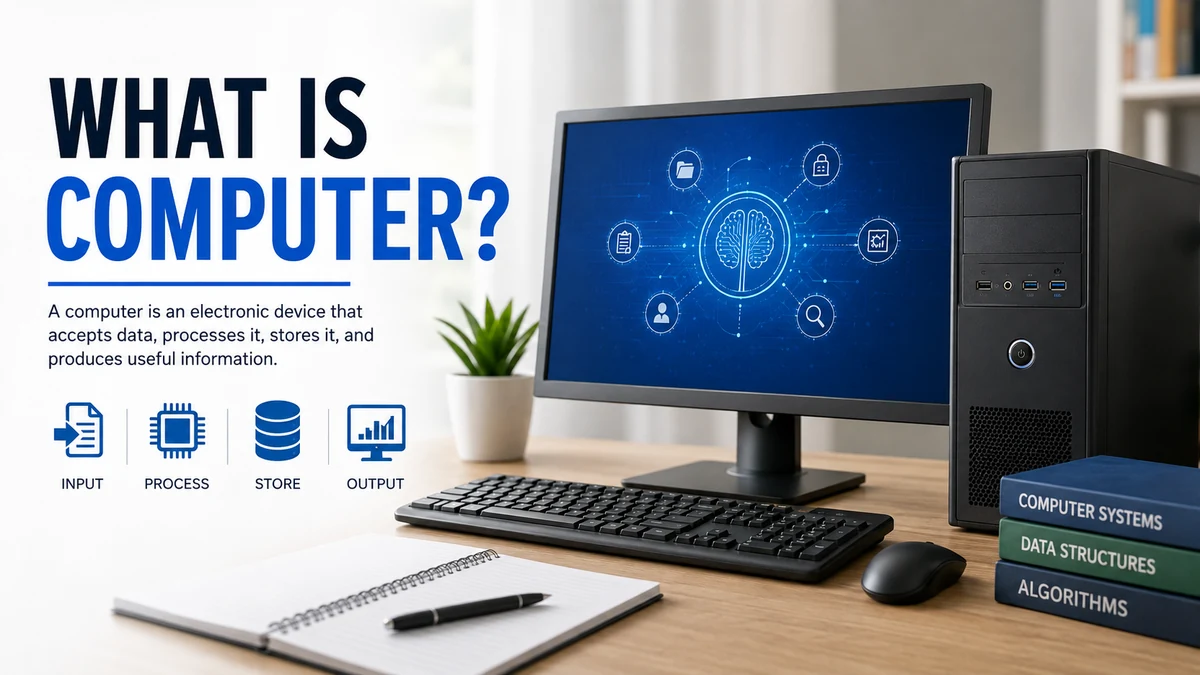
A computer is a programmable electronic device that accepts data as input, processes it according to stored instructions, produces information as output, and can store data for later use. A modern computer combines physical components called hardware with programs called software to perform calculations, manage information, communicate, and automate tasks.
Understanding this basic process makes everything else about computers much easier to learn.
What Is a Computer?
A computer is an electronic machine designed to manipulate information or data. It can store, retrieve, process, and communicate information while following instructions supplied by software.
The word “computer” historically relates to computation or calculation. Early computing machines were primarily designed for mathematical work, but modern computers can handle an enormous range of tasks beyond arithmetic.
You can use a computer to:
- Write documents
- Browse the internet
- Send email
- Watch videos
- Edit photographs
- Create presentations
- Perform calculations
- Store files
- Play games
- Communicate with other people
- Analyze large datasets
- Run artificial intelligence applications
A useful way to understand a computer is to think of it as an information-processing system rather than simply a calculating machine.
It receives something, does something with it according to instructions, and provides a result.
Data vs. Information
These two terms are closely connected but are not identical.
Data consists of raw facts, numbers, symbols, images, sounds, or other values supplied to a computer.
Information is meaningful output produced after that data has been processed.
For example, imagine a teacher enters these examination scores:
78, 85, 91, 69, 87
Those individual numbers are data. If a computer calculates the class average and displays the result, that result becomes useful information.
How Does a Computer Work?
To understand what is computer and how it functions, remember four fundamental operations:
- Input
- Processing
- Output
- Storage
Some explanations also treat data retrieval as a separate function.
1. Input
Input is the information or instruction supplied to the computer.
Common input devices include:
- Keyboard
- Mouse
- Touchscreen
- Microphone
- Camera
- Scanner
- Trackpad
When you type a letter on your keyboard, click a button with your mouse, speak into a microphone, or touch your phone’s screen, you are providing input.
2. Processing
The computer processes the input according to instructions contained in a program.
Much of this work is performed by the Central Processing Unit (CPU).
Suppose you enter:
15 + 10
The computer receives the numbers and operation as input, processes the calculation, and determines that the answer is 25.
Modern processors perform vastly more complicated operations, but the fundamental principle remains the same.
3. Output
Output is the result produced after processing.
Output devices can include:
- Monitor
- Speakers
- Printer
- Projector
- Headphones
When the answer “25” appears on your monitor, the screen is acting as an output device.
4. Storage
Computers can save programs and data so they remain available for future use.
Common storage technologies include:
- Solid-state drives (SSDs)
- Hard disk drives (HDDs)
- USB flash drives
- Memory cards
- Optical media
Storage capacity is commonly measured using units such as kilobytes (KB), megabytes (MB), gigabytes (GB), and terabytes (TB).
A Simple Example
Consider what happens when you type a document and save it.
| Stage | What happens |
|---|---|
| Input | You type using the keyboard |
| Processing | The computer interprets your keystrokes |
| Output | Words appear on the monitor |
| Storage | The document is saved to storage |
This input-process-output-storage cycle is one of the easiest ways for beginners to understand how computers operate.
Quick Takeaway: A computer receives data, follows programmed instructions to process it, provides output, and stores information when required.
Main Components of a Computer
A computer system contains several components working together.
At a broad level, beginners should understand two major categories:
hardware and software.
Computer Hardware
Hardware means the physical components of a computer—the parts that physically exist and can be touched.
Examples include:
- CPU
- Motherboard
- RAM
- SSD or HDD
- Keyboard
- Mouse
- Monitor
- Speakers
- Graphics hardware
- Network hardware
Hardware can be internal or external.
Central Processing Unit (CPU)
The CPU, or Central Processing Unit, executes instructions and performs many of the calculations required by programs.
It is often described as the “brain” of the computer. While that comparison simplifies a much more complicated system, it helps beginners understand the CPU’s central role.
A CPU works closely with memory, storage, and input/output hardware.
Two important concepts traditionally associated with CPU operation are:
Arithmetic Logic Unit (ALU): performs arithmetic calculations and logical operations.
Control Unit (CU): coordinates instructions and helps control operations between different parts of the system.
Modern processors are significantly more sophisticated and may contain multiple processing cores, caches, specialized execution units, and integrated components.
Motherboard
The motherboard is the main circuit board inside a computer.
Components such as the processor and memory connect directly or indirectly through it. It provides communication pathways that allow different pieces of hardware to exchange data.
You can think of the motherboard as the platform that connects the major internal components.
RAM
RAM (Random Access Memory) provides fast temporary working memory.
When you open an application or work with active data, relevant information is generally loaded into RAM so the processor can access it quickly.
RAM is normally volatile memory, meaning its contents are lost when power is removed.
That makes RAM different from permanent storage.
ROM
ROM (Read-Only Memory) traditionally refers to non-volatile memory used to store instructions or data that should remain available without power.
The distinction between ROM and other forms of firmware storage has become more complicated in modern devices because many systems use rewritable flash memory.
For beginners, the key distinction is simple:
- RAM primarily supports active, temporary work.
- Non-volatile memory retains information without continuous power.
Storage Devices
Storage keeps files and applications for long-term use.
Two common forms are:
HDD: A hard disk drive uses magnetic storage and moving mechanical components.
SSD: A solid-state drive uses flash memory and has no mechanical moving parts. SSDs generally offer faster access times than traditional hard drives.
Your operating system, applications, photographs, videos, and documents can all be stored on these devices.
Input Devices
Input devices allow information to enter the computer.
Examples include:
| Input device | Purpose |
| Keyboard | Enters text and commands |
| Mouse | Controls the pointer |
| Microphone | Captures sound |
| Scanner | Converts physical material into digital data |
| Camera | Captures images and video |
| Touchscreen | Detects touch-based commands |
Output Devices
Output devices present processed information.
Common examples include:
| Output device | Purpose |
| Monitor | Displays visual information |
| Printer | Produces physical copies |
| Speakers | Produce sound |
| Headphones | Provide personal audio output |
| Projector | Displays an image on a larger surface |
Some hardware can serve both input and output roles. A touchscreen, for example, displays information while also accepting touch input.
What Is Computer Software?
Hardware alone cannot perform useful general-purpose computing tasks without instructions.
Those instructions are provided through software.
Software refers to programs and related instructions that tell computer hardware what operations to perform. Web browsers, games, word processors, and operating systems are all examples.
Software is commonly divided into two broad categories.
System Software
System software helps operate and manage the computer itself.
The most familiar example is the operating system.
Popular desktop operating systems include:
- Microsoft Windows
- macOS
- Linux
Operating systems manage resources such as memory, files, hardware devices, applications, and user interaction.
Without an operating system or comparable system software, using a general-purpose computer would be far more difficult.
Application Software
Application software is designed to help users perform particular tasks.
Examples include:
- Web browsers
- Word processors
- Spreadsheets
- Media players
- Photo editors
- Video editors
- Communication applications
- Games
For example, a spreadsheet program can perform calculations and organize information, while a web browser allows you to access websites and web applications.
Hardware vs. Software
The difference can be summarized simply:
| Hardware | Software |
| Physical components | Programs and instructions |
| Can physically exist as electronic/mechanical components | Exists as digital code and data |
| CPU, keyboard, SSD | Operating system, browser, applications |
| Executes or supports operations | Tells hardware what operations to perform |
Hardware and software depend on each other.
Software requires hardware on which to execute, while general-purpose hardware becomes useful because software provides instructions.
Types of Computers
Not every computer looks like a desktop PC.
Computers can be classified according to size, architecture, processing method, purpose, and form factor. Common classifications include personal computers, servers, mainframes, supercomputers, embedded systems, and mobile computers.
Desktop Computer
A desktop is a personal computer intended primarily for use at a fixed location.
A typical setup may contain:
- Computer case
- Monitor
- Keyboard
- Mouse
Desktops are widely used in homes, offices, schools, laboratories, gaming setups, and professional workstations.
Their modular design can make certain models easier to upgrade or repair than highly integrated portable devices.
Laptop Computer
A laptop combines many desktop components into a portable unit.
It normally contains:
- Screen
- Keyboard
- Trackpad
- Processor
- RAM
- Storage
- Battery
- Wireless networking hardware
The main advantage is portability.
Modern laptops range from inexpensive everyday machines to powerful mobile workstations and gaming computers.
Tablet
A tablet is a portable computer built primarily around a touchscreen interface.
Tablets typically run mobile-oriented operating systems and applications, although some models can perform many jobs traditionally associated with laptops.
Smartphone
A modern smartphone is also a computing device.
It contains a processor, memory, storage, operating system, input/output interfaces, network connectivity, and applications.
The difference between a smartphone and a traditional PC is therefore more about design and intended use than whether the device qualifies as a computer.
Server
A server is a computer or software system that provides resources or services to other computers, commonly called clients.
Servers may:
- Host websites
- Store files
- Manage databases
- Process application requests
- Handle email
- Provide cloud services
A server can range from a small machine in an office to powerful systems operating in large data centers.
Mainframe Computer
Mainframes are powerful systems designed to handle large workloads and high volumes of transactions reliably.
They are commonly associated with large organizations that need substantial processing capacity, reliability, and centralized data handling.
Supercomputer
Supercomputers are designed to perform extremely demanding calculations at very high speeds.
They can be used for areas such as:
- Scientific simulations
- Climate modeling
- Physics research
- Weather forecasting
- Engineering
- Large-scale data analysis
- Artificial intelligence research
Rather than being ordinary personal computers with faster components, modern supercomputers often combine enormous numbers of processors working together.
Embedded Computer
An embedded computer is designed to perform specific functions inside another device or system.
Embedded computing systems can be found in:
- Cars
- Appliances
- Industrial equipment
- Medical devices
- Smart TVs
- Routers
- Cameras
This explains why computers are far more widespread than the visible desktops and laptops around us.
Digital, Analog, and Hybrid Computers
Another traditional classification considers how information is represented and processed.
Digital Computers
Digital computers process information represented in discrete values, typically using binary states.
Most modern computers—including laptops, smartphones, desktops, and servers—are digital computers.
Analog Computers
Analog computers represent information using continuously variable physical quantities.
They have historically been used for specialized scientific, engineering, measurement, and simulation applications.
Hybrid Computers
Hybrid systems combine characteristics of analog and digital computing.
They can use analog techniques for certain measurements or continuous signals while using digital processing for calculations, control, or storage.
For most beginners learning what is computer, digital computers are the most relevant category because they dominate everyday computing.
Important Characteristics of a Computer
Computers have become central to modern life because several characteristics make them exceptionally useful.
Speed
Computers can execute enormous numbers of operations rapidly.
The actual performance depends on factors such as processor architecture, number of cores, clock speed, available memory, storage performance, software design, and workload.
Accuracy
Computers can perform calculations with extremely high consistency when the hardware, instructions, and input data are correct.
However, a computer is not automatically correct.
Incorrect input, faulty code, hardware failures, numerical limitations, or poorly designed algorithms can produce incorrect results.
This is an important limitation often overlooked in simple definitions of computers.
Storage
Computers can store large quantities of information and retrieve it rapidly.
Modern storage systems can hold documents, applications, databases, photographs, audio, video, and many other forms of digital information.
Automation
Once properly programmed, computers can perform sequences of operations automatically.
Automation is used in manufacturing, banking, scientific research, administration, transportation, communication, and countless other areas.
Versatility
A single general-purpose computer can perform very different jobs simply by running different software.
The same laptop might be used to write an essay, edit photographs, conduct a video meeting, analyze a spreadsheet, program an application, and watch a movie.
Reliability
Computers can repeat programmed tasks consistently for long periods, provided their hardware and software operate correctly.
That consistency is especially valuable for repetitive operations.
Connectivity
Modern computers can communicate through local networks and the internet.
Network connectivity enables computers to:
- Exchange information
- Access websites
- Share files
- Use cloud computing resources
- Send messages
- Stream media
- Collaborate remotely
Networking has transformed computers from largely independent machines into interconnected information systems.
A Brief History of Computers
Computers did not appear in their modern form overnight.
Their development stretches across centuries of mathematics, mechanical calculation, electronics, and engineering.
Early Calculating Devices
Humans have used tools for calculation for thousands of years.
Devices such as the abacus helped people perform arithmetic long before electronic computers existed.
Later inventors developed increasingly sophisticated mechanical calculating machines.
Charles Babbage and the Analytical Engine
During the 19th century, English mathematician Charles Babbage designed the Analytical Engine.
Although it was never completed in its intended form during his lifetime, its design included ideas recognizable in modern computing, such as programmable operations and separate mechanisms for calculation and storage.
Ada Lovelace, who wrote about the Analytical Engine, described methods for using the proposed machine to carry out operations and is frequently associated with the early history of computer programming.
Electronic Computing
The development of electronic computers accelerated dramatically during the 20th century.
Early electronic systems relied on technologies such as vacuum tubes. Later innovations transformed computer design.
Transistors
The transistor offered major advantages over bulky vacuum-tube technology, including smaller size and improved efficiency and reliability.
Transistors became fundamental building blocks of modern electronics.
Integrated Circuits
Integrated circuits made it possible to place multiple electronic components on compact semiconductor devices.
As integration improved, computers became smaller, faster, cheaper, and more capable.
Microprocessors
The microprocessor placed the core processing functions of a CPU onto an integrated circuit.
Microprocessors helped accelerate the development of smaller and more affordable computers and played a major role in the rise of personal computing.
Today, processors containing billions of transistors power everything from smartphones to servers.
Quick Takeaway: The computer evolved from mechanical calculation concepts into programmable electronic systems through advances including vacuum tubes, transistors, integrated circuits, and microprocessors.
What Is Binary and Why Do Computers Use It?
Modern digital computers fundamentally represent information using binary values.
Binary uses two digits:
0 and 1
At the hardware level, these values can be represented using distinguishable physical states.
A single binary digit is called a bit.
Eight bits form a byte.
Larger units commonly include:
- Kilobytes
- Megabytes
- Gigabytes
- Terabytes
Text, images, audio, video, applications, and other digital information can ultimately be represented as patterns of bits.
Users normally never need to interact directly with these patterns because software translates between human-friendly representations and machine-level data.
Computer Memory vs. Storage
Memory and storage are often confused, but they perform different jobs.
Memory, particularly RAM, provides fast temporary working space for active programs and data.
Storage, such as an SSD or HDD, keeps information for longer periods.
Imagine working at a desk.
Your desk surface is similar to RAM: items you are currently using are immediately accessible.
A filing cabinet is more like storage: it keeps material until you need it again.
Having more RAM can allow a computer to handle more active data efficiently, while having more storage lets you keep more files and applications.
What Is an Operating System?
An operating system (OS) is system software that manages computer resources and provides an environment in which applications can run.
It acts as an important layer between users, applications, and hardware.
An operating system typically manages:
- Files
- Memory
- Processes
- Hardware devices
- User accounts
- Security permissions
- Network connections
- Application execution
Common operating systems include Windows, macOS, Linux, Android, ChromeOS, and iOS.
When you click an application icon, save a file, connect to Wi-Fi, or print a document, the operating system helps coordinate the necessary hardware and software operations.
What Are the Main Uses of Computers?
Computers are used across almost every major sector of modern society.
Education
Students and teachers use computers for:
- Online learning
- Research
- Writing assignments
- Presentations
- Educational software
- Simulations
- Communication
- Exams and assessments
Computing also makes digital libraries and educational resources accessible from almost anywhere with internet connectivity.
Business
Businesses rely on computers for:
- Accounting
- Inventory
- Communication
- Data analysis
- Customer management
- Payroll
- Marketing
- Project management
- Online commerce
Many business processes that once required extensive paperwork are now managed digitally.
Banking and Finance
Computers process enormous volumes of financial information.
They support:
- Electronic payments
- Account management
- Online banking
- Financial analysis
- Transaction processing
- Fraud detection
Computer networks also allow financial systems in different locations to communicate.
Healthcare
Healthcare organizations use computers for functions such as:
- Electronic records
- Medical imaging
- Laboratory systems
- Appointment management
- Research
- Data analysis
- Monitoring equipment
Specialized computing systems also support medical devices and diagnostic technologies.
Science and Engineering
Scientists and engineers use computers for calculations, modeling, simulation, visualization, research, and data analysis.
Some scientific problems require supercomputers capable of processing huge datasets or performing complex simulations.
Communication
Computers have dramatically changed how people communicate.
Common examples include:
- Messaging
- Video calls
- Social networks
- Online collaboration platforms
The internet allows computers across the world to exchange information in seconds.
Entertainment
Computers power many forms of digital entertainment, including:
- Games
- Streaming video
- Music
- Animation
- Digital art
- Virtual reality
- Video editing
Gaming computers and consoles are specialized computing systems optimized partly for real-time graphics and interactive applications.
Artificial Intelligence
Artificial intelligence systems use computing resources to perform tasks involving areas such as language, image recognition, prediction, pattern detection, and decision support.
AI does not replace the basic principles of computing. AI applications still depend on processors, memory, storage, software, algorithms, and data.
What Is the Difference Between a Computer and a Calculator?
Both devices can perform calculations, but a general-purpose computer is far more flexible.
| Computer | Basic calculator |
| Runs many different programs | Primarily performs mathematical operations |
| Handles many data types | Usually focuses on numerical input |
| Can store large amounts of data | Usually has limited storage |
| Supports complex applications | Limited functionality |
| Often connects to networks | Usually operates independently |
| Highly programmable | Usually offers predefined functions |
Advanced programmable and graphing calculators blur this distinction because they are themselves specialized computing devices.
The key idea is programmability and general-purpose information processing.
Does a Computer Think on Its Own?
Not in the human sense.
Computers execute instructions and algorithms. Modern artificial intelligence can produce outputs that appear remarkably intelligent, but those capabilities depend on computational models, software, training data, and hardware.
A computer also does not automatically understand whether its input is correct.
This is why the traditional computing principle often summarized as “garbage in, garbage out” (GIGO) remains useful.
Poor data or faulty instructions can lead to poor results.
Human judgment remains important when designing software, interpreting results, checking information, and deciding how computer systems should be used.
Advantages and Limitations of Computers
Understanding what is computer also means understanding what computers do well—and what they do not.
Main Advantages
Computers provide:
- High processing speed
- Consistent calculations
- Large storage capacity
- Automation
- Multitasking
- Rapid information retrieval
- Global communication
- Versatility
- Repeatability
- Access to digital resources
These capabilities explain why computers are used in almost every industry.
Main Limitations
Computers also have limitations.
They:
- Depend on hardware and software
- Require power
- Can experience hardware failures
- Can contain software bugs
- Can produce incorrect results from incorrect input
- Face cybersecurity and privacy risks
- Require appropriate human oversight
- Can become outdated
- Cannot automatically judge the truth or quality of every piece of information
A powerful computer is therefore not automatically a reliable decision-maker.
Its usefulness depends heavily on the quality of its hardware, software, data, instructions, security, and human use.
How Computers Connect to the Internet
A computer does not need the internet to function, but networking greatly expands what it can do.
Computers communicate using network hardware and standardized communication protocols.
A typical home connection might involve:
- A computer connects to a router through Wi-Fi or Ethernet.
- The router connects the local network to an internet service.
- Data travels between networks.
- Servers receive requests and return information.
- Your computer processes and displays the results.
For example, when you open a website, your computer communicates with systems elsewhere on the internet and receives the resources needed to display the page.
The internet and a computer are therefore not the same thing.
A computer is a computing device. The internet is a global network that enables interconnected devices to communicate.
Computer Science vs. Computer
These terms are also different.
A computer is the device or system that performs computation.
Computer science is a broader academic field concerned with computing, including areas such as algorithms, programming, software, data structures, computer systems, networking, artificial intelligence, and the theoretical foundations of computation.
OpenStax describes algorithms—precise sequences of instructions—as fundamental to computing and computer science.
You can therefore use a computer without studying computer science, just as you can drive a car without studying automotive engineering.
What Should a Beginner Learn About Computers First?
Someone starting from zero does not need to memorize every technical term.
A practical learning sequence is:
- Learn the main physical parts of a computer.
- Understand hardware and software.
- Learn how input, processing, output, and storage work.
- Become familiar with the operating system.
- Practice creating and organizing files and folders.
- Learn to use a keyboard and mouse efficiently.
- Understand applications and how to install or remove them safely.
- Learn basic internet and web-browser skills.
- Understand Wi-Fi and basic networking.
- Learn essential cybersecurity practices such as strong passwords, software updates, backups, and phishing awareness.
Once those fundamentals are comfortable, topics such as programming, networking, databases, hardware repair, cloud computing, cybersecurity, and artificial intelligence become much easier to understand.
Final Thoughts on what is computer
The simplest answer to what is computer is that it is a programmable device that receives data, processes it according to instructions, produces output, and stores information when needed.
Behind that simple definition is a coordinated system of hardware, software, processors, memory, storage, input devices, output devices, operating systems, and networks.
Desktop PCs and laptops are only the most visible examples. Smartphones, servers, supercomputers, tablets, and embedded systems are also forms of computers.
Once you understand the input-processing-output-storage cycle and the relationship between hardware and software, you have the foundation needed to understand almost every other basic computing concept.
