
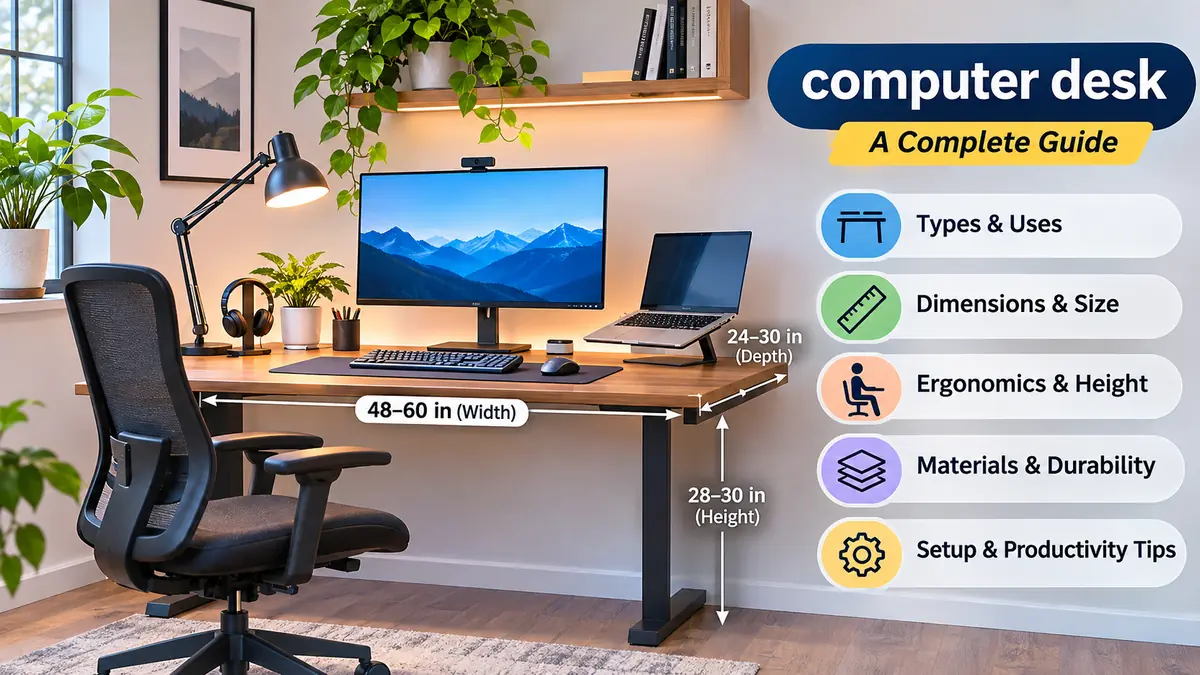

A computer desk does more than hold a monitor and keyboard. Its dimensions, height, surface material, and layout influence how comfortably you work, study, or play games.
A desk that is too narrow can leave your keyboard cramped. One that is too high may encourage raised shoulders and wrist discomfort. Even an attractive workstation can become frustrating when cables, storage, and legroom are overlooked.
A computer desk is a workspace designed to accommodate a desktop computer or laptop, input devices, and everyday accessories. The right setup provides sufficient surface area, appropriate working height, comfortable legroom, and practical cable management. Different designs suit home offices, gaming stations, study rooms, and shared workspaces.
What Is a Computer Desk?
A computer desk is a specialized table used to support computer equipment and related work activities. Unlike a traditional writing desk, it often incorporates features intended for monitors, keyboards, cables, and electronic accessories.
Common features include:
- A flat work surface for monitors, laptops, and documents.
- Space for a keyboard, mouse, and other peripherals.
- Cable openings, trays, or channels.
- Drawers or shelves for office supplies.
- An open area beneath the desktop for comfortable seating.
- Optional monitor stands, keyboard trays, or adjustable-height mechanisms.
Not every computer desk includes all these features. A simple rectangular table can function effectively as a workstation when its dimensions and ergonomics are suitable.
Computer Desk vs. Writing Desk
A writing desk is primarily designed for paperwork, reading, and handwriting. It may have a relatively shallow surface and limited provisions for electronics.
A computer desk typically prioritizes equipment placement, cable routing, and enough depth to position a screen comfortably.
However, the distinction is not absolute. Many modern desks are multipurpose, and a well-sized writing desk can serve as an excellent computer workstation.
Types of Computer Desks and Their Uses
Standard rectangular desk
A versatile design with a flat surface and four legs or side panels. Suitable for home offices, student rooms, and everyday computing.
L-shaped corner desk
Provides two connected work surfaces, making it useful for dual-monitor setups, paperwork, and multitasking.
Renewed Electric Height Adjustable Table – Imperium Neo | Green Soul
Standing desk
Offers adjustable working heights for alternating between sitting and standing. Available with manual cranks or electric motors.
Portable Small Folding Desk Space Saving Home Office Study Room Living Room New | eBay
Compact computer desk
Designed for bedrooms, apartments, dormitories, and other limited spaces. Usually accommodates one screen and essential accessories.
OnlineStore24 EU · Electronics, Home & Lifestyle | Top Deals 2026 ⭐4.5/5
Gaming desk
Often includes generous mouse space, cable-management features, headset hooks, and room for multiple displays.
Executive and Storage Desks
Executive desks typically have a larger work surface and built-in storage, often using wood or wood-look finishes.
A desk with drawers, a pedestal cabinet, or overhead shelving may be appropriate when physical documents and office supplies need dedicated storage.
Storage capacity should not come at the expense of knee and leg clearance.
Computer Desk Dimensions: Finding the Right Size
Desk dimensions affect monitor placement, movement, and available working space. Width, depth, and height should be considered separately.
Standard Computer Desk Sizes
The following are common approximate dimensions, not mandatory standards.
| Desk type | Width | Depth |
|---|---|---|
| Small desk | 32–40 in | 18–24 in |
| Standard desk | 42–55 in | 24–30 in |
| Large desk | 60–72 in | 28–36 in |
| Gaming desk | 48–72 in | 24–36 in |
| L-shaped desk | 48–72 in per main side | 20–30 in |
Fixed-height desks are often around 28–30 inches high (71–76 cm). That height does not fit everyone equally well.
How Wide Should a Computer Desk Be?
For a single laptop, a width of approximately 32–40 inches may be sufficient.
A 48-inch desk offers more flexibility for a monitor, keyboard, mouse, and small accessories.
For two monitors, 55–72 inches is often more comfortable, although the exact requirement depends on screen size, orientation, monitor stands, and mounting arms.
How Deep Should a Computer Desk Be?
Depth determines how far the screen can sit from your eyes and how much room remains for input devices.
A depth of 24 inches works for many basic setups, especially when a monitor arm frees surface space.
A 28–30-inch depth is often preferable for larger displays, paperwork, or a full-size keyboard.
The ideal viewing distance depends on screen size, text readability, and personal comfort. OSHA’s computer workstation guidance describes a typical monitor viewing distance of approximately 20–40 inches.
Calculate Your Desk Space
Desk space plannerDesk width
48 inchesDesk depth
24 inchesNumber of monitors123
Desktop surface area
8.0 sq ft
Generally suitable
Illustrative layout only. Monitor sizes, stands, keyboard placement, and edge clearance can change the fit.
Computer Desk Ergonomics and Proper Height
An ergonomic computer desk supports a comfortable working posture without forcing your body into awkward positions.
Desk height is particularly important because it influences shoulder, elbow, and wrist positioning.
What Is the Ideal Computer Desk Height?
There is no single ideal desk height for everyone.
For seated computer work, adjust your chair and desk so that:
- Your shoulders remain relaxed.
- Your elbows stay close to your body.
- Your forearms are approximately parallel to the floor.
- Your wrists remain reasonably straight while typing.
- Your feet rest flat on the floor or on a footrest.
- Your knees and thighs have adequate clearance.
If a fixed desk is too high, adjusting the chair upward may improve arm positioning, but you may then need a footrest.
If the desk is too low, it can restrict legroom and encourage awkward postures.
Monitor Position and Eye Level
Place the monitor directly in front of your primary seating position.
The top of the visible screen is generally at or slightly below eye level, with the main viewing area lower. Individual needs may differ, particularly for bifocal or progressive-lens users.
Avoid placing the display so high that you must tilt your head backward.
A monitor arm or riser can help adjust screen height without replacing the entire desk.
Keyboard and Mouse Placement
Keep the keyboard and mouse close enough that you do not need to reach forward repeatedly.
A full-size keyboard requires more horizontal space than a compact or tenkeyless keyboard.
If you use a keyboard tray, make sure it has adequate width for both devices and does not reduce knee clearance.
Sitting and Standing Throughout the Day
An adjustable standing desk can make it easier to change posture.
However, standing continuously is not automatically healthier than sitting continuously. The more useful approach is to vary your position and include movement breaks.
Start with manageable standing periods and adjust based on comfort rather than forcing a fixed schedule.
Computer Desk Materials: Wood, Metal, Glass, and More
Desk materials influence appearance, durability, weight, maintenance, and resistance to everyday wear.
| Material | Advantages | Limitations |
|---|---|---|
| Solid wood | Durable, repairable, natural appearance | Heavy, often expensive, sensitive to moisture |
| MDF | Smooth finish, affordable, versatile | Vulnerable to moisture and edge damage |
| Particleboard | Lightweight, economical | Fasteners and edges may wear with repeated assembly |
| Plywood | Good structural stability, layered construction | Quality varies by grade and finish |
| Metal | Strong, durable, suitable for frames | Can be heavy or cold to the touch |
| Tempered glass | Modern appearance, easy to wipe | Fingerprints, glare, breakage risk |
Solid Wood vs. Engineered Wood
Solid wood is often selected for its appearance and potential longevity. Scratches can sometimes be repaired or refinished, depending on the surface treatment.
Engineered wood, including MDF and particleboard, is widely used in affordable furniture. Its performance depends heavily on panel thickness, surface laminate, edge sealing, and construction quality.
A well-built engineered-wood desk may be more practical than a poorly constructed solid-wood model.
Does Desktop Thickness Matter?
Yes, especially for wide work surfaces and monitor arms.
Thicker panels can resist bending more effectively, but thickness alone does not determine strength. Material composition, span length, support placement, and load distribution also matter.
Before attaching a monitor arm, check that the desk surface and clamp location can safely support the intended equipment.
How to Set Up a Computer Desk for Productivity
A practical computer desk setup starts with the equipment you actually use.
Step 1: Position the Desk Correctly
Place the desk where there is enough room to sit, stand, and move comfortably.
Natural light is useful, but direct sunlight or bright windows behind a monitor can cause glare.
Positioning the screen roughly perpendicular to a window often helps reduce reflections.
Step 2: Arrange Your Monitor and Laptop
Keep your primary monitor centered.
For two monitors used equally, position them close together and angle them inward slightly. If one is used much more frequently, keep the primary screen directly ahead.
When using a laptop for extended periods, an external keyboard and mouse allow the laptop screen to be raised to a more comfortable viewing height.
Step 3: Organize Your Cables
Cable management improves appearance and makes equipment easier to maintain.
Useful methods include cable sleeves, reusable hook-and-loop straps, under-desk trays, and grommet holes.
Keep power cables away from chair wheels and walking areas. Avoid overloading outlets, and follow the manufacturer’s instructions for power strips and surge protectors.
Step 4: Keep Frequently Used Items Accessible
Place the keyboard, mouse, notebook, and other frequently used objects within easy reach.
Move infrequently used items into drawers, shelves, or storage boxes.
An organized surface does not need to be completely empty. The objective is to preserve enough usable space for your actual tasks.
Step 5: Adjust Lighting
Good task lighting helps you read documents and use your computer without unnecessary glare.
An adjustable desk lamp can illuminate paperwork while keeping light away from the monitor.
Brightness and color temperature should be comfortable for the room and activity.
Computer Desk Ideas for Different Rooms
Small Bedroom or Apartment
A compact desk with a shallow footprint can work well in a bedroom.
Wall-mounted shelves and vertical organizers preserve floor space. A monitor arm may create more usable desktop area, provided the desk supports the clamp.
For particularly small rooms, consider the clearance needed to pull out the chair before deciding on desk width.
Home Office
A home office desk should support the full range of daily activities, including video meetings, typing, reading, and document handling.
A surface around 48–60 inches wide offers useful flexibility for many single-monitor setups.
Drawers, shelves, and a dedicated cable tray can help keep the workstation organized.
Gaming Setup
Gaming workstations often need room for a larger monitor, mouse movement, headset storage, and sometimes a desktop computer tower.
A desk with sufficient depth is especially useful for large screens.
RGB lighting and decorative accessories are optional; stability, screen positioning, and usable surface area are more important for comfort.
Student Study Area
Students may need room for a laptop, textbooks, stationery, and handwritten notes.
A desk with a clear central work area is usually more versatile than one crowded with fixed shelves or decorative features.
Good lighting and a supportive chair can make a modest desk significantly more comfortable.
Common Computer Desk Mistakes to Avoid
Choosing Appearance Over Function
A visually appealing desk may still have poor legroom, an unsuitable height, or inadequate depth.
Check the usable dimensions rather than relying only on product photographs.
Ignoring Monitor Weight and Load Capacity
A desk must safely support the combined weight of monitors, computer equipment, accessories, and anything else placed on it.
For adjustable desks, consider the manufacturer’s rated lifting capacity and whether the frame remains stable at standing height.
Placing a Computer Tower in an Enclosed Space
Desktop computers need adequate ventilation.
An enclosed cabinet can restrict airflow, particularly if the rear or sides block ventilation openings.
Follow the computer manufacturer’s clearance guidance and keep vents unobstructed.
Forgetting Chair Clearance
A desk can fit the room but still leave insufficient space for a chair.
Measure the available floor area, including the space behind the chair and the clearance under the desktop.
Overlooking Assembly and Stability
A desk may wobble because of uneven flooring, loose fasteners, inadequate bracing, or a weak frame.
Leveling feet and correctly tightened connections can improve stability. Tall shelving or desk attachments may require wall anchoring according to their instructions.
How to Choose the Right Computer Desk
Before deciding on a desk design, measure your room and identify your equipment requirements.
Use this checklist:
- Width: Enough space for all displays and accessories.
- Depth: Comfortable viewing distance and keyboard placement.
- Height: Suitable for your seated or standing posture.
- Legroom: Adequate clearance for knees, feet, and chair movement.
- Material: Appropriate durability and maintenance requirements.
- Storage: Enough space without restricting movement.
- Stability: A sturdy frame and suitable weight capacity.
- Cable management: Safe, accessible routing for power and data cables.
- Flexibility: Room for potential changes to your equipment.
Is a Standing Desk Better Than a Regular Computer Desk?
A standing desk is useful when height adjustability matters or several people share a workstation.
A fixed-height desk can be equally practical when it fits the user properly and is paired with a suitable chair and monitor arrangement.
The key difference is adjustability, not an automatic improvement in health or productivity.
Can You Use a Dining Table as a Computer Desk?
Yes, provided the table has suitable height, depth, stability, and legroom.
Dining tables are sometimes higher or have aprons that interfere with comfortable keyboard positioning. Check your seated posture before using one for long computer sessions.
How Much Space Is Needed for Two Monitors?
Two monitors often fit comfortably on a desk around 55–60 inches wide, but this is only a planning estimate.
A pair of large displays may need more room, while compact monitors on adjustable arms may fit a narrower desk.
Measure the actual screen and stand widths, including the space needed for comfortable viewing angles.
Computer Desk Maintenance and Long-Term Care
Routine maintenance helps preserve the desk’s appearance and structural stability.
Clean surfaces with products appropriate for their finish. Avoid soaking MDF, particleboard, or exposed wooden edges.
Inspect screws, brackets, and adjustable components periodically, particularly after moving the desk.
Keep liquids away from electrical equipment and wipe spills promptly.
For standing desks, follow the manufacturer’s instructions for motor care, lifting limits, and troubleshooting.
If the desktop begins to sag or the frame becomes unstable, investigate the cause rather than simply adding more weight or tightening fasteners excessively.
Final Thoughts
The right computer desk combines comfortable dimensions, stable construction, practical organization, and suitable ergonomics.
For many everyday workstations, a desk approximately 48–60 inches wide and 24–30 inches deep provides a useful starting point. Smaller or larger setups may be appropriate depending on your equipment and room.
Before settling on a computer desk, measure your available space, check your preferred working posture, and plan where your monitor, keyboard, cables, and storage will go. A thoughtfully arranged workstation can remain useful even as your equipment and working habits change.
