
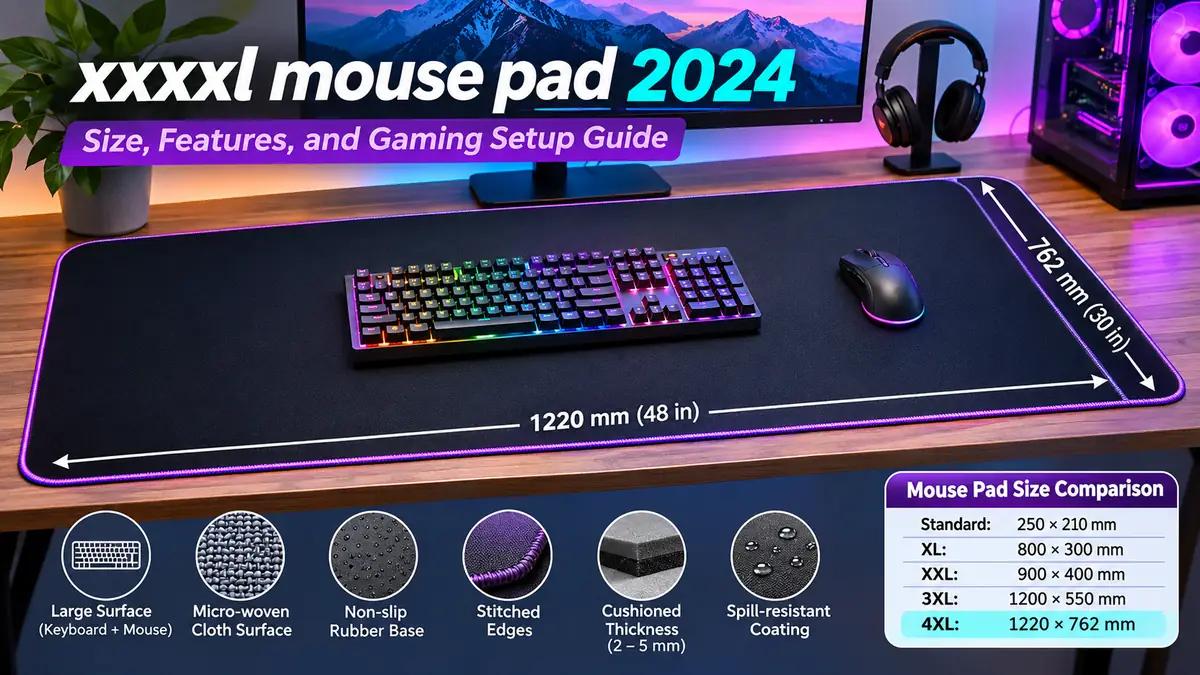

A mouse pad might seem like a small detail in a gaming or office setup, but its size can make a noticeable difference. If your mouse regularly reaches the edge of your pad, or your keyboard and mouse sit on different surfaces, an oversized desk mat may solve both problems.
The xxxxl mouse pad 2024 refers to an extra-large mouse pad designed to accommodate a keyboard, mouse, and sometimes other desktop accessories. Unlike conventional mouse pads, these oversized mats provide generous movement space, a consistent tracking surface, and broader desk protection. Their actual dimensions vary considerably between manufacturers.
Although the keyword references 2024, the fundamental considerations remain relevant: physical dimensions, surface texture, base grip, thickness, durability, and compatibility with your desk.
What Is an xxxxl mouse pad 2024?
An XXXXL mouse pad is an oversized desk mat intended to cover a substantial portion of a workstation. The name represents an extremely large size category, but it is not a standardized measurement.
Manufacturers use several labels for similar products, including:
- 4XL gaming mouse pad
- XXXXL extended mouse pad
- Extra-large gaming desk mat
- Full-desk mouse pad
- Oversized keyboard and mouse pad
- Extended gaming mouse mat
These products typically feature a fabric tracking surface supported by a rubber or similar nonslip base.
The main difference between an oversized mouse pad and a traditional mouse pad is the amount of usable space.
A standard mouse pad generally accommodates only the mouse. An extended mat can support both a keyboard and mouse, allowing users to maintain a consistent surface across a larger area.
Why are oversized mouse pads useful?
An extra-large mat can improve a desktop setup in several practical ways.
First, it provides more room for broad mouse movements, especially during low-sensitivity gaming.
Second, placing the keyboard and mouse on the same material creates a more unified workspace.
Third, the mat protects the underlying desktop from minor scratches and everyday contact.
Finally, a fabric surface can soften some keyboard vibration and reduce direct contact between the wrists or forearms and a hard desk.
These benefits depend on the mat’s material and construction. A larger mouse pad does not automatically improve mouse accuracy or gaming skill.
xxxxl mouse pad 2024 Sizes and Dimensions Explained
One of the most confusing aspects of oversized mouse pads is inconsistent sizing.
There is no universal industry standard defining the exact dimensions of an XXXXL mouse pad. A product labeled 4XL by one manufacturer may be smaller than a product another manufacturer calls 3XL.
For context, established gaming brands offer large mats ranging from approximately 900 × 400 mm to 1600 × 800 mm. Desk Mat Reviews+1
Mouse pad size comparison chart
| Size category | Example dimensions | Approximate inches |
|---|---|---|
| Standard | 250 × 210 mm | 9.8 × 8.3 |
| Large | 450 × 400 mm | 17.7 × 15.7 |
| XL Extended | 800 × 300 mm | 31.5 × 11.8 |
| XXL | 900 × 400 mm | 35.4 × 15.7 |
| 3XL | 1200 × 550 mm | 47.2 × 21.7 |
| 4XL | 1220 × 762 mm | 48 × 30 |
| 5XL | 1600 × 800 mm | 63 × 31.5 |
Illustrative size categories, not universal specifications. Dimensions vary by brand and product line.
For example, the SteelSeries QcK 4XL measures approximately 1220 × 762 mm, while some products marketed as XXXXL measure around 1200 × 600 mm. Desk Mat Reviews+1
This variation makes physical measurements more reliable than labels.
How much desk space does a 4XL mouse pad require?
A 1220 × 762 mm mouse pad needs a flat surface at least that wide and deep to fit without overhanging.
For a desk measuring 1400 × 800 mm, the pad would leave approximately 90 mm of uncovered width on each side if centered, and 38 mm of uncovered depth in total.
However, a desk measuring 1200 × 600 mm cannot fully accommodate that same pad without overhang.
Always consider monitor stands, desk clamps, cable openings, and other accessories when measuring the available space.
Key Features of an Extra-Large Gaming Mouse Pad
The performance of a large gaming mouse pad depends on more than its dimensions.
Surface material, thickness, edge construction, and grip determine how the mat feels during everyday use.
1. Micro-woven cloth surface
Many gaming mouse pads use a woven textile surface, often polyester-based.
The fabric provides a relatively uniform texture that supports optical mouse tracking.
Different fabric weaves create different levels of friction. Some surfaces allow rapid movement, while others emphasize stopping control.
The appropriate texture depends on the user’s preferences and mouse settings.
2. Nonslip rubber base
A rubberized underside helps prevent movement during rapid mouse swipes and keyboard use.
Natural rubber and synthetic rubber compounds are common base materials.
The effectiveness of the grip depends on the rubber formulation, desk surface, and cleanliness.
Dust, moisture, or an uneven desktop may reduce stability.
3. Stitched edges
Stitched edges help protect the fabric layers against separation and fraying.
This feature becomes particularly useful on large mats because their perimeter is longer and may experience frequent contact with arms or accessories.
However, thick or raised stitching can irritate the forearm if it sits directly in the mouse movement area.
Flat, consistent stitching is generally preferable.
4. Thickness and cushioning
Common gaming mouse pad thicknesses include 2 mm, 3 mm, and 4 mm, although thicker options exist.
| Thickness | Typical characteristics |
|---|---|
| 2 mm | Thin, firm, minimal cushioning |
| 3 mm | Moderate cushioning and flexibility |
| 4 mm | More cushioning and surface isolation |
| 5 mm or more | Softer feel, depending on foam density |
Thickness alone does not determine comfort.
A dense 4 mm pad may feel firmer than a softer 3 mm pad. The underlying material matters as much as the measurement.
5. Spill-resistant coatings
Some desk mats feature water-resistant surface treatments that help liquid remain on the surface temporarily.
These coatings can simplify cleanup after minor spills.
However, water resistance is not the same as waterproofing. Liquid can still penetrate through stitching, seams, or damaged coatings.
Users should also check whether surface treatments affect texture or cleaning instructions.
How Does an XXXXL Mouse Pad Affect Gaming Performance?
An oversized gaming mouse pad is particularly relevant to players who use broad arm movements.
In first-person shooter games such as Counter-Strike 2 and Valorant, some players prefer lower mouse sensitivity to make precise aiming adjustments.
A larger surface can reduce the likelihood of reaching the mouse pad’s edge during these movements.
Mouse DPI and sensitivity
DPI, or dots per inch, describes a mouse’s movement resolution.
In gaming discussions, DPI is often considered alongside in-game sensitivity.
For example, a player using 800 DPI with relatively low in-game sensitivity may need a substantial amount of physical movement to rotate the camera.
A player using higher sensitivity may need considerably less movement for the same action.
The actual distance depends on the game, sensitivity configuration, and other input settings.
What is eDPI?
Effective DPI, commonly called eDPI, is calculated by multiplying mouse DPI by in-game sensitivity.
\[ \text{eDPI}=\text{Mouse DPI}\times\text{Game Sensitivity} \]
For example:
- Mouse DPI: 800
- In-game sensitivity: 0.5
- eDPI: 400
This measurement helps compare sensitivity settings within the same game, but it is not a universal comparison across different games.
A player’s physical movement distance can also be described using centimeters per 360-degree rotation, often written as cm/360.
Speed versus control surfaces
Gaming mouse pads are frequently described as speed, control, or balanced surfaces.
Speed surfaces have relatively low friction, making quick movements easier.
Control surfaces provide greater resistance, which some players prefer when stopping the mouse precisely.
Balanced surfaces aim for a middle ground.
These descriptions are useful, but they are not standardized performance ratings.
Mouse feet, humidity, surface wear, and applied pressure can influence the actual glide.
Does a larger mouse pad improve aim?
A larger pad can remove a physical limitation, but it does not guarantee better aim.
If a player frequently runs out of movement space, increasing the available area may make broad movements more comfortable.
However, if the existing pad already provides enough room, increasing its size may offer little direct aiming benefit.
Consistent sensitivity settings, comfortable posture, practice, and a suitable mouse are also important.
Popular Oversized Mouse Pad Designs and Examples
Several well-known gaming peripheral manufacturers illustrate how large mouse pads differ in size and construction.
SteelSeries QcK 4XL
The SteelSeries QcK 4XL is a useful reference for a genuine 4XL-sized mat.
Its published dimensions are 1220 × 762 mm, approximately 48 × 30 inches. It features a micro-woven cloth surface and a nonslip rubber base.
The QcK range also includes smaller 3XL and larger 5XL formats, making it a good example of how one manufacturer differentiates full-desk sizes. steelseries.com+1
Razer Gigantus V2 3XL
The Razer Gigantus V2 demonstrates why comparing measurements is more useful than comparing size labels.
Its 3XL variant measures 1200 × 550 × 4 mm. It uses a textured micro-weave cloth surface and high-density rubber foam base.
Although labeled 3XL, its width is close to that of some products marketed as XXXXL. Its depth, however, is substantially smaller than that of the SteelSeries QcK 4XL. Razer United States+1
RGB oversized desk mats
RGB mouse pads include lighting elements, typically around the perimeter.
Some large RGB designs offer customizable lighting effects through software and compatible peripherals.
For example, the SteelSeries QcK Prism Cloth 4XL combines a 1220 × 762 mm footprint with RGB lighting.
The illuminated edges add visual customization but do not inherently improve mouse tracking. They also introduce a cable, electronic components, and additional cleaning considerations. steelseries.com+1
How to Choose the Right XXXXL Mouse Pad for Your Desk
Choosing an oversized desk mat begins with measuring your actual workspace rather than estimating from photographs.
Step 1: Measure the usable desktop area
Use a measuring tape to determine the available width and depth.
Account for any objects that prevent the mat from lying flat, including monitor stands, desk-mounted arms, cable organizers, and speakers.
Do not assume the desk’s advertised dimensions equal the available flat surface.
Step 2: Calculate keyboard and mouse space
Measure the width of your keyboard and estimate how much room your mouse needs.
For example, consider a full-size keyboard approximately 450 mm wide and a desired mouse movement area of 400 mm.
Together, they require about 850 mm of horizontal space, before allowing any separation between them.
A 900 mm-wide mat may already accommodate this arrangement. A 1200 mm-wide mat provides additional flexibility.
Step 3: Check desk depth
Depth is often overlooked when choosing extended mouse pads.
A mat measuring 1200 × 600 mm requires 600 mm of unobstructed depth.
If your desk is only 550 mm deep, the mat cannot lie completely flat without overhanging or extending beyond the usable area.
Step 4: Select a suitable surface
For general office use, a balanced cloth surface is often sufficient.
For competitive gaming, consider whether you prefer faster glide or greater stopping resistance.
For work involving frequent spills, a surface with a suitable protective coating may be easier to maintain.
Step 5: Examine construction quality
Pay attention to the fabric, rubber base, edge finishing, and thickness.
Check whether the mat lies flat after unrolling and whether its edges interfere with wrist or forearm movement.
An attractive printed design is less useful if the surface is inconsistent or the mat slides across the desk.
XXXXL Mouse Pad vs Standard Mouse Pad
An oversized mouse pad is not necessarily better for every workstation.
The most appropriate size depends on available desk space, mouse movement requirements, and preferred layout.
| Feature | Standard mouse pad | XXXXL mouse pad |
|---|---|---|
| Surface coverage | Mouse area only | Large desktop area |
| Keyboard support | Usually separate | Often accommodates keyboard |
| Portability | Easy to transport | Bulky when rolled |
| Mouse movement | Limited by smaller dimensions | Greater available movement |
| Desk protection | Localized | Broader coverage |
| Cleaning | Smaller surface | More material to clean |
| Desk compatibility | Fits most desks | Requires careful measurement |
When a standard mouse pad makes more sense
A compact mouse pad may be preferable when desk space is limited, portability matters, or the user operates a mouse with relatively small movements.
It also allows the keyboard to rest directly on the desk, which some users prefer.
When an XXXXL mouse pad makes more sense
An oversized mat is more suitable when the workstation has ample surface area, the user wants the keyboard and mouse on one continuous surface, or broad mouse movements are common.
It may also appeal to people who prefer a coordinated desktop appearance.
The practical advantage comes from usable surface area, not the size label itself.
Comfort, Ergonomics, and Workspace Organization
An oversized mouse pad can influence how a workstation feels, but it should not be treated as a replacement for ergonomic positioning.
A soft mat may reduce direct pressure from a hard desktop. However, excessive pressure on the wrist or forearm can still cause discomfort.
Keyboard and mouse positioning
Keep the mouse close enough to the keyboard that you do not need to reach excessively.
The keyboard should sit at a comfortable height, allowing the shoulders to remain relaxed.
A large desk mat makes it possible to reposition both devices without moving them off the padded surface.
However, the extra space should not encourage an unnecessarily wide gap between the keyboard and mouse.
Wrist and forearm support
Avoid placing sustained pressure directly on the wrist while operating the mouse.
Try to maintain a relatively neutral wrist position and allow movement through the arm when appropriate.
A thicker mouse pad may provide some cushioning, but it does not correct poor desk height or awkward posture.
Keyboard sound and vibration
A cloth desk mat can reduce some vibration transferred from a mechanical keyboard to a hard desk.
This may slightly alter the perceived sound and feel of typing.
The effect depends on keyboard construction, desk material, mat density, and other factors.
A mouse pad should not be considered a substitute for dedicated sound insulation.
How to Clean and Maintain an XXXXL Mouse Pad
Large fabric mouse pads gradually collect dust, skin oils, and other debris.
These contaminants can affect appearance and may alter the way a mouse glides across the surface.
Regular maintenance helps preserve consistent performance.
Routine cleaning
For ordinary dust and light dirt:
- Remove the keyboard, mouse, and other accessories.
- Use a clean, soft cloth or suitable brush to remove loose debris.
- Lightly dampen a microfiber cloth with water.
- Gently wipe the surface without excessive scrubbing.
- Allow the mat to dry completely before replacing accessories.
Avoid soaking the pad unless its manufacturer explicitly permits washing.
Deep cleaning
For a heavily soiled cloth mouse pad, first consult the manufacturer’s care instructions.
If washing is permitted, use lukewarm water and a small amount of mild detergent.
Gently clean the surface, rinse thoroughly, and dry the mat flat in a well-ventilated area.
Avoid twisting, wringing, or exposing the mat to excessive heat.
Machine washing and tumble drying can damage some fabrics, coatings, adhesives, and rubber bases.
Cleaning RGB mouse pads
RGB mats require additional precautions because they contain electrical components.
Disconnect the mat from power before cleaning.
Use a lightly dampened cloth rather than immersing the product in water.
Keep moisture away from connectors, controllers, and illuminated edges.
Follow the specific manufacturer’s cleaning guidance.
How often should a large mouse pad be cleaned?
The appropriate frequency depends on use and environmental conditions.
A lightly used office mat may need occasional surface cleaning, while a heavily used gaming mat may require more frequent attention.
Visible dirt, persistent odors, or noticeably inconsistent mouse glide are signs that cleaning may be necessary.
Common Problems With Oversized Mouse Pads
Even a well-constructed mouse pad can develop issues through shipping, daily use, or improper care.
Curled edges after unpacking
Large cloth mats are often shipped rolled inside cylindrical packaging.
When first opened, their edges may remain slightly curved.
Lay the mat flat on a clean surface and allow it time to relax.
Avoid using excessive heat or placing sharp, heavy objects directly on the material.
Mouse pad sliding on the desk
A mat may move when its rubber underside becomes dusty or the desktop is unusually smooth.
Clean both surfaces and allow them to dry.
If sliding continues, examine whether the rubber base is worn or damaged.
Uneven mouse glide
Inconsistent movement may result from accumulated dirt, worn fabric, humidity, or mouse feet that have become damaged.
Cleaning the mat is a sensible first step.
If the problem persists, inspect the mouse feet and test the mouse on another suitable surface.
Fraying or separating edges
Fabric separation may develop around poorly finished edges.
Stitched construction can help reduce this problem, although stitching quality varies.
Avoid pulling loose threads or aggressively scrubbing the perimeter.
Unpleasant rubber odor
Some new rubber-backed mats have a noticeable smell when unpacked.
Ventilating the mat in an appropriate area may help.
If the odor is unusually strong, persistent, or irritating, discontinue use and consult the manufacturer.
Common Misconceptions About XXXXL Mouse Pads
Several assumptions about oversized gaming mats can lead to disappointing expectations.
Bigger always means better gaming performance
A larger mat provides more physical movement space, but it does not improve a mouse sensor or automatically make aiming more accurate.
The benefit is greatest when the previous surface was too small.
All 4XL mouse pads have identical dimensions
Size names are manufacturer-specific.
For example, the SteelSeries QcK 4XL measures 1220 × 762 mm, while some mats described as XXXXL have dimensions closer to 1200 × 600 mm.
Always check the actual measurements. steelseries.com+1
Thicker pads are always more comfortable
Comfort depends on material density, desk height, posture, and personal preference.
Some users prefer a firm, thin surface. Others prefer additional cushioning.
RGB lighting improves tracking accuracy
RGB lighting is primarily an aesthetic feature.
Mouse tracking depends on the sensor, tracking surface, mouse settings, and physical movement rather than decorative lighting.
Every cloth mouse pad can be machine washed
Different products use different adhesives, coatings, edge finishes, and rubber compounds.
Washing methods that are safe for one model may damage another.
Manufacturer-specific instructions should take priority over general cleaning advice.
Is an xxxxl mouse pad 2024 Still Relevant?
Yes. The practical reasons for using an oversized mouse pad have not fundamentally changed since 2024.
Gamers still benefit from sufficient tracking space, while office workers and content creators may appreciate broader desk coverage and a consistent surface for their peripherals.
However, the 2024 label does not identify a universal technical specification or guarantee that a product belongs to a particular size category.
A mouse pad’s usefulness depends on its actual dimensions, surface construction, and compatibility with the user’s workstation.
For a compact desk, an extended 800 × 300 mm or 900 × 400 mm mat may provide sufficient coverage.
For a larger gaming workstation, a 1200 mm-wide mat can offer more flexibility.
A genuine 4XL-sized pad, such as the 1220 × 762 mm SteelSeries QcK 4XL, requires considerably more desk depth and should be measured carefully before use.
Final Thoughts
The xxxxl mouse pad 2024 represents the growing preference for oversized desk surfaces that combine mouse tracking space, keyboard support, and desktop protection.
Its most valuable features are not simply its size, but its usable dimensions, consistent cloth surface, stable rubber base, appropriate thickness, and durable construction.
An oversized mouse pad can make a spacious workstation more comfortable and organized, particularly for people who use low mouse sensitivity or prefer a continuous surface beneath their peripherals.
The most reliable approach is to measure the desk, calculate the necessary keyboard and mouse space, and compare actual product dimensions rather than relying on labels such as XXXL or XXXXL.
A properly sized mouse pad should fit the workstation naturally, provide sufficient movement space, and remain comfortable throughout everyday use.
