

Computers did not become small, fast, and intelligent overnight. Early electronic machines filled rooms, consumed enormous amounts of electricity, and performed a tiny fraction of the work a modern laptop or smartphone handles.
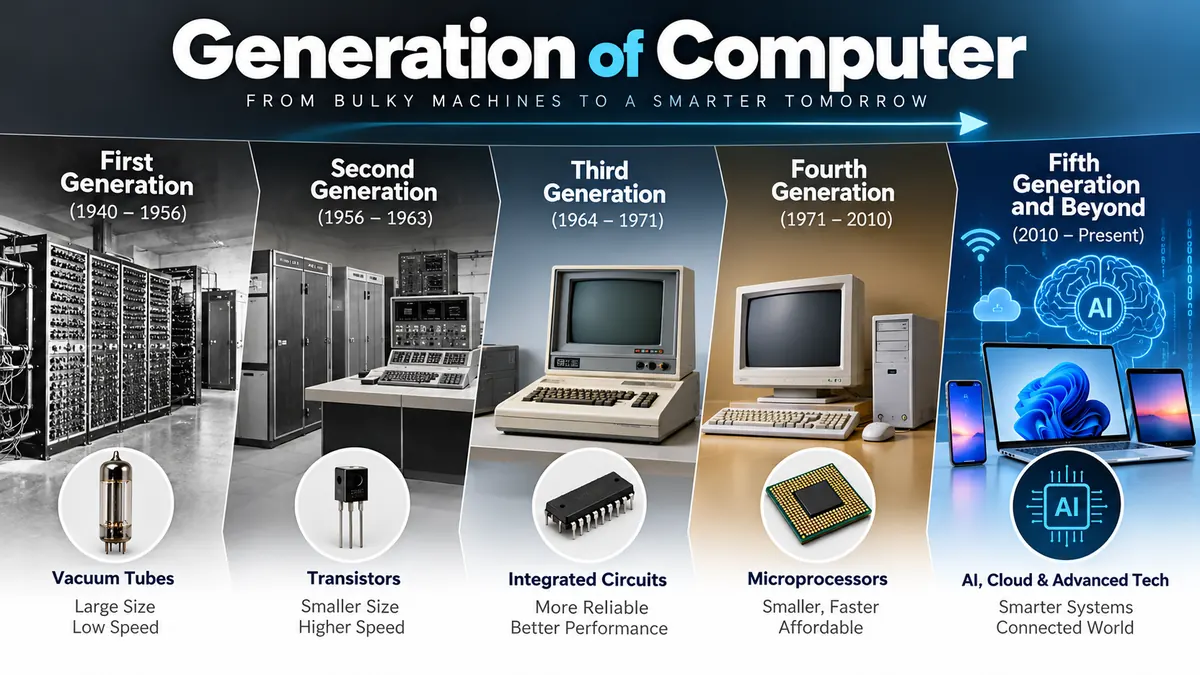
The generation of computer concept divides the development of electronic computers into major technological stages. The commonly taught model has five generations: vacuum tubes in the first, transistors in the second, integrated circuits in the third, microprocessors in the fourth, and artificial-intelligence-oriented computing in the fifth.
Understanding these generations makes computer history much easier because each stage represents more than a date range. It shows how changes in electronic components improved processing speed, reliability, storage, size, power consumption, programming, and usability.
What Is generation of computer?
The term generation of computer refers to a period in the evolution of computing distinguished by an important change in the technology used to build or operate computers.
Originally, computer generations were mainly associated with changes in hardware. Over time, the idea expanded to include developments in software, programming languages, processing techniques, storage, and human-computer interaction.
The commonly taught five-generation classification is:
| Generation | Approximate Period | Main Technology | Major Development |
|---|---|---|---|
| First generation | 1940s–1950s | Vacuum tubes | Electronic computing |
| Second generation | 1950s–1960s | Transistors | Smaller, more reliable computers |
| Third generation | 1960s–1970s | Integrated circuits | Multiple electronic components on chips |
| Fourth generation | 1970s–present | Microprocessors/VLSI | Personal and compact computing |
| Fifth generation | Present and future | AI and parallel processing | Intelligent computing systems |
The dates vary slightly between textbooks because technological generations overlap rather than changing on one exact day. Some sources, for example, place the first generation around 1940–1956, while others use 1946–1959. The hardware transition is more meaningful than memorizing a single date range.
How many generations of computers are there?
The traditional educational classification recognizes five generations of computers.
They are:
- First generation — vacuum tubes
- Second generation — transistors
- Third generation — integrated circuits
- Fourth generation — microprocessors
- Fifth generation — artificial intelligence and advanced parallel processing
This classification is useful for learning computer fundamentals, although historians and computer scientists do not treat every generation boundary as an absolute technical standard.
First generation of computer: Vacuum Tubes
The first generation represents the beginning of large-scale electronic digital computing.
These computers primarily relied on vacuum tubes, also called thermionic valves, for switching and electronic circuitry. Thousands of tubes might be required inside a single machine.
Because vacuum tubes consumed considerable electricity and generated heat, early computers were extremely large and expensive to operate.
Main characteristics of first-generation computers
First-generation systems generally had these characteristics:
- Vacuum tubes for electronic circuitry
- Magnetic drums or similar early memory systems
- Punched cards and paper tape for input
- Machine language programming
- Large physical size
- High electricity consumption
- Significant heat generation
- Frequent component failures
- Limited memory compared with later computers
- Very high cost
- Specialized operation requiring trained personnel
Machine language consisted directly of binary instructions that the hardware could execute. Programming was therefore difficult and time-consuming.
Examples of first-generation computers
Well-known machines associated with the era include:
- ENIAC
- EDVAC
- EDSAC
- UNIVAC I
- IBM 701
- IBM 650
ENIAC became one of the best-known early electronic computers. UNIVAC I later became an important example of early commercial computing.
Early machines were mainly used by governments, universities, military organizations, scientific laboratories, and large businesses because their cost and physical requirements made ordinary personal use impossible.
Advantages of first-generation computers
For their time, these machines represented a huge technological advance. They could automate calculations far more effectively than purely manual methods and demonstrated that large electronic digital computers were practical.
They contributed to scientific calculations, engineering, census processing, military research, and other data-intensive work.
Limitations
Their disadvantages were substantial:
- Extremely large size
- Heavy power consumption
- Excessive heat
- Expensive maintenance
- Frequent hardware failures
- Limited programming flexibility
- Slow input and output
- Difficult machine-language programming
These weaknesses created strong demand for a smaller and more reliable electronic switching technology.
That technology was the transistor.
Second generation of computer: Transistors
The second generation began when transistors started replacing vacuum tubes in computers.
John Bardeen and Walter Brattain demonstrated successful transistor action at Bell Laboratories in December 1947, while William Shockley also played a major role in the development of transistor technology. Bell Labs publicly announced the device in 1948.
A transistor could perform switching and amplification functions while occupying far less space and consuming less power than a vacuum tube.
That change transformed computer design.
Characteristics of second-generation computers
Second-generation systems typically offered:
- Transistor-based circuitry
- Smaller physical dimensions
- Lower power consumption
- Less heat generation
- Greater reliability
- Improved processing speed
- Magnetic core memory
- Magnetic tape and disk storage
- Assembly language
- Increasing use of high-level programming languages
- Lower operating costs than first-generation systems
Languages such as FORTRAN and COBOL became important during this era, making computers significantly easier to program for scientific and business applications.
Instead of writing every operation as raw machine code, programmers could increasingly work with instructions that were closer to mathematical or human-readable notation.
Examples of second-generation computers
Common examples include:
- IBM 1401
- IBM 7090
- IBM 7094
- UNIVAC III
- CDC 1604
The IBM 1401 became especially influential in business data processing, while machines such as the IBM 7090 were used for demanding scientific and technical calculations.
First vs second generation computers
The most important difference was the switch from vacuum tubes to transistors.
| Feature | First Generation | Second Generation |
|---|---|---|
| Main technology | Vacuum tubes | Transistors |
| Size | Very large | Smaller |
| Heat | Very high | Lower |
| Reliability | Relatively poor | Improved |
| Programming | Mainly machine language | Assembly and high-level languages |
| Power consumption | Very high | Lower |
| Maintenance | Difficult | More manageable |
Transistors solved many problems associated with vacuum tubes, but computer circuits still required numerous individual components.
The next major breakthrough was to place multiple electronic components together on a single semiconductor device.
Third Generation: Integrated Circuits
The third generation is associated with the adoption of the integrated circuit, commonly abbreviated as IC.
Instead of assembling every transistor as a separate component, manufacturers could combine multiple electronic elements into compact semiconductor circuits.
Jack Kilby of Texas Instruments demonstrated a working integrated circuit in September 1958. Robert Noyce at Fairchild Semiconductor independently developed an important monolithic integrated-circuit approach soon afterward.
The IC became one of the most important inventions in the history of electronics.
Characteristics of third-generation computers
Typical developments included:
- Integrated circuits replacing individual transistor assemblies
- Smaller computers
- Increased processing speed
- Reduced power consumption
- Improved reliability
- Lower manufacturing and maintenance costs
- Better storage capacity
- Operating systems becoming more sophisticated
- Multiprogramming
- Time-sharing
- Wider use of keyboards and monitors
- Growing use of high-level programming languages
The improvement was not simply physical.
Operating systems allowed computers to manage resources and multiple tasks more effectively. Users increasingly interacted with machines through keyboards and terminals rather than depending entirely on punched cards.
Examples of third-generation computers
Commonly cited systems include:
- IBM System/360
- PDP-8
- PDP-11
- UNIVAC 1108
The IBM System/360 family was particularly influential because it represented a broad family of compatible computer systems intended for different workloads.
Why integrated circuits changed computing
Integrated circuits increased the number of components that engineers could place into a relatively small area.
This led to:
- Smaller machines
- Faster electrical operation
- Greater reliability
- Lower costs per computing function
- More complex processors
- Improved commercial accessibility
IC technology continued advancing through increasingly dense integration.
Terms such as SSI (Small-Scale Integration), MSI (Medium-Scale Integration), LSI (Large-Scale Integration), and eventually VLSI (Very-Large-Scale Integration) describe increasing levels of circuit integration.
That progress paved the way for the microprocessor.
Quick Takeaway: The first three generations can be remembered by one simple progression: vacuum tube → transistor → integrated circuit. Each step made computers smaller, faster, cooler, more reliable, and easier to manufacture.
Fourth generation of computer: Microprocessors
The fourth generation is associated with the microprocessor and VLSI technology.
A microprocessor places the essential processing functions of a CPU onto a highly integrated chip. This development dramatically reduced the size and cost of computing systems.
Intel announced its 4004 programmable microprocessor in November 1971. The chip contained approximately 2,300 transistors and played an important role in demonstrating how processing functions could be integrated into a compact programmable device.
The commercially available Intel 4004 was a 4-bit processor originally developed in connection with Busicom’s calculator project.
Characteristics of fourth-generation computers
Fourth-generation computing is associated with:
- Microprocessors
- VLSI semiconductor technology
- Semiconductor memory
- Much smaller physical size
- Greater processing speed
- Lower cost
- Lower energy requirements
- Improved reliability
- Graphical interfaces
- Personal computers
- Computer networks
- Portable computing
- Large storage devices
- Advanced programming languages
- Widespread commercial and household use
The microprocessor made it economically practical to produce much smaller general-purpose computers.
Rise of personal computers
Earlier generations were largely centered around mainframes, scientific machines, and institutional computing.
Fourth-generation technology helped bring computing to individual users.
Important developments included:
- Desktop PCs
- Workstations
- Laptops
- Graphical user interfaces
- Local-area networks
- Mass-market software
- Internet-connected computing
- Mobile devices
Computers moved from specialist facilities into homes, schools, offices, factories, laboratories, and eventually pockets.
Examples of fourth-generation computers
Rather than being limited to a handful of machines, the fourth-generation era encompasses enormous families of microprocessor-based devices.
Examples commonly associated with it include:
- Altair 8800
- Apple II
- IBM PC
- Apple Macintosh
- Modern desktop computers
- Laptops
- Many embedded computer systems
The Intel 4004 was followed by increasingly capable processor designs. Over time, chip manufacturers placed vastly more transistors into processors and integrated increasingly complex functions.
What is VLSI?
VLSI stands for Very-Large-Scale Integration.
It refers to semiconductor manufacturing techniques that allow very large numbers of electronic components to be incorporated into integrated circuits.
VLSI helped make modern processors, memory chips, and compact digital devices possible.
As integration density increased, computers gained more processing capacity while physical components became dramatically smaller.
Fifth generation of computer: Artificial Intelligence
The fifth generation is usually described in educational materials as the stage centered on artificial intelligence (AI), parallel processing, natural-language interaction, intelligent systems, and advanced semiconductor integration.
This generation is different from the first four.
Vacuum tubes, transistors, integrated circuits, and microprocessors identify fairly concrete hardware transitions. “Artificial intelligence,” however, describes a broad field of computing rather than one universally adopted replacement for the microprocessor.
For that reason, fifth-generation terminology should be treated as a useful educational model rather than a universally standardized engineering boundary. Recent computer-history explanations similarly note that the fifth-generation classification remains debated.
Characteristics commonly associated with fifth-generation computers
These systems emphasize capabilities such as:
- Artificial intelligence
- Machine learning
- Natural language processing
- Speech recognition
- Computer vision
- Robotics
- Parallel processing
- Advanced semiconductor technology
- Intelligent decision-making
- Pattern recognition
- Knowledge-based systems
- Human-like computer interaction
The aim is no longer simply to calculate faster.
The focus increasingly includes systems that can interpret information, learn patterns, generate responses, recognize objects, understand speech, make predictions, and assist with complex decisions.
Examples of fifth-generation technologies
Rather than one specific category of computer, fifth-generation ideas appear across many modern technologies:
- AI assistants
- Machine-learning systems
- Autonomous robots
- Natural-language systems
- Computer-vision applications
- Expert systems
- Speech-recognition software
- AI-enabled supercomputing
- Advanced research systems using massively parallel processing
Modern AI still runs on electronic processors and integrated circuits, so the fourth and fifth generations overlap technologically.
That is one reason the five-generation model should be viewed as an educational framework rather than a strict replacement sequence.
Was Japan’s Fifth Generation Computer Systems project the same thing?
Not exactly.
The Fifth Generation Computer Systems (FGCS) project was a specific Japanese research initiative associated with advanced computing, logic programming, knowledge processing, and parallel architectures.
This historical project helped popularize the phrase “fifth generation,” but the broad classroom definition of fifth-generation computers now covers a much wider set of AI-oriented technologies.
Generation of computer Comparison: 1st to 5th
The easiest way to understand the generation of computer progression is to compare how each major technology changed computer capabilities.
| Feature | First | Second | Third | Fourth | Fifth |
|---|---|---|---|---|---|
| Main technology | Vacuum tubes | Transistors | Integrated circuits | Microprocessors/VLSI | AI-oriented computing |
| Typical era | 1940s–1950s | 1950s–1960s | 1960s–1970s | 1970s–present | Present/future |
| Size | Extremely large | Smaller | Much smaller | Compact | Varies |
| Speed | Low by modern standards | Faster | Faster again | Extremely high | Very high and specialized |
| Reliability | Low | Better | High | Very high | Very high |
| Heat generation | Very high | Lower | Lower | Much lower per computation | Depends on system/workload |
| Programming | Machine language | Assembly, FORTRAN, COBOL | High-level languages | Broad modern language ecosystem | AI frameworks and modern languages |
| Main interaction | Punch cards/paper tape | Cards, tapes, printers | Terminals/keyboards | GUI, keyboard, mouse, touch | Voice, text, vision, intelligent interfaces |
| Major contribution | Electronic computing | Semiconductor switching | Chip integration | Personal computing | Intelligent computing |
The progression can be summarized as:
Vacuum tubes → transistors → integrated circuits → microprocessors → AI-oriented systems
Each transition improved one or more fundamental qualities of computing: speed, size, reliability, cost, accessibility, storage, power efficiency, software capability, or ease of interaction.
How Computer Generations Changed Programming
Computer hardware was only part of the story.
Programming also became progressively easier and more powerful.
First generation: Machine language
Early programmers worked close to the hardware using binary machine instructions.
This was difficult because instructions were tightly linked to a specific machine architecture.
Second generation: Assembly and early high-level languages
Assembly language gave programmers symbolic representations of machine operations.
High-level languages such as FORTRAN and COBOL made scientific and business programming considerably more practical.
Third generation: High-level programming expands
Languages and operating systems matured as integrated-circuit computers became more capable.
Computing environments increasingly supported multiple programs and users.
Fourth generation: Modern software ecosystems
Microprocessor-based computers helped create enormous software industries.
Languages such as C and its descendants, along with countless other programming languages, became important across desktop software, operating systems, networking, embedded systems, mobile computing, and the web.
Fifth-generation-oriented computing
AI development makes extensive use of modern languages, libraries, machine-learning frameworks, large datasets, specialized accelerators, and parallel computation.
A useful distinction is that programming-language generations are their own classification. First-generation language, second-generation language, and so forth do not map perfectly to the five hardware generations discussed here.
Major Technologies Behind the Five Generations
Memorizing the component associated with each generation is useful, but understanding why each component mattered makes the topic much easier to remember.
Vacuum tubes
Vacuum tubes could control electrical signals and made early electronic digital computation possible.
Their weakness was efficiency. They were bulky, generated substantial heat, consumed considerable power, and could fail relatively frequently.
Transistors
Transistors replaced many vacuum-tube functions with solid-state semiconductor devices.
They were smaller, more efficient, and more reliable.
The transistor therefore made computers much more practical.
Integrated circuits
Integrated circuits placed multiple electronic components onto compact semiconductor structures.
This dramatically increased component density and reduced the number of individually wired parts.
Microprocessors
A microprocessor consolidated CPU functions into a highly integrated semiconductor device.
This breakthrough became central to the development of personal computers and countless embedded systems.
Artificial intelligence
AI represents a shift in what computers are expected to do.
Instead of merely following straightforward programmed operations, AI systems can perform tasks involving pattern recognition, prediction, language, perception, and learning from data.
What Improved From One Generation to the Next?
Computer generations demonstrate a consistent long-term trend.
Computers became smaller
Room-sized systems gradually gave way to mainframes, minicomputers, desktops, laptops, tablets, smartphones, and tiny embedded processors.
Processing became faster
Advances in semiconductor design increased the amount of computational work that could be performed within a given period.
Reliability improved
Moving away from large collections of vacuum tubes toward solid-state electronics reduced many hardware reliability problems.
Storage capacity increased
Early machines had extremely limited storage by modern standards.
Later computers gained magnetic disks, semiconductor memory, solid-state drives, network storage, and large-scale data-center systems.
Power efficiency improved
A modern processor can perform vastly more computation per unit of energy than early vacuum-tube computers, although today’s large data centers and high-performance AI workloads can still consume substantial amounts of electricity.
Computers became more affordable
Early electronic computers were available only to well-funded organizations.
Semiconductor manufacturing and mass production eventually made personal computing affordable to millions and then billions of people.
Interaction became easier
The user experience evolved from punched cards and machine instructions to keyboards, graphical interfaces, touchscreens, speech, and natural-language interaction.
Quick Takeaway: Computer evolution is not simply a story of “faster processors.” Every generation changed how computers were built, programmed, powered, purchased, and used.
Why Do Sources Give Different Dates for Computer Generations?
Students often encounter different years for the same generation.
One source may list the first generation as 1940–1956, another as 1946–1959. Similar differences occur with later generations.
This does not necessarily mean one source is completely wrong.
Technological change is gradual.
A new technology may be invented in one year, become commercially usable later, and take several more years to replace older technology across the industry.
For example:
- The transistor was demonstrated in 1947, but transistor computers did not instantly replace all vacuum-tube machines.
- Integrated circuits were developed before they became dominant in computer systems.
- The Intel 4004 appeared in 1971, but older architectures continued operating for years afterward.
- AI technologies coexist with conventional microprocessor-based computing today.
For exams or coursework, use the timeline specified by your textbook or instructor. For understanding computer history, concentrate on the technology defining each generation.
Is There a Sixth Generation of Computer?
You may see websites describing a “sixth generation” involving quantum computers, advanced AI, nanotechnology, neural interfaces, or other emerging technologies.
There is currently no universally accepted historical standard that clearly declares modern computing to be a sixth generation in the same way textbooks commonly describe the first five.
Even the fifth generation is less sharply defined than the first four.
Quantum computing, for example, is an important developing computing paradigm, but it should not automatically be labeled the official sixth generation simply because it is newer.
The safer academic approach is:
- Recognize five generations as the traditional classification.
- Treat fifth-generation computing as an AI-oriented and partly conceptual category.
- Discuss quantum and other emerging technologies separately unless a specific curriculum defines them as a sixth generation.
This distinction prevents a common mistake: treating every new computing trend as if it automatically creates a universally recognized generation.
Difference Between Computer Generations and Types of Computers
“Generations” and “types” describe different things.
A computer generation classifies machines according to historical technological development.
A type of computer may classify a system according to size, purpose, processing method, or form factor.
For example, computers can be described as:
- Mainframes
- Supercomputers
- Personal computers
- Workstations
- Servers
- Laptops
- Tablets
- Smartphones
- Embedded computers
A laptop and a supercomputer can both use modern semiconductor technology even though they differ enormously in size, purpose, performance, and architecture.
So “fifth-generation computer” and “supercomputer” are not competing categories. They describe different aspects of computing.
Easy Way to Remember the Five Generations of Computers
For exams and basic computer studies, associate one defining idea with each generation:
- First — Vacuum Tube
- Second — Transistor
- Third — Integrated Circuit
- Fourth — Microprocessor
- Fifth — Artificial Intelligence
Then remember the technological progression:
Tube → Transistor → IC → Microprocessor → AI
You can also connect each technology with its main effect:
- Vacuum tubes: electronic computing becomes practical
- Transistors: computers become smaller and more reliable
- Integrated circuits: components become highly compact
- Microprocessors: personal computing expands
- AI: computers gain increasingly intelligent capabilities
Final Summary
The generation of computer framework explains how computing developed through successive technological breakthroughs. First-generation machines depended on vacuum tubes, second-generation systems adopted transistors, third-generation computers used integrated circuits, and fourth-generation machines grew around microprocessors and VLSI technology.
The fifth generation is generally associated with artificial intelligence, natural-language processing, machine learning, parallel processing, robotics, and increasingly intelligent interaction. Unlike the earlier hardware-based transitions, however, its boundary is less precisely defined.
The biggest lesson is not the exact dates. It is the progression of technology.
Vacuum tubes made electronic computers possible. Transistors made them more practical. Integrated circuits made them compact. Microprocessors helped put computing into everyday devices. AI is now expanding what those devices can understand and accomplish.
Remember that sequence, and the entire history of computer generations becomes much easier to understand.
