
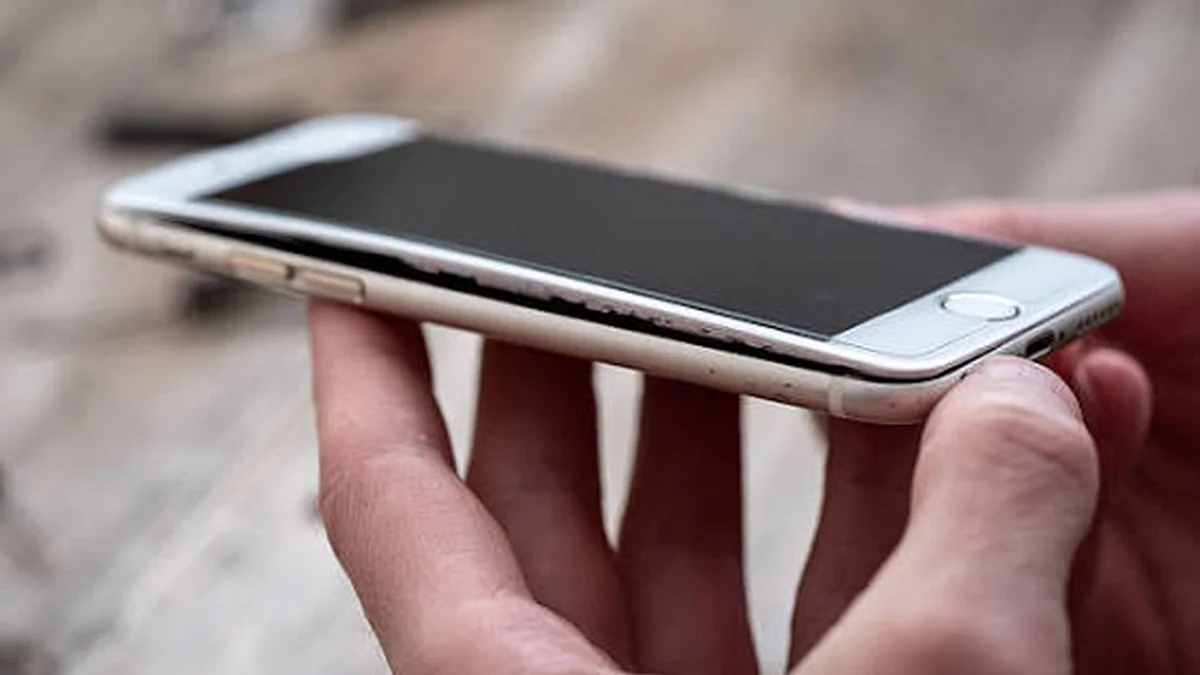

You picked up your phone and it wouldn’t sit flat on the table. Or the back cover popped loose like it’s trying to escape. That’s not a defect in your case — understanding phone battery swelling causes starts with knowing it’s a battery expanding from the inside out, and it’s worth taking seriously.
Phone battery swelling happens when gas builds up inside the sealed battery cell, usually from overcharging, heat exposure, physical damage, or natural aging of the lithium-ion chemistry. The gas has nowhere to go, so the pouch expands, pushing against the screen and casing. Once a battery starts swelling, the damage doesn’t reverse — the safest move is to stop using it and have it replaced.
Below is what’s actually causing it, how to spot it early, and what to do next — without the scare tactics.
Phone Battery Swelling Causes: What’s Actually Happening Inside
Picture a sealed, flexible pouch — that’s essentially what a phone battery is. Inside, a chemical reaction shuttles lithium ions back and forth to store and release energy. Under normal conditions, that reaction is contained and safe.
When something disrupts it, the electrolyte inside starts breaking down and releasing gas. Because the pouch is sealed, that gas has nowhere to go. It builds pressure and pushes outward, which is what you see as a bulging back panel or a screen that no longer sits flush.
It’s a mechanical symptom of a chemical problem, not a cosmetic glitch you can flatten out.
The 7 Real Causes of Phone Battery Swelling
Most articles on this topic list three or four causes. Here’s the fuller picture, including a couple that rarely get mentioned.
1. Overcharging (and the trickle-charge trap)
Modern phones are designed to stop drawing full power once they hit 100%. But leaving a phone plugged in overnight, every night, keeps the battery cycling through small “top-up” charges to hold it at max capacity. That constant high-voltage stress accelerates the same gas-producing chemical breakdown that eventually causes swelling.
2. Heat exposure
Leaving your phone in a hot car, on a sunny windowsill, or gaming for hours while it’s plugged in generates heat the battery has to absorb. Heat speeds up almost every degradation process inside a lithium-ion cell, including the one that produces gas.
3. Cold-temperature charging
This one gets skipped by most guides, but it matters. Charging a lithium-ion battery in near-freezing temperatures can trigger an internal short circuit, because the cold slows the chemical process that normally absorbs incoming lithium ions safely. That mismatch can cause localized damage and, eventually, swelling.
4. Physical damage
A battery is a precision-built component. Drop the phone hard enough, bend the chassis, or puncture the casing, and you can compromise the internal structure. Even damage that isn’t visible on the outside can create the conditions for gas buildup over time.
5. Manufacturing defects
Rare, but real. A batch with an ultra-thin separator layer or stray debris inside the cell can develop an internal short circuit from day one, generating heat and gas well before you’d expect normal wear to cause problems.
6. Natural aging and electrolyte decomposition
Every charge cycle causes a small amount of electrolyte breakdown — it’s an unavoidable part of how lithium-ion batteries work. After roughly two to three years or a few hundred full charge cycles, that gradual gas production can become visible as mild swelling, even with perfect charging habits.
7. Deep discharge
Letting your phone die completely and sit at 0% for extended periods stresses the battery almost as much as overcharging does. Repeated deep discharges can destabilize the internal chemistry, contributing to swelling over time — a cause that’s well documented in battery engineering literature but rarely mentioned in consumer guides.
Quick takeaway: Swelling is almost never caused by one single event. It’s usually the accumulated effect of heat, charging habits, and time — with damage or a defect occasionally speeding things up.
Warning Signs of Phone Battery Swelling You Shouldn’t Ignore
Catching it early keeps you safer and often saves the rest of the phone. Watch for:
- A visible bulge on the back panel or a case that no longer fits
- Screen lifting or separating at the corners, sometimes with an “oil-slick” rainbow distortion underneath
- Buttons that feel stiff or harder to press than usual
- The phone rocking instead of sitting flat on a table
- A sweet or chemical smell, similar to nail polish remover
- Faster battery drain or the device struggling to hold a charge
- Erratic charging behavior — stopping randomly or refusing to charge past a certain point
This happens on any brand — iPhone, Samsung, Huawei, Vivo, Oppo, Honor, or any other Android device. It’s not a flaw specific to one manufacturer; it’s inherent to how lithium-ion cells age and react to stress.
Is a Swollen Battery Actually Dangerous?
Yes — treat it as a safety issue, not a cosmetic one. A swollen battery means pressurized, often flammable gas is trapped inside a compromised casing. If that casing ruptures from a drop, a puncture, or continued heat exposure, the result can be a fire or, less commonly, an explosion — a process called thermal runaway.
Not every swollen battery ignites. Plenty sit safely for a while once removed from use. But there’s no way to predict which one will fail catastrophically, which is exactly why the standard advice is consistent across manufacturers and repair experts: stop using it immediately.
What to Do the Moment You Notice Swelling
Do this immediately
- Stop charging and stop using the device. Continued use accelerates the swelling and increases fire risk.
- Power it down if it’s still safe to touch and not emitting heat, smoke, or a strong odor.
- Move it to a fireproof, well-ventilated spot — a metal container filled with sand, or simply outside on a non-flammable surface, away from anything else flammable.
- Leave battery removal to a professional unless you have proper tools, gloves, and eye protection. A punctured swollen cell can vent toxic fumes or spark.
- If it starts smoking or smells strongly of chemicals, treat it like any small fire — get clear of it and call your local fire service if it escalates.
Never do this
- Don’t puncture, bend, or try to “flatten” the swelling
- Don’t charge it, even briefly, “to see if it still works”
- Don’t store it somewhere hot, like a car or near sunlight
- Don’t throw it in household trash or a regular recycling bin
- Don’t keep using the phone because “it still turns on fine”
Where to Dispose of a Swollen Phone Battery
A swollen lithium-ion battery counts as hazardous waste, so it needs a proper disposal channel:
- Manufacturer repair programs — Apple and most major brands offer in-store battery service and recycling
- Certified battery recyclers — programs like Call2Recycle or Battery+ Bulbs accept batteries, though some locations restrict damaged or swollen units, so call ahead
- Local household hazardous waste (HHW) facilities — most municipalities run scheduled drop-off events
- Authorized phone repair shops — they handle swollen batteries routinely and can dispose of them correctly, sometimes for a small fee
- Mail-in options — DOT-approved shipping containers exist for battery disposal by mail, though they add cost and aren’t the fastest route if you need the phone functional again
Never place a swollen battery in curbside trash or standard recycling — it’s a genuine fire risk in waste collection vehicles and facilities.
How to Prevent Phone Battery Swelling Going Forward
None of these guarantee a battery never swells — aging happens regardless — but they meaningfully slow the process:
- Unplug once it hits 100% instead of leaving it on the charger overnight out of habit
- Avoid extreme temperatures — don’t charge in the cold, and don’t leave your phone baking in a hot car
- Keep it in the 20–80% range for daily use when you can, rather than constantly running it flat or topping it to full
- Remove thick cases while charging so heat can dissipate instead of building up
- Use the charger that came with the phone or a certified equivalent — cheap, uncertified chargers are more likely to deliver unstable voltage
- Avoid letting it die to 0% repeatedly — a light discharge and recharge rhythm is gentler on the cell than full drains
Repair, Replace, or Recycle: What It Actually Costs
Once a battery is confirmed swollen, repair isn’t on the table — a swollen lithium-ion cell can’t be “fixed,” only replaced. Your real decision is between three paths:
| Option | What It Involves | Best For |
|---|---|---|
| Manufacturer battery replacement | Official service center swaps the battery, often same-day | Newer phones still under warranty or with high resale value |
| Third-party repair shop | Usually faster and cheaper than official service, quality varies by shop | Older phones, tight budgets, non-warranty devices |
| Trade-in or recycle, buy new | Battery replacement cost approaches the value of the phone itself | Older or budget devices where a new battery isn’t cost-effective |
As a rough guideline, a professional battery swap typically costs a fraction of buying a new phone, while a full device replacement makes more sense once the phone is several years old and already showing other signs of wear. A local repair shop or your manufacturer’s support page can give you an exact quote based on your model.
The Bottom Line
A swollen phone battery is a mechanical warning sign of a chemical problem that’s already underway — not something that resolves on its own. Whether it came from overnight charging, a cold snap, a drop last year, or just time, the response is the same: stop using it, handle it carefully, and get it replaced through a proper channel. If your phone is showing any of the signs above, the safest next step is booking a battery check with a certified repair provider before it goes any further.
LOOKING FOR MORE FIXES? SEE TECHKOU.NET’S HOMEPAGE AND KEEP LEARNING.
FAQ
Why is my phone battery swollen? It’s almost always a mix of heat, overcharging habits, natural aging, or physical damage causing gas to build up inside the sealed battery cell. In rare cases, a manufacturing defect is the root cause.
Is a swollen phone battery dangerous? Yes. The trapped gas is under pressure inside a compromised casing, which raises the risk of leaking, overheating, or — in worst cases — fire. Stop using the device as soon as you notice swelling.
Can I still use my phone if the battery is swollen? No. Continued use and charging speeds up the swelling and increases the chance of the casing failing. Power it down and stop charging immediately.
How do I know if my battery is swelling? Look for a bulging back panel, a phone that rocks instead of sitting flat, screen separation or discoloration, stiff buttons, or a chemical smell.
Can a swollen battery explode? It can rupture or catch fire, and in rarer cases explode, especially if punctured or exposed to more heat. Not every swollen battery fails catastrophically, but there’s no reliable way to predict which one will.
Can cold temperatures cause battery swelling? Yes. Charging a lithium-ion battery in near-freezing conditions can trigger an internal short circuit, which is a lesser-known but genuine cause of swelling.
Is it normal for old phone batteries to swell? Mild swelling after a few years of regular use is a known aging effect of lithium-ion chemistry. It’s common, but it still needs the same safety response as any other swollen battery.
What should I do with a swollen phone battery? Stop using and charging it, store it in a cool, fireproof spot, and take it to a certified recycler, repair shop, or manufacturer service center for safe disposal.
