
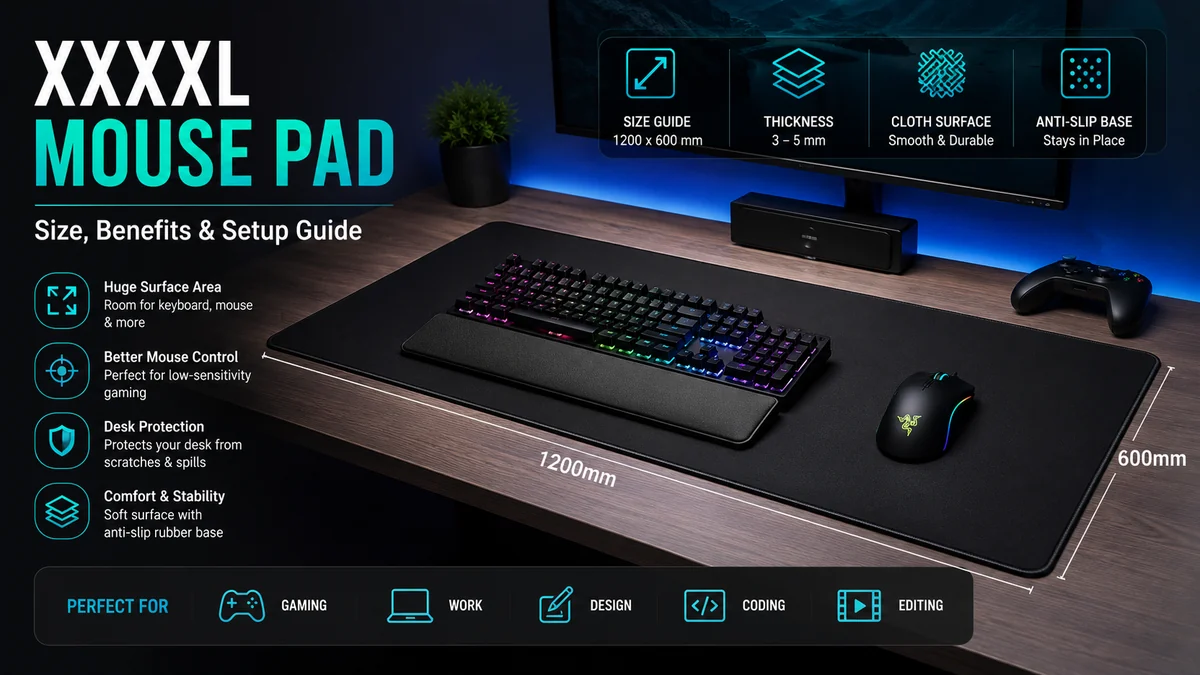

A xxxxl mouse pad takes the basic idea of a mouse pad and stretches it across a substantial part of your workspace. Instead of supporting only your mouse, an oversized pad can hold your keyboard, mouse, wrist rest, laptop, and other desk accessories on one consistent surface.
That extra area can be especially useful for low-sensitivity gaming, large mechanical keyboards, creative work, and desks that need protection from scratches and everyday wear. The catch is that labels such as XXL, XXXL, 3XL, and XXXXL are not standardized, so the printed size matters far more than the name.
Quick answer: A xxxxl mouse pad is an oversized mouse mat or desk mat designed to provide significantly more surface area than a conventional pad. Depending on the manufacturer, dimensions can range from roughly 1000 × 500 mm to 1600 × 800 mm or more, providing space for a keyboard, mouse, laptop, and wide mouse movements.
What Is a xxxxl mouse pad?
A xxxxl mouse pad is essentially an extra-large desk mat with a mouse-friendly surface. Most models are designed to sit beneath both the keyboard and mouse instead of occupying only the mouse side of a desk.
The concept is simple, but the terminology gets confusing.
There is no universal sizing standard requiring every manufacturer to use XXXXL for the same dimensions. One company may describe a 1000 × 500 mm mat as XXXXL, while another reserves that label for products measuring 1200 × 600 mm, 1400 × 700 mm, or even larger. Current product and sizing pages illustrate exactly this variation.
That makes the dimensions—not the number of Xs—the specification you should pay attention to.
How big is a xxxxl mouse pad?
A useful way to understand the category is to compare typical sizes.
| Size category | Approximate dimensions | Typical coverage |
|---|---|---|
| Large/XL | 450 × 400 mm | Primarily mouse |
| Extended | 800 × 300 mm | Keyboard + mouse |
| XXL | 900 × 400 mm | Keyboard + generous mouse area |
| XXXL | 1000–1200 × 500–600 mm | Large portion of desk |
| XXXXL | 1200 × 600 mm and larger | Large or near-full desk coverage |
These are guidelines rather than industry standards. For example, some current XXXXL products are sold at 1000 × 500 mm, while other sizing guides put the category around 1200 × 600 mm through 1600 × 800 mm.
A 1200 × 600 mm mat converts to approximately 47.2 × 23.6 inches, which illustrates just how much desk area these mats can occupy.
Why Use a xxxxl mouse pad Instead of a Standard Pad?
The biggest advantage is obvious: space. But size changes several aspects of how a desk feels and functions.
More room for mouse movement
Large mouse movements are particularly relevant to players who use relatively low mouse sensitivity.
Instead of performing small wrist movements, a low-sensitivity player may move much of the forearm across the desk. A small pad can force the player to reach its edge, lift the mouse, reposition it, and continue.
An oversized gaming mouse pad creates a much wider uninterrupted tracking area.
That doesn’t automatically improve aim. Mouse sensitivity, sensor behavior, technique, and the characteristics of the pad’s surface still matter. What the extra area does is remove a physical space restriction.
One consistent surface under the keyboard and mouse
Traditional setups usually have:
- keyboard on the bare desk;
- mouse on a small pad;
- wrist rest on another surface;
- accessories scattered around them.
A large desk mat brings several of those items onto the same surface.
For many people, this creates a more cohesive workstation. The keyboard is also less likely to move when the mat uses a grippy rubber base.
Better desk protection
A full-size desk mat acts as a barrier between your equipment and the desktop.
It can help protect against:
- keyboard scratches;
- mouse wear marks;
- minor spills;
- pen marks;
- abrasion from accessories;
- repeated wrist and forearm contact.
This can be particularly useful with painted, laminated, glass, or easily scratched desks.
A mouse pad should not, however, be treated as waterproof protection unless its manufacturer specifically describes it that way.
Softer contact with the desk
Resting your wrists and forearms against a hard desk edge or desktop for hours can be uncomfortable.
A cloth mat with a 3–5 mm rubber or foam-like base adds cushioning beneath the working area. Current oversized mouse pads commonly fall within this general thickness range, although thinner options also exist.
The mat itself isn’t an ergonomic solution to poor posture, but the softer contact surface can make a long gaming or working session more comfortable.
A quieter workspace
Mechanical keyboards and other peripherals can transmit vibrations directly into a hard desk.
Placing them on a large cloth-and-rubber mat introduces another layer between the device and desk. That can reduce some of the sharp contact noise and vibration associated with typing or repositioning equipment.
For mechanical keyboard users, this small change can make the desk feel less harsh acoustically.
xxxxl mouse pad Sizes: Which Dimensions Make Sense?
Choosing the biggest pad available isn’t always the best approach.
The ideal size depends on the relationship between your desk dimensions and the equipment sitting on it.
1000 × 500 mm
A 1000 × 500 mm mat provides substantial coverage while remaining practical on many medium-to-large desks.
It can usually accommodate:
- full-size keyboard;
- gaming mouse;
- wrist rest;
- small accessories;
- substantial mouse movement area.
Some products currently marketed specifically as XXXXL use exactly this size.
For someone who wants an oversized gaming surface without covering an entire desk, this can be a sensible middle ground.
1200 × 500 mm
At 1200 × 500 mm, the mat starts approaching full-workstation territory.
This format gives you more horizontal room for a keyboard and wide mouse movements while keeping the depth somewhat restrained. Some manufacturers use 1200 × 500 mm as their XXXXL format.
It can suit gaming desks where width matters more than front-to-back coverage.
1200 × 600 mm
A 1200 × 600 mm desk mat provides substantially more depth.
That extra 100 mm may sound minor, but it creates noticeably more space for forearm movement, wrist rests, laptops, drawing tablets, and other equipment.
This 120 × 60 cm format is also listed as a full-desk XXXXL size by some suppliers.
1400 × 700 mm and 1600 × 800 mm
These sizes move into true full-desk territory.
They make the most sense when you have:
- a very large desktop;
- multiple monitors;
- large peripherals;
- a streaming setup;
- several input devices;
- substantial desk depth.
They can look impressive, but practical disadvantages become more noticeable. Large mats are heavier, harder to wash, slower to dry, and inconvenient to transport.
How to Measure Your Desk for a xxxxl mouse pad
This is the step that prevents most sizing mistakes.
Never choose an oversized mat solely because its product name says XXXXL.
1. Measure the usable width
Measure the horizontal space available from left to right.
Don’t automatically use the desk’s advertised width. Measure the usable surface after accounting for permanent equipment or structures.
For example, a 1400 mm desk doesn’t necessarily provide 1400 mm of clear mat space.
2. Measure the usable depth
Measure from the front edge toward the rear of the desk.
Pay attention to:
- monitor stands;
- monitor arms;
- cable grommets;
- speaker stands;
- desk shelves;
- lamps;
- charging docks.
Desk depth is often the limiting measurement for oversized mats.
A 600 mm-deep mat on a desk with only 550 mm of usable depth will either hang over an edge or interfere with something.
3. Measure your equipment footprint
Put your keyboard and mouse in their normal positions.
Then measure the area they actually occupy.
A full-size keyboard takes substantially more horizontal room than a 60% or tenkeyless keyboard. A separate wrist rest increases the required depth.
If a laptop or graphics tablet will also sit on the mat, include those dimensions.
4. Check your actual mouse movement
Don’t guess.
Move your mouse normally for a few minutes and observe how far your hand travels.
Someone doing office work at relatively high pointer sensitivity may need surprisingly little space. A low-sensitivity FPS player may use several times as much.
Your movement pattern is more useful than a generic recommendation.
5. Leave room around obstacles
A little uncovered desk area can actually be useful.
You may need clearance for:
- cables;
- USB hubs;
- monitor mounts;
- microphone clamps;
- desk lamps;
- ventilation;
- charging accessories.
Full coverage looks clean, but practical clearance should come first.
Quick Takeaway: Measure the desk’s usable width and depth first, then compare those numbers with the pad’s dimensions in millimeters. Treat “XXXXL” only as a product category, not a guaranteed size.
Cloth, Rubber, Leather, Glass: Which Material Works Best?
Size gets most of the attention, but surface material has a more direct effect on mouse feel.
Cloth surface
Cloth is one of the most common choices for oversized gaming mouse pads.
It offers a balance between glide and control and is relatively comfortable beneath the wrists and arms. Because cloth can be rolled, storing and transporting a large mat is also more practical than moving an equivalent rigid surface.
The trade-off is maintenance.
Fabric collects dust, skin oils, crumbs, and moisture over time, so periodic cleaning is necessary.
Rubber base
Many cloth mats use natural or synthetic rubber on the underside.
The goal is traction.
A good anti-slip rubber base helps prevent the mat from shifting when you make fast mouse movements or move the keyboard. Large mats already resist movement because of their surface area and equipment weight, but a textured base makes them more stable.
Leather and synthetic leather desk mats
Leather-style mats are commonly associated with office setups rather than competitive gaming.
They can provide:
- easy surface wiping;
- a clean appearance;
- good desk protection;
- a firmer writing surface.
However, their glide characteristics differ from gaming-oriented cloth surfaces.
If mouse tracking and controlled gaming movement are the priorities, choose based on surface performance rather than appearance alone.
Hard and glass surfaces
Hard plastic and glass mouse pads are designed around a very different feel.
They tend to provide fast, direct glide and are easy to wipe clean, but they’re harder beneath the wrist and generate more mouse movement noise.
Size also becomes a practical issue. Producing, shipping, and handling a rigid 1200 × 600 mm surface is much less convenient than rolling a cloth mat.
For that reason, very large full-desk mats are commonly fabric-based.
Speed vs Control: What Does Mouse Pad Surface Mean?
You’ll often see gaming surfaces described as speed, control, or hybrid/balanced.
These terms describe the relationship between friction and mouse movement.
Speed surfaces
A faster surface reduces resistance and lets the mouse glide with relatively little effort.
This can suit players who prefer quick movements and a lightweight feel.
The downside is that stopping precisely can feel less controlled to someone accustomed to a slower pad.
Control surfaces
A control-oriented surface introduces more friction.
The mouse still moves smoothly, but starting and stopping movements requires slightly more force.
Some players prefer this for fine corrections and deliberate aiming.
Balanced surfaces
Many general-purpose gaming mats aim for a middle ground.
For a workstation used for gaming, browsing, editing, and office work, a balanced cloth surface is usually easier to adapt to than either extreme.
Surface consistency matters more than marketing terminology. Two products described as “speed” pads can feel noticeably different.
Is a xxxxl mouse pad Better for Gaming?
It can be, but only when you actually need the movement area.
Large pads are particularly relevant to FPS gaming and other situations involving broad mouse sweeps. Low-sensitivity settings naturally require more physical movement for the same on-screen rotation.
A bigger pad allows those movements without constantly reaching the edge.
However, a larger surface doesn’t:
- increase mouse DPI;
- improve the mouse sensor;
- reduce input latency;
- automatically improve accuracy;
- compensate for poor mouse settings.
It simply gives you more usable physical space.
What about DPI and CPI?
DPI is commonly used when describing mouse sensitivity, although CPI (counts per inch) is often a more technically accurate description of sensor resolution.
Lower CPI/DPI settings generally require more physical movement to move the pointer or rotate the camera the same distance.
That’s where a large gaming mouse pad becomes useful.
If you use very high sensitivity and primarily move the mouse with your wrist, you may never use most of a XXXXL surface.
Does Thickness Matter?
Yes, although thicker isn’t automatically better.
Most large cloth mats sit somewhere around a few millimeters thick. Current examples include approximately 3 to 5 mm, while individual products may fall outside that range.
2 mm
A thin mat feels relatively close to the desk surface.
Advantages include:
- low-profile edges;
- easier rolling;
- less height difference between desk and mat.
But it offers limited cushioning and may reveal imperfections in an uneven desktop.
3–4 mm
This range provides a useful balance for many setups.
There is enough material to soften desk contact without making the mat unusually bulky.
A 3–4 mm cloth pad with a rubber underside is a common configuration for extended gaming surfaces.
5 mm and thicker
A thicker base provides more cushioning and can better mask small surface imperfections.
The trade-off is a softer feel and greater bulk.
Players who press downward heavily with the mouse may also notice more surface compression on very soft mats.
Why Stitched Edges Matter on Oversized Mouse Pads
The edge is one of the first places a cloth mouse pad can show wear.
Repeated forearm contact, rolling, unrolling, and cleaning can gradually separate the fabric surface from its base.
Stitched edges reinforce that boundary and help reduce fraying.
For an oversized mat, durability at the edges is particularly useful because the perimeter is much longer than on a normal mouse pad. Some current XXXXL products specifically combine a cloth surface, rubber base, and low-profile stitched edges for this reason.
The stitching should ideally sit low enough that it doesn’t rub uncomfortably against your forearm.
xxxxl mouse pad for Gaming vs Office Work
An oversized mat isn’t limited to gaming.
The same characteristics can work well in an office or creative workstation.
| Feature | Gaming use | Office/creative use |
| Large surface | Wide aiming movements | Multiple devices |
| Cloth top | Controlled mouse glide | Comfortable daily navigation |
| Rubber base | Stability during fast movement | Keeps keyboard in place |
| Desk coverage | Unified gaming setup | Protects work surface |
| Thick base | Arm/wrist comfort | Softer typing area |
| Stitched edge | Handles repeated movement | Improves long-term durability |
Designers can use the space for a mouse, keyboard, graphics tablet, or stylus accessories. Developers may appreciate having a mechanical keyboard and mouse on one surface. Streamers may need room for macro pads, controllers, audio interfaces, or a Stream Deck.
The benefit is less about gaming specifically and more about creating one predictable working surface.
What Are the Downsides of a xxxxl mouse pad?
Oversized mats solve space problems, but they create a few of their own.
They require a large desk
This is the most obvious limitation.
Putting a 1200 × 600 mm mat on a compact workstation can leave almost no exposed surface for other equipment.
A large mouse pad can even interfere with monitor stands or cable holes if you haven’t measured carefully.
Cleaning is less convenient
A standard mouse pad can be cleaned in a sink.
A full-desk mat may not fit.
Large fabric mats also become heavy when wet and need a broad, flat or properly supported area for drying.
They’re less portable
If you regularly move between home, an office, LAN events, or another workspace, transporting a 1200–1600 mm mat gets annoying.
Even rolled up, it occupies substantial space.
Not everyone needs the extra tracking area
If your mouse movement stays within a 300 × 300 mm area, the rest of the mat isn’t improving tracking performance.
You may still value desk protection and appearance, but those are different benefits.
Poor materials become a bigger problem
A slight wave or uneven texture is irritating on a small mouse pad. Across a huge desk mat, it becomes much more noticeable.
Large pads need:
- uniform thickness;
- consistent fabric weave;
- a flat base;
- reliable edge stitching.
Quality matters more as surface area increases.
How to Clean a xxxxl mouse pad Safely
Cleaning instructions vary by manufacturer, so check the care label before using water or detergent.
For a typical washable cloth-and-rubber mat, a cautious manual method is:
- Remove all equipment from the pad.
- Shake or brush away loose dust and crumbs.
- Use cool or lukewarm water if the manufacturer’s instructions allow it.
- Apply a small amount of mild soap.
- Gently clean the cloth with a soft microfiber cloth or sponge.
- Avoid aggressive scrubbing around stitched edges.
- Rinse away soap residue thoroughly.
- Remove excess water without twisting the mat.
- Let it air-dry completely before putting electronics back on it.
Some sellers recommend simple damp-cloth cleaning with mild detergent rather than soaking the entire pad.
Avoid harsh chemicals unless the manufacturer explicitly approves them. Strong cleaners can affect fabric coatings, printed graphics, adhesives, or rubber.
Can you put a large mouse pad in a washing machine?
Don’t assume you can.
Machine washing can stress stitched edges, rubber bases, surface coatings, and printed designs. The large size can also make a XXXXL mat unsuitable for a domestic washing machine.
Follow the manufacturer’s care instructions. When those instructions aren’t available, gentle hand cleaning is the safer approach.
Common Mistakes When Setting Up a Large Desk Mat
A few problems show up repeatedly with oversized setups.
Choosing by the XXXXL label alone
This is the biggest mistake.
One manufacturer may use XXXXL for 1000 × 500 mm while another uses it for a much larger format.
Always compare actual width × depth.
Forgetting monitor stand depth
You measure the desk as 600 mm deep and order a 600 mm-deep mat.
Then you discover the monitor base occupies the rear 200 mm.
Measure usable depth rather than total depth.
Covering cable grommets
Full-desk mats can block holes used for cable routing.
Plan where your power, monitor, keyboard, microphone, and USB cables need to go before placing the mat.
Putting electronics on a damp mat
After cleaning, a huge pad can feel dry on top while moisture remains deeper in the fabric or rubber interface.
Give it enough time to dry completely.
Expecting size to fix mouse tracking
If the pointer skips or tracking behaves inconsistently, a larger surface alone may not solve the problem.
Check:
- mouse sensor cleanliness;
- surface compatibility;
- DPI/CPI;
- polling and software settings;
- wireless interference where relevant;
- surface contamination.
A huge pad only provides additional space; it doesn’t change the capabilities of the sensor.
How to Decide Whether You Actually Need One
Start with how you use your desk rather than with product labels.
A xxxxl mouse pad makes the most sense when you want several benefits simultaneously: broad mouse travel, keyboard support, desk protection, cushioning, and a visually unified setup.
Consider one if you:
- use low mouse sensitivity;
- regularly run out of mouse space;
- have a large gaming desk;
- use a full-size mechanical keyboard;
- want your keyboard and mouse on the same surface;
- need room for a laptop or graphics tablet;
- want to protect most of the desktop;
- prefer a full-desk mat appearance.
A smaller XXL or extended pad is probably enough if your desk is compact, you use high mouse sensitivity, or you want something easy to wash and transport.
Final Thoughts on Choosing a xxxxl mouse pad
The most useful thing to remember about a xxxxl mouse pad is that the name doesn’t define the dimensions. Depending on the manufacturer, XXXXL can describe anything from roughly 1000 × 500 mm to much larger full-desk formats.
Measure your usable desk width and depth first. Then consider mouse movement, keyboard size, monitor placement, material, surface friction, thickness, anti-slip backing, and stitched edges.
For low-sensitivity gamers and people with large workstations, the extra area can provide genuine practical benefits: unrestricted mouse movement, a stable keyboard surface, softer arm contact, and broad desk protection. For a small desk or high-sensitivity setup, however, an XXL or extended mouse pad may provide the same functional benefits without occupying unnecessary space.
Choose by actual dimensions and surface characteristics, not by how many Xs appear in the product name.
