
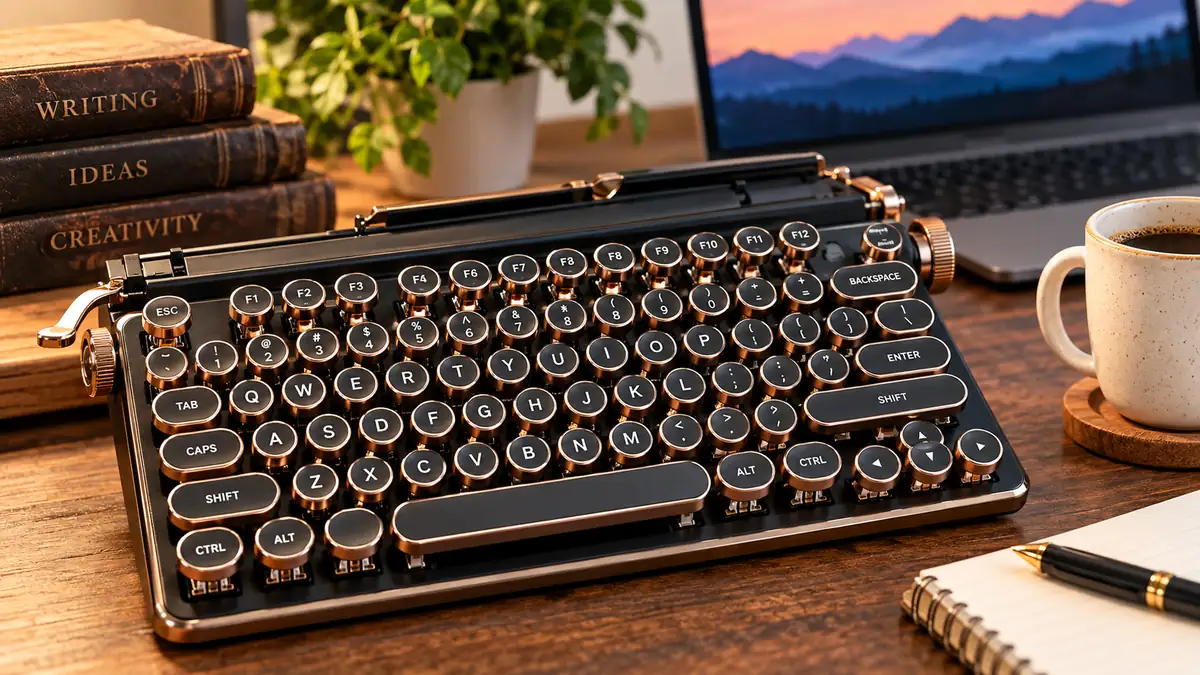

The unmistakable click-clack of a typewriter has survived long after most people stopped putting paper into typewriters. Today, that experience lives on through the typewriter keyboard—both as the traditional key mechanism found on classic machines and as a modern computer keyboard inspired by vintage typewriters.
A typewriter keyboard is a set of keys used to enter characters on a typewriter or, in its modern form, a computer keyboard designed to recreate the appearance and tactile experience of classic typewriters. Traditional versions mechanically print characters onto paper, while modern versions use electronic switches and connect to computers, tablets, or phones. Lexicus
What Is a Typewriter Keyboard?
In the strict historical sense, a typewriter keyboard is the input section of a typewriter. Pressing its keys causes letters, numbers, punctuation marks, or other characters to be printed on paper. Dictionary definitions describe it simply as a keyboard for manually entering characters to be printed. Vocabulary.com
The phrase has developed a second meaning in modern computing. It now commonly describes a typewriter-style mechanical keyboard designed to resemble an old writing machine while functioning as a normal digital keyboard.
Modern designs often include:
- Round or vintage-style keycaps
- Mechanical switches
- Raised keys
- Retro color schemes
- Audible or tactile feedback
- QWERTY layouts
- USB-C, Bluetooth, or 2.4 GHz wireless connectivity
- Backlighting on some models
- Compatibility with computers and mobile devices
Some premium designs go considerably further. For example, modern typewriter-inspired keyboards can include hot-swappable switches, programmable controls, tablet stands, aluminum chassis, and multi-device wireless support. QWERKYWRITER®
The important distinction is that a modern retro keyboard may look like a typewriter without using an actual typewriter mechanism.
How Does a Traditional Typewriter Keyboard Work?
A manual typewriter converts the movement of your finger into a mechanical printing action. There is no operating system interpreting the keystroke and no digital document storing the letter first.
Press a key, and mechanical components transfer that movement toward the printing mechanism.
In a traditional typebar machine, the basic sequence is:
- The typist presses a key.
- The key activates a system of mechanical linkages.
- The corresponding type element moves toward the paper.
- It strikes an inked ribbon.
- The ribbon is pressed against the paper.
- The character appears on the page.
- The carriage advances to prepare for the next character.
This mechanical relationship between the key and printing mechanism gives traditional typewriters their distinctive resistance, movement, and sound. Sivo Hub
The exact mechanism varies among manual, electric, and electronic typewriters. Some machines use individual typebars, while later designs adopted different printing systems.
A computer keyboard is fundamentally different: pressing a key activates an electrical switch, and the computer interprets the resulting signal.
Understanding the Typewriter Keyboard Layout
One of the typewriter’s most lasting contributions is the keyboard layout itself.
QWERTY Layout
Look at the first six letters on the upper alphabetic row of most English-language keyboards:
Q W E R T Y
That sequence gives the QWERTY keyboard its name.
QWERTY became closely associated with typewriters and later carried over to computers. Vocabulary.com identifies the QWERTY keyboard as the standard typewriter keyboard, named for those first six letters. Vocabulary.com
This continuity is why someone familiar with a modern desktop or laptop keyboard can recognize much of a traditional typewriter keyboard immediately.
Common Typewriter Keys
Although layouts vary by model and era, familiar controls include letters, numbers, punctuation, a space bar, Shift, Backspace and Tab.
These controls established conventions that survived into modern computing. WordNet-derived definitions, for example, identify Shift, Space Bar, Tab and Backspace as parts associated with the typewriter keyboard. Lexicus
Their physical functions, however, were not always identical to what happens on a computer.
On a computer, Backspace usually deletes a character from digital text. On a traditional typewriter, moving backward did not magically remove ink already printed on the page.
That difference captures the fundamental divide between mechanical typing and digital text editing.
Traditional Typewriter Keyboard vs Modern Keyboard
The two devices may share a familiar arrangement of letters, but they operate very differently.
| Feature | Traditional Typewriter | Modern Computer Keyboard |
|---|---|---|
| Primary output | Printed paper | Digital input |
| Operation | Mechanical/electromechanical | Electronic |
| Editing | Limited | Extensive |
| QWERTY available | Yes | Yes |
| Physical feedback | Usually strong | Depends on keyboard |
| Sound | Usually noticeable | Quiet to loud |
| Software required | No | Computer/device handles input |
| Connectivity | None | USB, Bluetooth or wireless |
| Customization | Very limited | Often extensive |
| Backlighting | No on classic models | Available on many models |
A traditional typewriter is effectively a writing and printing machine in one. A computer keyboard is only an input device; the computer, software, and display handle the rest.
What Is a Modern Typewriter Keyboard?
Modern use of typewriter keyboard frequently refers to a retro-styled computer keyboard rather than an actual typewriter component.
These products combine visual cues from vintage machines with contemporary keyboard technology.
A typical model may have circular keycaps that resemble old typewriter keys but use mechanical switches underneath them. When pressed, the switch registers an electrical signal just like other computer keyboards.
Some manufacturers deliberately reproduce the heavy, industrial appearance of older writing machines. Others borrow only a few elements—perhaps round keycaps and a retro color palette.
Current examples demonstrate how far the category has moved beyond simple visual imitation. Qwerkywriter’s modern models offer features such as Bluetooth, USB-C, 2.4 GHz wireless connectivity and hot-swappable switches. YUNZII also markets retro typewriter-style mechanical keyboards with modern customization technology such as QMK/VIA. QWERKYWRITER®
So “retro” describes the design inspiration, not outdated functionality.
Mechanical Switches and the Typewriter Feel
A common misconception is that every typewriter-style keyboard must be extremely loud.
It doesn’t.
The sound and feel depend heavily on the switches installed underneath the keycaps.
Clicky Switches
Clicky mechanical switches provide noticeable tactile and audible feedback.
For someone trying to recreate the sensory character of typing on an old machine, they are an obvious match. Each press produces deliberate feedback that can make writing feel more physical.
The disadvantage is noise.
A loud keyboard may be enjoyable in a private office but distracting during meetings, late-night work, or in a shared workspace.
Tactile Switches
Tactile switches provide a noticeable bump during actuation without necessarily producing the pronounced click of a clicky switch.
They can provide a useful compromise between feedback and noise.
Linear Switches
Linear switches move smoothly through the keystroke without a deliberate tactile bump.
They don’t reproduce the traditional typewriter sensation as closely, but they can make a retro keyboard more comfortable for users who enjoy the appearance but prefer smoother key movement.
This flexibility is one reason modern typewriter-inspired keyboards should not be treated as a single category of typing feel.
Two keyboards that look almost identical can feel completely different.
Round Keycaps: Style vs Typing Experience
Circular keycaps are probably the easiest way to identify a retro typewriter keyboard.
Classic typewriters often featured distinct rounded keys, so modern manufacturers reproduce that visual language to create an instantly recognizable vintage appearance.
But keycap shape isn’t purely cosmetic.
Modern rectangular keycaps provide a relatively large surface for your fingertips. Small circular caps may offer less usable area, depending on their dimensions and spacing.
That can require an adjustment period.
If you’re accustomed to a low-profile laptop keyboard, moving directly to tall round keycaps may initially result in:
- More typing mistakes
- Slower typing
- Greater finger movement
- Different wrist positioning
- More noticeable key travel
None of those effects is universal. They depend heavily on the keyboard’s geometry and the user’s typing habits.
The practical lesson is simple: retro appearance does not automatically mean authentic typewriter feel, and authentic-looking keys do not automatically mean better ergonomics.
Typewriter Keyboard Sizes
Modern typewriter-inspired keyboards are available in several layouts.
Full-Size Keyboard
A full-size model generally provides the main typing area, navigation controls, function keys and numeric keypad.
It suits users who frequently enter numbers or want dedicated controls.
The trade-off is desk space.
Tenkeyless Keyboard
Tenkeyless, often abbreviated as TKL, removes the number pad while retaining most other conventional keys.
It offers more room for a mouse without making the layout dramatically unfamiliar.
75% Layout
A 75% keyboard compresses navigation and function controls into a smaller footprint while retaining many frequently used keys.
This format has become particularly useful for compact mechanical keyboards. Modern retro models such as the YUNZII QL75 demonstrate how typewriter aesthetics can be combined with a 75% layout and current customization features. YUNZII KEYBOARD
Compact Layouts
Smaller 65% and 60% keyboards eliminate or combine additional keys.
They save considerable desk space but rely more heavily on key combinations and function layers.
For writing, smaller isn’t automatically better. Writers who frequently use dedicated navigation keys may prefer a larger layout even if a compact model looks cleaner.
Wired vs Wireless Typewriter Keyboards
Modern retro keyboards can use the same connection technologies found in conventional computer keyboards.
USB Wired Connection
A wired keyboard connects directly to a computer, usually through USB.
Its main advantages are simplicity and consistent connectivity. There is also no wireless battery to manage.
Bluetooth
Bluetooth is useful when connecting a keyboard to laptops, tablets, smartphones, or multiple portable devices.
It is particularly relevant to writers who use an iPad or Android tablet as a distraction-light writing setup.
2.4 GHz Wireless
Some newer mechanical keyboards provide dedicated 2.4 GHz wireless connectivity through a receiver.
Depending on the implementation, it can offer a responsive wireless connection suited to users who prefer to avoid cables.
Premium contemporary typewriter-inspired boards can support several methods at once. Qwerkywriter 2, for example, lists USB-C, Bluetooth and 2.4 GHz connectivity along with multi-device support. QWERKYWRITER®
Typewriter Keyboard vs Mechanical Keyboard
These terms overlap, but they are not synonyms.
A mechanical keyboard is defined primarily by its switch technology. Individual mechanical switches sit beneath the keys.
A typewriter keyboard, in modern product terminology, describes the design inspiration or typing aesthetic.
Therefore:
A typewriter-style keyboard can be mechanical, but a mechanical keyboard does not have to look like a typewriter.
Most mechanical keyboards use conventional modern keycaps. Conversely, a cheap retro-looking keyboard might imitate round typewriter keys while using a different switch mechanism.
This distinction matters because appearance tells you surprisingly little about typing quality.
When evaluating one, look beyond the photographs and check:
- Switch type
- Keycap profile
- Layout
- Build material
- Hot-swap capability
- Connectivity
- Operating-system compatibility
- Dimensions
- Weight
- Battery specifications for wireless models
Those details reveal far more about everyday usability.
Why Do People Like Typewriter Keyboards?
Part of the appeal is obvious: they look different.
Modern keyboards often prioritize minimalism. A retro keyboard deliberately does the opposite, turning a basic input device into a prominent desk object.
But appearance isn’t the only attraction.
Tactile Feedback
Mechanical movement can make each keystroke feel deliberate. Some writers enjoy receiving stronger physical confirmation that a key has been pressed.
Audible Feedback
The rhythmic sound of typing can be satisfying to some people.
It isn’t the same as a real manual typewriter—the underlying mechanisms are completely different—but clicky switches can create a similarly noticeable auditory experience.
Nostalgia
Typewriters are closely connected with journalism, correspondence, literature and twentieth-century office work.
A modern keyboard can reference that history without forcing users to give up spell-checking, instant editing or digital storage.
Focus
Some writers find a distinctive physical keyboard helps create a writing ritual. Sitting down at a particular device can psychologically separate focused writing from casual browsing.
That benefit is personal rather than technical, but it can still matter.
Desk Aesthetics
Retro technology has become part of workspace design. Round keys, metal frames and vintage-inspired colors can complement classic, industrial or minimalist desk setups.
Advantages of a Modern Typewriter Keyboard
The strongest advantage is that you can enjoy vintage styling without accepting the limitations of an actual typewriter.
You can still use modern word processors, undo mistakes, copy and paste text, save files, search documents and synchronize work across devices.
Mechanical models can also offer advantages such as replaceable switches and keycaps. Hot-swappable boards make it possible to change compatible switches without soldering, allowing the feel of the keyboard to be modified later. Current premium retro models explicitly offer this capability. QWERKYWRITER®
Durability can also be attractive when the keyboard uses a sturdy chassis and replaceable components.
For writers in particular, a good model can combine:
- Distinctive tactile feedback
- Familiar QWERTY typing
- Modern editing
- Wireless flexibility
- Customizable switches
- Strong construction
- A visually distinctive workspace
The key phrase is a good model. Typewriter styling by itself guarantees none of these qualities.
Disadvantages and Common Problems
The retro concept has trade-offs.
Noise
Clicky switches can be disruptive in shared environments.
If you work around other people, don’t assume you need loud switches just because you want a vintage design. Quiet linear and tactile alternatives exist, and even current typewriter-style products are sold with linear switches. Ubuy Pakistan
Height
Mechanical keyboards are often taller than laptop and low-profile keyboards.
A high case combined with tall round keycaps can affect wrist position. Some users may prefer a wrist rest or a lower-profile board.
Adjustment Period
Switching from flat laptop keys to tall circular keycaps can feel strange initially.
Give your fingers time to adapt before judging typing speed.
Price
Decorative materials, mechanical switches, wireless electronics and metal construction can increase cost substantially.
At the premium end, typewriter-inspired boards can cost hundreds of dollars. QWERKYWRITER®
Form Over Function
Some products prioritize photographs over typing quality.
Round keys and chrome trim are easy to market. Consistent stabilizers, sensible spacing, comfortable switches and reliable wireless electronics are less visible—but more important during daily use.
Are Typewriter Keyboards Good for Typing?
They can be excellent for typing, but the retro design itself isn’t what makes them good.
Typing comfort depends on factors such as switch weight, key spacing, keycap shape, keyboard height, layout and your personal technique.
For long writing sessions, prioritize comfort over appearance.
A writer who produces thousands of words per day should pay particular attention to:
Switch force: Heavy switches can become tiring.
Keycap shape: Make sure your fingertips land comfortably and consistently.
Keyboard height: Excessive height can make wrist positioning awkward.
Layout: Don’t sacrifice keys you use constantly merely to achieve a smaller footprint.
Noise: Consider where you’ll actually use the keyboard.
A visually beautiful keyboard that causes fatigue after 30 minutes isn’t a good writing keyboard.
Can You Use a Typewriter Keyboard With a Tablet or Phone?
A modern one, yes—provided it supports a compatible connection.
Bluetooth models can often connect directly to smartphones and tablets. Some keyboards can remember multiple devices, making it possible to move between a desktop, tablet and phone without repeatedly setting up the connection.
Modern premium typewriter-inspired products specifically advertise compatibility with computers, tablets and smartphones. QWERKYWRITER®
A traditional mechanical typewriter obviously cannot function as a Bluetooth keyboard without substantial modification or additional hardware.
That distinction matters when searching online: “typewriter keyboard” can describe both historical typewriter hardware and modern typewriter-inspired computer peripherals.
How to Choose a Typewriter Keyboard
Start with how you type rather than how you want your desk to look.
1. Decide How Much Retro Styling You Want
Some keyboards closely imitate antique machines with round keys, metal finishes and decorative controls.
Others simply use vintage colors.
A subtler design may be easier to type on while still delivering the aesthetic you want.
2. Choose the Right Switch
If you want pronounced sound and feedback, investigate clicky switches.
If you want feedback with less noise, consider tactile switches.
If you prefer smooth movement, consider linear switches.
Don’t select a switch solely because someone calls it “typewriter-like.”
3. Pick the Correct Layout
Need a numeric keypad? Choose full-size.
Want more mouse space without losing too many dedicated controls? TKL or 75% may make more sense.
Want maximum portability? Consider a compact layout, but check which dedicated keys disappear.
4. Check Connectivity
Choose wired if you want straightforward reliability.
Choose Bluetooth if tablets and phones matter.
Consider multi-mode wireless if you regularly move among several devices.
5. Examine the Keycaps
Round keycaps define much of the traditional aesthetic, but their shape, diameter and profile vary.
Comfort matters more than authenticity.
6. Check Compatibility
Verify support for your operating system and device.
Pay particular attention to modifier-key legends and shortcuts if you regularly move between Windows, macOS, iOS or Android.
7. Look at Customization
Mechanical-keyboard enthusiasts may want:
- Hot-swappable switches
- Replaceable keycaps
- Remappable keys
- Programmable layers
- QMK/VIA support
These features can extend the useful life of a keyboard and let you refine it after purchase.
8. Consider Your Environment
A private writing room and an open-plan office have very different noise requirements.
The most authentic-sounding keyboard may also be the least considerate choice in a shared room.
Typewriter Keyboard for Writers
Writers are an obvious audience for this style of keyboard, but nostalgia shouldn’t override practical needs.
For serious writing, consistency matters. The keyboard should allow you to maintain a comfortable rhythm without forcing unnecessary finger or wrist movement.
A useful writing setup usually favors:
- Comfortable switch weight
- Stable keys
- Predictable spacing
- Suitable wrist position
- Reliable connectivity
- A layout that preserves frequently used keys
The sensory experience can then be a bonus.
A click, tactile bump, or substantial metal chassis may make sitting down to write more enjoyable. If that encourages longer focused sessions, the keyboard is doing something useful beyond looking attractive.
But there’s no evidence that round keycaps automatically make someone a faster or better writer.
Is a Typewriter Keyboard Good for Gaming?
It can be, depending on the underlying hardware.
A retro appearance doesn’t prevent a keyboard from using responsive modern switches and wired or low-latency wireless connections.
However, users primarily interested in competitive gaming may value characteristics that have little to do with typewriter aesthetics, including latency, switch actuation, rollover, polling behavior, layout and software customization.
In other words, judge the keyboard by its technical specifications rather than its vintage shell.
A typewriter keyboard can be both decorative and capable, but neither quality guarantees the other.
Typewriter Keyboard Maintenance
Modern mechanical retro keyboards generally require less maintenance than actual typewriters.
Dust and debris accumulate between keycaps over time, so periodic cleaning helps maintain appearance and key movement.
A sensible routine is to disconnect or power off the keyboard, remove loose debris carefully, clean accessible surfaces with appropriate tools, and follow the manufacturer’s instructions before removing switches or keycaps.
Hot-swappable switches should only be removed using the proper technique and compatible tools.
Traditional typewriters require a very different maintenance approach. Their moving linkages, type elements, ribbon systems, carriage mechanisms and other mechanical parts may need cleaning, adjustment or specialist repair.
Avoid treating an antique typewriter like a modern mechanical keyboard.
The Lasting Influence of the Typewriter Keyboard
The physical typewriter has largely disappeared from everyday offices, but its keyboard design has had remarkable staying power.
The QWERTY arrangement crossed from mechanical writing machines into electronic terminals, personal computers, laptops, smartphones and tablets. Familiar controls such as Shift, Tab, Backspace and the space bar also remain central to modern text entry. Vocabulary.com
Modern retro keyboards complete the circle.
Instead of simply inheriting the typewriter’s layout, they intentionally bring back its visual character while keeping contemporary features such as Bluetooth, USB-C, mechanical switches, programmable controls and wireless connectivity.
A typewriter keyboard can therefore mean two closely connected things: the physical keyboard mechanism used to enter characters on a traditional typewriter, or a modern digital keyboard inspired by that machine. If you’re choosing the modern version, focus first on switches, keycap comfort, layout and connectivity. The vintage appearance should enhance a keyboard that already works well for the way you type.
