
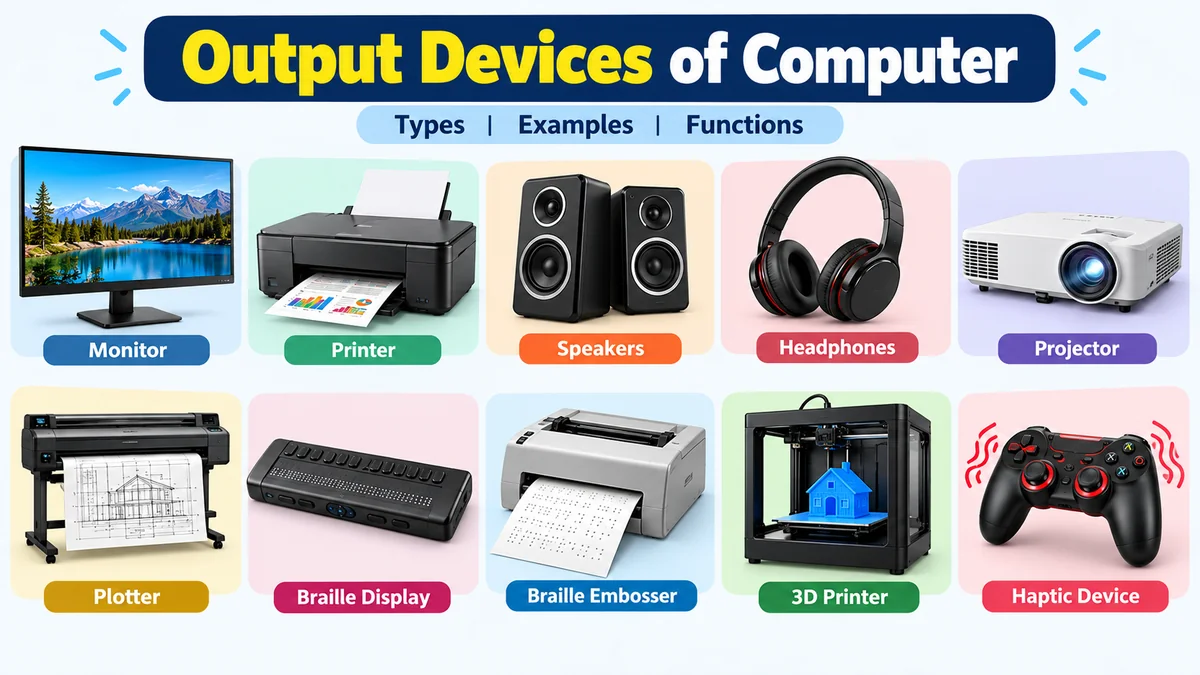

A computer can process millions of instructions, but those calculations are useful only when the results can be presented to a person. That is where output devices of computer come in. They turn processed digital data into information we can see, hear, print, or physically experience.
Output devices of computer are hardware components that receive processed data from a computer and present it in a usable form. Common examples include monitors, printers, speakers, headphones, projectors, plotters, Braille displays, and haptic devices. They can produce visual, audio, printed, tactile, or physical output.
Understanding output devices also makes the basic Input–Process–Output cycle much easier to understand. You provide data, the computer processes it, and an output device communicates the result.
What Are Output Devices of Computer?
An output device is a hardware component that receives information from a computer system and communicates that information to a user in an understandable or usable form.
For example, when you type a sentence using a keyboard, the keyboard provides input. The computer processes that input, and the monitor displays the letters on its screen as output.
Similarly:
- A monitor displays text, graphics, and video.
- A printer produces information on paper.
- Speakers produce sound.
- A projector displays an enlarged image.
- A Braille display converts digital information into tactile output.
The exact form of output depends on the device and what the user needs.
How Do Output Devices Work?
Output devices form the final stage of the traditional Input → Process → Output (IPO) model.
The process can be understood in three simple stages:
- Input: A user provides data or instructions through an input device.
- Processing: The CPU and other computer components process the data according to software instructions.
- Output: The processed information is sent to an output device and presented in an understandable form.
Suppose you want to play a song.
You select the song using a mouse or touchscreen. The computer processes the audio file, and the resulting audio signal is delivered through speakers or headphones.
The same information can sometimes be delivered through different output devices. A document might appear electronically on a monitor or become a physical document when sent to a printer.
Main Types of Output Devices of Computer
Output devices can be classified according to the type of information they produce. Common categories include visual, audio, hard-copy, tactile, and specialized physical output.
| Output Type | Common Devices | Result |
|---|---|---|
| Visual | Monitor, projector, VR headset | Text, images, graphics, video |
| Audio | Speakers, headphones | Music, speech, alerts, sound |
| Hard copy | Printer, plotter | Printed documents or drawings |
| Tactile | Braille display, haptic device | Touch-based feedback |
| Physical | 3D printer, some computer-controlled systems | Physical objects or actions |
Let’s examine the most important examples individually.
10 Common Output Devices of Computer
When students are asked to name output devices, monitors and printers usually come to mind first. Modern computing, however, uses many different output technologies.
1. Monitor
A monitor is one of the most widely used output devices of computer. It displays information visually, including:
- Text
- Images
- Graphics
- Software interfaces
- Animations
- Video
The information displayed on a monitor is generally considered soft copy because it exists electronically rather than as a permanent printed document.
Modern monitors use flat-panel display technologies. Common terms associated with computer displays include LCD (Liquid Crystal Display), LED-backlit LCD, OLED, pixels, resolution, refresh rate, and screen size.
A monitor’s resolution describes the number of pixels available to form an image. Higher resolutions can display greater image detail when other factors are equal.
Monitors are used everywhere from home computers and classrooms to hospitals, offices, engineering workstations, and industrial control systems.
2. Printer
A printer converts digital information into physical output, usually on paper. This physical result is commonly called a hard copy.
Printers can produce:
- Documents
- Photographs
- Reports
- Labels
- Receipts
- Charts
- Forms
Two familiar modern printer technologies are inkjet and laser printing.
Inkjet printers place tiny droplets of ink onto a surface and are widely used for general-purpose and color printing. Laser printers use an electrophotographic process and toner and are common in offices where fast document printing is important.
Older or specialized systems may use impact printing technologies such as dot-matrix printers.
3. Speakers
Speakers are audio output devices. They convert electronic audio signals into sound that people can hear.
Computer speakers can reproduce:
- Music
- Speech
- Video sound
- Games
- Notification tones
- System alerts
- Video-call audio
Speakers may be built into laptops and monitors or connected as external devices.
Unlike a monitor, which provides visual output, speakers communicate computer information through sound.
4. Headphones
Headphones perform a similar basic function to speakers but provide audio directly to the listener.
They are useful when privacy is required or when a user does not want computer audio to disturb other people.
Headphones are commonly used for:
- Online classes
- Gaming
- Music
- Video editing
- Video conferences
- Voice communication
Earphones and earbuds are related personal-audio output devices.
Some headsets combine headphones with a microphone. In that case, the headphones provide output, while the microphone provides input. This is a useful example of a product containing both input and output components.
5. Projector
A projector receives visual information from a computer and projects an enlarged version onto a screen, wall, or other suitable surface.
Projectors are particularly useful when the same computer output must be visible to many people at once.
Typical applications include:
- Classrooms
- Business presentations
- Conferences
- Training sessions
- Home theaters
- Public displays
A projector and monitor therefore perform similar visual-output roles but serve different viewing situations. Projectors are particularly suited to large-group viewing.
6. Plotter
A plotter is an output device traditionally associated with producing precise, large-format drawings.
Plotters have been particularly useful for:
- Engineering drawings
- Architectural plans
- Maps
- Technical diagrams
- Construction plans
- Large graphics
Traditional pen plotters created images by physically moving a pen or similar drawing instrument across a surface.
Modern large-format printing technologies have replaced traditional pen plotters for many applications, but the term remains important in computer education, engineering, and design contexts.
7. Braille Display
A refreshable Braille display provides tactile output for people who read Braille.
Instead of displaying information as pixels or producing sound, the device raises and lowers small pins to represent Braille characters. This allows compatible digital text to be read through touch.
Braille displays demonstrate an important point: computer output does not have to be visual or audible.
Output can also be tactile.
8. Braille Embosser
A Braille embosser is another accessibility-focused output device.
It works somewhat like a specialized printer, but instead of printing ordinary ink characters, it creates raised Braille dots on paper or another suitable material.
The distinction between the two devices is useful:
- A refreshable Braille display provides temporary electronic tactile output.
- A Braille embosser creates a physical Braille document.
This is similar to the difference between viewing a document on a monitor and printing it on paper.
9. 3D Printer
A 3D printer turns digital models into physical three-dimensional objects.
Unlike a conventional printer, which generally creates text or images on a flat surface, a 3D printer builds an object layer by layer using suitable material.
3D printing can be used for:
- Prototypes
- Models
- Educational projects
- Engineering components
- Product development
- Medical and scientific applications
It expands the concept of computer output from information presentation to physical object creation.
10. Haptic Feedback Device
A haptic device communicates information through physical sensations such as vibration, resistance, or motion.
A familiar example is the vibration produced by a game controller in response to an event in a game.
Haptic feedback may also appear in:
- Smartphones
- Game controllers
- Simulators
- Virtual-reality systems
- Training equipment
- Accessibility technologies
These devices provide tactile rather than purely visual or audio feedback.
Output Devices of Computer and Their Functions
The following table provides a quick summary of important output devices and what each one does.
| Device | Output Type | Main Function |
|---|---|---|
| Monitor | Visual | Displays text, images, graphics, and video |
| Printer | Hard copy | Produces physical documents and images |
| Speakers | Audio | Produces sound for multiple listeners |
| Headphones | Audio | Provides personal audio output |
| Projector | Visual | Projects computer images onto a larger surface |
| Plotter | Hard copy | Produces large or precise technical drawings |
| Braille display | Tactile | Presents digital information through Braille |
| Braille embosser | Physical/tactile | Produces permanent Braille documents |
| 3D printer | Physical | Creates three-dimensional objects |
| Haptic device | Tactile | Provides vibration, force, or touch feedback |
Quick Takeaway
The easiest way to remember these devices is to focus on what comes out of them: a monitor gives visual information, speakers give sound, a printer gives paper output, and a Braille display provides tactile information.
Soft Copy and Hard Copy Output
Another common way to classify output is by distinguishing between soft copy and hard copy.
What Is Soft Copy Output?
Soft copy is information presented electronically rather than as a permanent physical printout.
Examples include:
- Text displayed on a monitor
- A presentation shown by a projector
- Audio played through speakers
- Video displayed on a screen
A soft copy normally requires an electronic device to access or experience it.
What Is Hard Copy Output?
Hard copy is information represented in a physical form.
The clearest example is a document produced by a printer.
Other examples can include:
- Printed photographs
- Printed charts
- Architectural drawings
- Braille documents
- Labels and receipts
The difference is therefore not simply “monitor versus printer.” It is whether the result remains electronic or becomes a physical representation.
Visual Output Devices
Visual output devices communicate information primarily through sight.
Monitor
The monitor is the standard visual display for desktop computers and is built into laptops and many all-in-one computers.
Projector
Projectors enlarge visual output so that it can be viewed by an audience.
Virtual Reality Headset
A VR headset presents computer-generated visual environments close to the user’s eyes. Depending on the system, it can also provide audio and other feedback.
Some modern devices combine input and output functionality. A VR headset, for example, may display images as output while its sensors simultaneously track the user’s movement as input.
Audio Output Devices
Audio output devices convert digital audio information into audible sound.
The most familiar examples are:
- Speakers
- Headphones
- Earphones
- Earbuds
Audio output is particularly important for entertainment, communication, accessibility, alarms, multimedia applications, and text-to-speech systems.
A computer can therefore communicate the same underlying information in different ways. Written text might appear visually on a monitor or be converted to speech and heard through speakers.
Printed and Physical Output Devices
Printed output remains important even though many computer activities have moved online.
Printers
Printers are suitable for documents, photographs, receipts, labels, and general paper output.
Plotters
Plotters and large-format printing systems are useful where large, detailed graphics are needed.
3D Printers
3D printers produce physical objects rather than flat documents.
Braille Embossers
Braille embossers produce raised-dot documents that can be read by touch.
These examples show how broad the definition of computer output has become.
What Is the Difference Between Input and Output Devices?
The key difference is the direction in which information moves.
An input device sends data or instructions into a computer, while an output device receives processed information from the computer and presents it to the user or another destination.
| Input Devices | Output Devices |
|---|---|
| Keyboard | Monitor |
| Mouse | Printer |
| Microphone | Speakers |
| Scanner | Projector |
| Webcam | Headphones |
For example, a microphone captures your voice and sends the audio data to the computer, making it an input device.
Speakers receive audio information from the computer and reproduce it as sound, making them output devices.
A simple memory trick is:
Input = information goes into the computer.
Output = information comes out of the computer.
Can a Device Be Both Input and Output?
Yes. Modern computer hardware does not always fit neatly into only one category.
A touchscreen is a good example.
The screen displays text, images, and interface elements, so it functions as an output device. At the same time, the touch-sensitive layer detects where a user taps or swipes, making it an input device.
A multifunction printer can provide another example. Its printer component produces output, while an integrated scanner captures information and provides input.
A headset may similarly contain:
- Headphones — output
- Microphone — input
The correct classification therefore depends on the particular function being discussed rather than simply the name of the overall product.
Is a Scanner an Output Device?
No. A conventional scanner is an input device.
It captures information from a document, photograph, barcode, or other physical source and sends that information into the computer.
This is the opposite direction from a printer.
Think of the difference this way:
Scanner: paper → computer
Printer: computer → paper
This distinction helps avoid one of the most common mistakes students make when learning input and output devices.
Is a Touchscreen an Input or Output Device?
A touchscreen is generally considered both an input and output device.
Its display provides visual output, while its touch-sensitive system accepts user input.
When you see an icon, that is output. When you tap the icon, that action becomes input.
The two functions are integrated into the same physical product, which is why modern devices can be harder to classify than traditional computer peripherals.
Monitor vs Printer: What Is the Difference?
Both monitors and printers are output devices, but the type of result they provide is different.
| Feature | Monitor | Printer |
|---|---|---|
| Output | Visual/electronic | Physical |
| Typical result | Soft copy | Hard copy |
| Medium | Screen | Paper or other printable material |
| Reusable display | Yes | Not applicable |
| Common use | Viewing information | Creating physical copies |
If you only need to read or edit a document, displaying it on a monitor may be sufficient. If you need a physical copy, a printer is required.
Printer vs Plotter
Printers and plotters can both create physical output, but historically they were designed for different jobs.
A normal printer is optimized for common documents, text, photographs, and graphics.
Traditional plotters were designed to create highly accurate line drawings and large technical designs. This made them especially valuable in engineering, architecture, mapping, and computer-aided design.
Today, large-format printers can perform many jobs once associated with traditional plotters, so the distinction is less clear in practical modern use than it was with older hardware.
What Are Five Common Output Devices?
If an exam or assignment asks for five examples of output devices, a simple answer is:
- Monitor — displays visual information.
- Printer — creates physical copies.
- Speakers — produce sound.
- Headphones — provide personal audio.
- Projector — displays enlarged visual information.
These five appear repeatedly in educational explanations of computer output hardware.
If more examples are requested, you can add plotters, Braille displays, Braille embossers, 3D printers, and haptic devices.
Why Are Output Devices Important?
A computer can process information internally, but users need some method of receiving the result.
Output devices provide that connection between computer processing and human understanding.
They allow users to:
- Read documents
- View photographs
- Watch videos
- Hear music and speech
- Print reports
- Give presentations
- Receive alerts
- Experience games
- Access information through Braille
- Produce physical models
Without suitable output hardware, much of the computer’s processed information would remain inaccessible to the user.
Output devices are therefore a fundamental part of human-computer interaction.
How to Identify an Output Device
When you are unsure whether a piece of hardware is an output device, ask:
Does this component receive information from the computer and present or act on the result?
If yes, it may be performing an output function.
For example:
- Monitor receives display information → output
- Speaker receives audio information → output
- Printer receives a print job → output
- Keyboard sends keystrokes to the computer → input
- Microphone sends captured sound to the computer → input
- Webcam sends captured images to the computer → input
This approach is more reliable than memorizing a long list because it focuses on the direction and purpose of the information flow.
Common Mistakes When Learning Output Devices
One common mistake is assuming every peripheral connected to a computer is an output device.
That is not true.
A mouse is connected to a computer but primarily provides input. A webcam is also connected to a computer but captures information rather than presenting processed information.
Another mistake is assuming one physical product can have only one classification.
Modern devices frequently combine functions. Touchscreens, multifunction printers, headsets, VR systems, and interactive displays may contain both input and output components.
Students should therefore classify the function, not just memorize the name of the product.
Output Devices in Everyday Life
Output technology appears far beyond the traditional desktop computer.
At an airport, large digital displays present flight information.
At a supermarket, a receipt printer creates a physical record of a purchase.
During a classroom presentation, a projector displays information for students.
At home, headphones provide private audio from a laptop.
In accessibility systems, Braille displays convert digital text into tactile information.
In product development, 3D printers can transform computer models into physical prototypes.
These applications all follow the same fundamental idea: processed digital information is converted into a form that is useful outside the computer’s internal processing system.
Choosing the Right Output Device
There is no single output device that is best for every situation. The correct choice depends on the type of result required.
For everyday visual computing, a monitor is usually appropriate.
For physical documents, use a printer.
For large presentations, a projector or large display is more suitable.
For private audio, headphones are generally preferable to speakers.
For technical drawings, large-format printing or plotting equipment may be appropriate.
For tactile accessibility, a refreshable Braille display or Braille embosser can provide information in a usable format.
For physical prototypes, a 3D printer may be needed.
The device should therefore be selected according to the output format, audience, environment, quality requirements, and intended use.
Final Thoughts on Output Devices of Computer
Output devices of computer are the hardware components that communicate the results of computer processing in forms people can use. They may produce visual information, audio, printed documents, tactile feedback, or physical objects.
The monitor, printer, speakers, headphones, projector, and plotter are some of the most familiar examples, while Braille displays, haptic devices, and 3D printers demonstrate how diverse computer output can be.
The simplest way to remember the concept is to follow the direction of information: input devices send information into a computer, while output devices deliver processed information out of it. Once that distinction is clear, identifying and understanding different output devices becomes much easier.
